

Book an intro call

Core Web Vitals on Shopify Explained for Store Owners


Core Web Vitals are three numbers collected from real people visiting your store in Chrome. One measures how long the main image or headline takes to appear. One measures how long the page takes to react when someone taps. One measures how much the layout jumps while it loads. Google uses them as part of its page experience signals, and Shopify now shows the same three numbers in your admin.
I work on conversion design at Teplin, and I care about these metrics for a slightly different reason than SEO. Each one describes a moment where a shopper either keeps going or gets annoyed: waiting for a product photo, tapping a size that does not respond, aiming for "Add to cart" and hitting a banner that slid in underneath. This explainer is written for store owners rather than developers. It covers what each metric means in plain language, how to read Shopify's reports, what usually causes a fail on Shopify, and which fixes you can make yourself before paying anyone.
Key takeaways
- Three thresholds to remember
Largest Contentful Paint should be 2.5 seconds or less, Interaction to Next Paint 200 ms or less, and Cumulative Layout Shift 0.1 or less, all at the 75th percentile of real visits. - INP is the newer and harder one
It replaced First Input Delay as a Core Web Vital on 12 March 2024, and script-heavy stores fail it far more often than they failed FID. - Judge yourself on field data
The PageSpeed Insights score is a single lab simulation. Google and Shopify both assess you on what real visitors experienced. - Apps and scripts are the usual cause
Removing unused apps, leftover app code and duplicate tracking tends to help more than any image or code work, and it should come first. - Speed problems and conversion problems overlap
Cluttered pages and sluggish mobile interactions hurt both, which is why I treat them as one piece of work.
The three metrics in plain language
A page passes Core Web Vitals when all three metrics are "good" at the 75th percentile of page loads, measured separately for mobile and desktop. Put simply, three out of every four visits must hit the target. Your own visit on office Wi-Fi does not count for much.
Largest Contentful Paint is the wait for the main thing
LCP is the time until the largest visible element, usually the hero image or the main product photo, is rendered. Good is 2.5 seconds or less, and Shopify's reports class anything over 4 seconds as poor. From a shopper's point of view, this is how long they stare at a half-empty page before they can see what they came for. On a product page that comes from an ad, it is the first impression of the product itself.
Interaction to Next Paint is how quickly the page reacts
INP measures how long the page takes to visually respond after a tap, click or key press, across the whole visit. Good is 200 ms or less and poor is above 500 ms. This is the metric I watch most closely from a conversion angle, because the interactions it measures are the ones that make money. Opening the menu, choosing a variant, adding to cart and opening a filter drawer all count. When a tap feels ignored, people tap again, tap something else or leave.
Cumulative Layout Shift is how much the page jumps
CLS is a unitless score for how much content moves unexpectedly while the page loads. Good is 0.1 or less and poor is 0.25 or more. The shopper version is simple. They go to tap one thing and the page moves, so they tap another. Late review stars pushing the price down and cookie banners shoving the header are the classic causes.
INP changed things for Shopify stores
Interaction to Next Paint officially replaced First Input Delay on 12 March 2024. FID only measured the delay before the browser started handling the very first interaction, and most stores passed it without trying. INP looks at the full latency of interactions throughout the visit. Stores loaded with scripts suddenly found themselves failing a metric they had never thought about.
The main cause of poor INP is long tasks on the main thread. A long task is any block of main-thread work that runs longer than 50 milliseconds, and while it runs the browser cannot respond to the shopper. Ten apps each doing "a little" on page load add up quickly, especially on mid-range Android phones.
Field data and lab data answer different questions
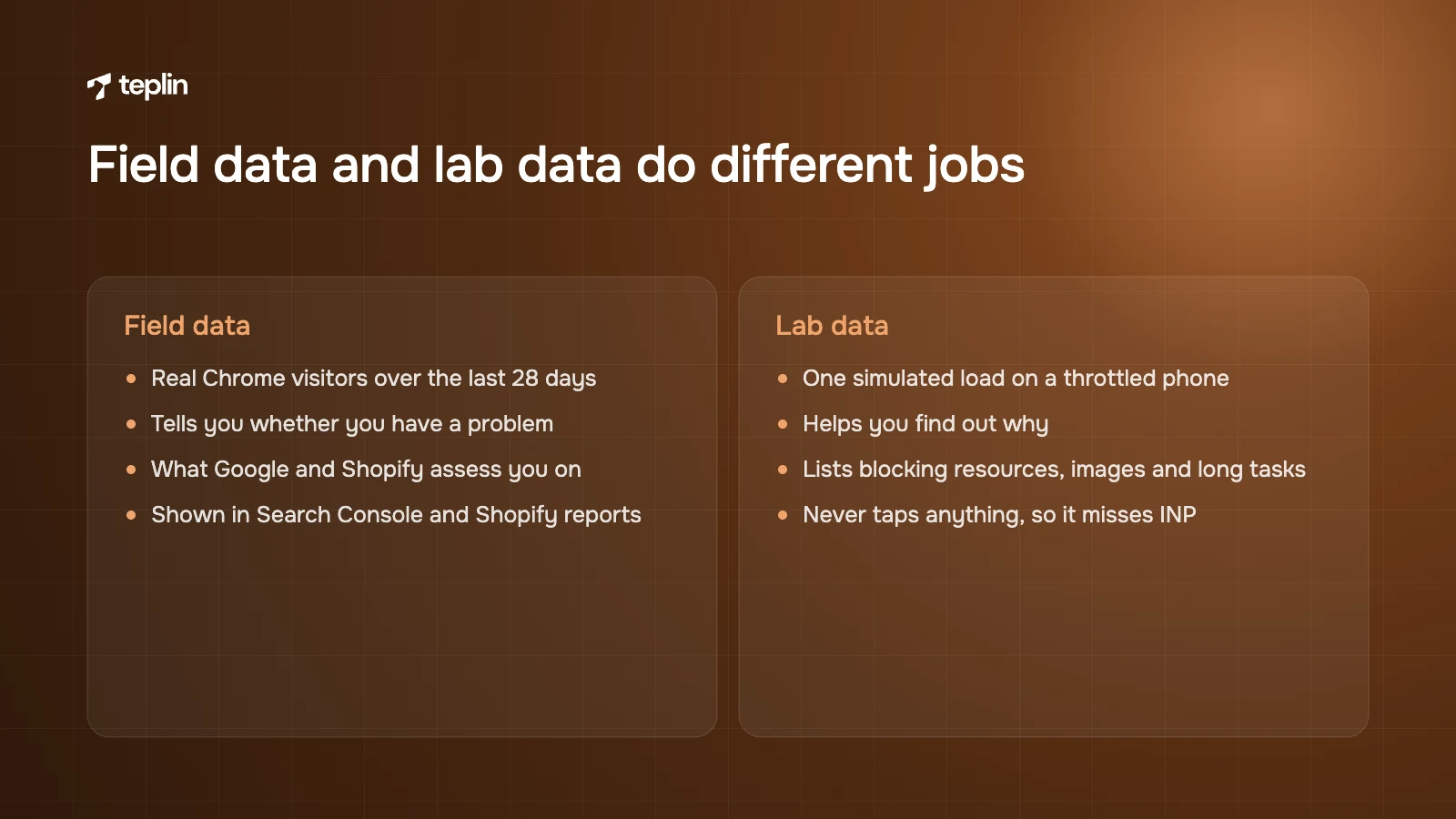
Field data tells you whether you have a problem. Lab data helps you find out why. Mixing them up is the most common reason I see merchants spend money on the wrong fixes.
Field data from CrUX
The Chrome User Experience Report (CrUX) collects anonymised performance data from Chrome users who have opted in. It feeds the field data at the top of PageSpeed Insights, which covers the previous 28 days, and the Core Web Vitals report in Google Search Console. A page needs enough traffic to have its own data, so smaller pages and stores may show little or nothing.
Lab data and the PageSpeed score
The 0 to 100 performance score in PageSpeed Insights comes from Lighthouse, which loads your page once on a simulated, throttled mid-range phone. It is very good for diagnosis because it lists render-blocking resources, oversized images and long tasks. As a target it is poor. A store can score modestly in the lab and pass in the field, or score well and still fail INP, because Lighthouse never taps anything. Chasing the score on its own often removes things that earn money while the real problem stays.
Shopify's own Web performance reports
Shopify collects real-user data too. A performance summary sits on the Themes page under Online Store, with ranges for today, the last 7 days and the last 30 days. The full Web performance reports are under Analytics, then Reports. Search for "contentful", "next" or "cumulative" to find the LCP, INP and CLS reports. You can view them over time, by page URL and by page type. The over-time view marks app installs, theme updates and new code, which makes it much easier to spot the change that hurt you.
A few details are worth knowing. The reports use the 75th percentile like Google, data can be delayed by up to 36 hours, only the last 90 days are kept, and stores still behind a password page may show no data. Your staff account needs the Reports permission to see them.
What to do depends on which metric fails
Once you know which of the three is red, and on which page type, the list of likely causes gets much shorter. I use these scenarios as a starting point.
If LCP fails on most templates
Look at the hero image first, then fonts and render-blocking scripts. On most home, collection and product pages the LCP element is an image. Shopify's CDN will resize, compress and serve WebP where supported, but only if the theme asks for sensible sizes. The usual mistakes are a full-width image requested at 3,000 px on a phone, a hero set as a CSS background image so the browser finds it late, a slider loading five big images at once, and the first image lazy-loaded by a blanket setting.
The fix is mostly in the theme, and it is a job for your developer rather than something you change in the admin. Shopify's image tools can serve each photo at several widths so a phone never downloads the desktop version, and they add the image's width and height automatically. For the hero image at the top of a page, ask your developer to check four things.
- Mark the hero image as high priority
Shopify's performance guidance recommends telling the browser that the main image matters most, so it fetches it ahead of other files. - Start loading it early, but only that one
The hero can be flagged so the browser starts downloading it before it has read the whole page. Shopify advises doing this sparingly, for one or two late-discovered files only. Doing it for five images defeats the point. - No lazy loading above the fold
Images further down the page should wait until the shopper scrolls, but the main image should never be lazy-loaded or hidden behind a fade-in animation, which delays LCP even after the file has arrived. - A real image, not a background
The browser can spot a normal image early. It cannot see a background image set in the stylesheet until that stylesheet has been processed. Different crops for mobile and desktop are still possible with a proper image element. - Sensible uploads
The CDN optimises what you give it, but there is no reason to upload a 12 MB camera original. Shopify suggests JPG for photos and PNG only where transparency is needed.
From a design point of view, I also question the hero itself. Autoplaying background video is one of the most expensive choices you can make on a Shopify home page. If you keep it, give it a lightweight poster image, keep the file short and compressed, and make sure it is not the LCP element by accident. A single strong image usually does the same job as a five-slide carousel, and in my view it communicates better too.
If LCP is slow because text appears late
Custom fonts delay text and can cause a jump when the real font replaces the fallback. Every weight and style is another file. Shopify recommends hosting fonts on its CDN rather than loading them from Google Fonts or other external services, and considering system fonts where the brand allows. For fonts from Shopify's own font library, your developer can set the theme to show text straight away in a fallback font while the brand font loads, so nobody stares at blank space.
- Fewer weights
Two or three weights of one family are usually enough for a store. - A matched fallback
CSS descriptors such as size-adjust make the fallback take up roughly the same space, which reduces the shift when the custom font arrives. - SVG icons instead of icon fonts
Inline SVG icons are lighter and do not flash as missing glyphs.
If INP fails
Poor INP almost always comes down to JavaScript, either too much of it or the wrong work at the wrong moment. On Shopify the usual suspects are variant pickers that re-render the whole product form, cart drawers that rebuild the DOM on every update, filter drawers on large collections, review widgets that hydrate hundreds of nodes, and several apps listening to the same click.
Start with apps, because they are the cheapest place to win. Shopify's own guidance names the theme, installed apps and third-party code as the biggest factors in store performance. Each app that touches the storefront may add JavaScript, CSS, fonts and requests to every page, whether that page uses the feature or not. Uninstalling is not always enough either. Shopify states that uninstalling an app does not automatically remove its code from your theme, and older apps often pasted snippets into theme.liquid or product templates that keep loading long after the subscription ended.
- List every app
For each one, note what it does, which pages need it and what revenue or saving it brings. If nobody can answer, it is a candidate for removal. - Find leftover code
Search theme files for apps you no longer use, and check the browser network panel for requests to domains you do not recognise. - Consolidate
Three apps for reviews, upsells and bundles can often become one, or be replaced by native features such as Shopify's Search and Discovery product recommendations.
Then look at third-party scripts. Analytics, ad pixels, heatmaps, affiliate trackers, chat, pop-ups and testing tools all compete for the same main thread. Shopify recommends auditing your tag manager and removing unused or low-value tags, and its developer guidance says to remove or defer scripts that block HTML parsing. A tag manager makes adding scripts easy, which is exactly why many containers still hold tags for campaigns that ended years ago. For every script I ask whether anyone uses the data, whether it duplicates something already tracked, and whether it really needs to run before the page is interactive. Chat widgets, for example, can usually wait until the first interaction.
Shopify's Customer Events (Settings, then Customer events) help here. They let tracking run as pixels rather than as scripts pasted into the theme. App pixels run in a strict sandbox in a web worker, and custom pixels run in a lax sandbox inside an iframe, isolated from the main page. Shopify presents web pixels as a way to reduce tracking code in the theme, and moving tags there makes them much easier to audit. Some legacy pixels do not work fully in the sandbox, so test events end to end before deleting the old code.
Whatever remains needs a developer and a profiler.
- Measure the interactions
Use the Performance panel in Chrome DevTools with CPU throttling, and record choosing a variant and adding to cart. Long tasks appear as blocks with a red corner. - Defer what is not critical
Shopify's developer guidance recommends defer for non-critical scripts and async only for independent third-party scripts where order does not matter. - Break up long tasks
Let the browser paint between steps, so the shopper sees feedback such as a spinner or a button state immediately while heavier work carries on. - Load features on demand
Quick-view modals, size guides and review galleries can load their scripts when first opened instead of on page load.
That last point is a design decision as much as a technical one. I would much rather a size guide take a moment to open than have every visitor pay for it on page load.
If CLS fails
Layout shift is usually the easiest of the three to fix. Shopify's guidance is to always include width and height on images, which Shopify's image tools do for you. Other common causes are banners injected after render, app blocks such as review stars that appear late and push the price down, and embeds with no reserved aspect ratio.
- Reserve space
Give app blocks and embeds a minimum height or aspect-ratio in CSS so they fill a placeholder instead of pushing content. - Overlay instead of insert
Cookie and promotional banners should sit over the content at the bottom of the screen rather than push the header down. - Check the fonts
A big font swap in the hero heading can account for a noticeable part of CLS by itself.
If collection pages fail and product pages pass
Collection pages combine many images, filters, swatches, quick-add buttons and often infinite scroll. Shopify suggests pagination for large collections rather than loading everything at once. Keep the number of products per page reasonable, load only the first row of product images eagerly, and avoid rendering every variant swatch image for every product on load. Heavy Liquid loops over every variant can also slow the server response. For YouTube or Vimeo embeds lower on any page, use a facade, meaning a thumbnail with a play button that loads the real player only when clicked.
If everything fails after the clean-up
Then the theme is probably the floor you are standing on. A theme built with features for every possible store carries code you do not need. Shopify recommends an up-to-date, optimised theme such as its Horizon family or other Online Store 2.0 themes, comparing performance with animations and page transitions switched on and off, and limiting the number of sections per template. For context, Shopify requires Theme Store themes to reach an average Lighthouse performance score of at least 60 across home, product and collection pages on its benchmark store. That is a minimum bar, not a promise that your configured store will be fast.
A heavily customised old theme edited by several freelancers over many years is often cheaper to rebuild than to untangle. I would make that call on evidence, once apps, scripts and images have been handled and the field data still fails.
A sensible order of work
This is the sequence I would follow on most stores. Re-measure after each step so you know what helped.
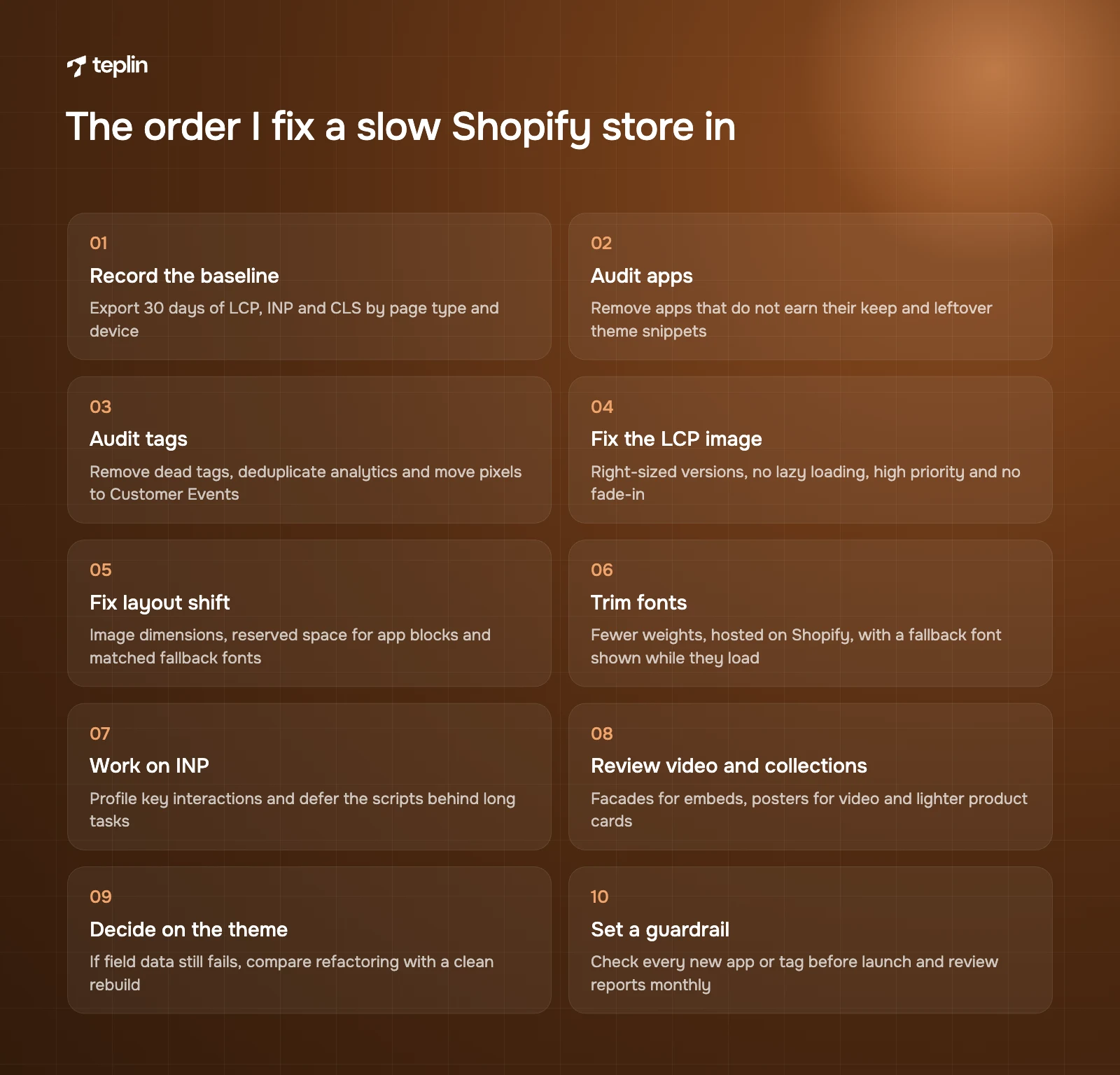
- Record the baseline
Export the last 30 days of LCP, INP and CLS by page type and device from Shopify's Web performance reports, plus a Lighthouse run of one home, collection and product URL. - Audit apps
Remove apps that do not earn their keep, replace overlapping ones, then search the theme for leftover snippets. - Audit tags
Remove dead tags, deduplicate analytics and move pixels to Customer Events where possible. - Fix the LCP image on each template
Right-sized versions for each screen, no lazy loading, high priority, no background image and no fade-in. - Fix layout shift
Dimensions on all images, reserved space for app blocks, overlay banners and matched fallback fonts. - Trim fonts
Fewer weights, hosted on Shopify, with text shown in a fallback font while they load. - Work on INP
Profile the key interactions (menu, variant change, add to cart, filters) and remove or defer the scripts behind long tasks. - Review video and collections
Facades for embeds, posters for background video, pagination and lighter product cards. - Decide on the theme
If field data still fails after steps 2 to 8, compare refactoring with a clean rebuild. - Set a guardrail
Agree that every new app or tag gets a quick performance check before launch, and review the reports monthly.
Fixes you can make without a developer
A good share of speed work needs no code at all. The hard part is usually knowing which fix matters for your store.
- App clean-up
Uninstall unused apps and remove their blocks in the theme editor. - Tag clean-up
Pause obviously dead tags in the tag manager, with your marketing team's agreement. - Image uploads
Upload reasonably sized images and replace a five-slide hero slider with one image. - Theme settings
Turn off animations, transitions and unneeded sections, and choose fewer font weights.
These are worth handing to a developer.
- Leftover code removal
Finding and safely deleting old app snippets without breaking something else. - LCP image setup
Updating the theme sections so the hero image is served at the right sizes, marked as high priority and loaded early. - INP work
Profiling long tasks and rewriting variant pickers, cart drawers or filters. - Pixel migration
Moving tracking to Customer Events and checking conversion data still matches. - Theme rebuilds
Building a lean custom theme, or judging whether headless is justified.
If headless is on the table mainly for speed, read our comparison of when to choose Hydrogen over a Liquid theme first. A well-built Liquid theme passes Core Web Vitals comfortably for most brands, and headless brings maintenance costs of its own.
Speed is a conversion lever when it is part of the design
I am careful not to claim that a faster page on its own produced a particular uplift, and I would be suspicious of anyone who does. What I see consistently is that speed problems and conversion problems share their causes. Crowded pages, competing widgets and slow mobile interactions hurt both. Fixing them together, as part of the design rather than as a technical clean-up afterwards, is what moves revenue.
Two projects show what I mean. For Ovrload, a UK creatine gummy brand selling mostly on subscription, we rebuilt the store on Shopify Plus with pages designed to load fast, simpler navigation and a step-by-step subscription funnel. Conversion went from 2.03% to 4.6% and average order value rose 32%. That came from the whole rebuild, though a fast funnel was in the brief from day one. For Nordik Recovery, a Canadian ice bath brand, loading speed, mobile responsiveness and checkout were part of the build from the start, and the store reached 1.15% conversion on a product of about $1,700, with more than 500 orders in the first month.
If your pages are fast and still not converting, the problem is elsewhere on the page. My product page checklist covers that side.
Frequently asked questions
What is a good PageSpeed score for a Shopify store?
No score guarantees a pass, because the score is a lab simulation and Google uses field data. A store with a modest mobile lab score often passes all three metrics for real users, and the reverse happens too. Use the score to find problems and use Shopify's Web performance reports and Search Console to judge success.
Do Core Web Vitals affect SEO on Shopify?
Google recommends good Core Web Vitals for success in Search and says page experience aligns with what its core ranking systems seek to reward. Relevance and content quality still carry more weight, so passing will not lift a weak page to the top by itself. The bigger effect is commercial, because slow and jumpy pages lose shoppers before they buy.
Does uninstalling an app remove its code?
Not always. Shopify states that uninstalling an app does not automatically remove its code from your theme. Apps built with theme app extensions come out more cleanly, but older apps may leave snippets in theme files that a developer needs to delete.
How do I fix a poor INP on Shopify?
Record the slow interactions in Chrome DevTools with CPU throttling to find the long tasks behind them. The cause is usually app scripts or theme JavaScript doing heavy work on a tap, such as re-rendering the whole product form on a variant change. Removing scripts, deferring non-critical ones and splitting heavy work so the page can show feedback first are the main fixes.
Is speed optimisation worth paying for?
It is when your field data fails one or more Core Web Vitals and you have already cleared the obvious app and tag clutter. What is left at that point usually sits in theme code and needs a developer. If you already pass in the field, the money is usually better spent on conversion work.
Once the free fixes are done and the reports are still red, that is the moment to bring in a developer. Our speed and performance team can look at your field data, find the scripts and templates behind the fails, and rank the fixes by how much they matter for shoppers. You can send us your store URL through the contact page to start.
Sources
- Shopify Help Center – Web performance reports
- Shopify Help Center – Improving your online store performance
- Shopify.dev – Theme performance best practices
- Shopify.dev – Liquid image_tag filter
- Shopify.dev – Liquid image_url filter
- Shopify.dev – Liquid font_face filter
- Shopify.dev – About web pixels
- Shopify Help Center – Manage your custom pixels
- Shopify Help Center – Product recommendations
- Google Search Central – Understanding Core Web Vitals and Google search results
- web.dev – Web Vitals
- web.dev – Interaction to Next Paint becomes a Core Web Vital on March 12
- web.dev – Interaction to Next Paint (INP)
- web.dev – Guide to optimising long tasks
- Chrome for Developers – CrUX data in PageSpeed Insights
- Teplin – Ovrload case study
- Teplin – Nordik Recovery case study

Get a free Shopify store audit

.webp)
Stay ahead of the curve

More from our resources
Is Shopify Plus Worth $2,300 a Month? Here Is the Real Bill





Ecommerce insights, straight to your inbox


10:33

10:33

16:33