

Book an intro call

What a Shopify Migration Really Costs and Why Budgets Overrun


Migration quotes are rarely wrong about the work they list. They go wrong on the work nobody listed. A catalogue turns out to have four spellings of "medium". The ERP partner needs three weeks' notice to test anything. A subscription platform cannot move cards the way everyone assumed. None of this is exotic, and almost all of it can be found before a contract is signed, if someone goes looking.
I manage migrations to Shopify day to day at Teplin, so this article is written from the scoping side of the table. It covers what a migration typically costs at three levels of scope, the assumptions that most often push a budget over, a realistic week-by-week plan, the checklist we work through, and what launch day and the following month should look like. The cost figures are typical market ranges, and I say so each time they appear.
Three cost bands cover most migrations
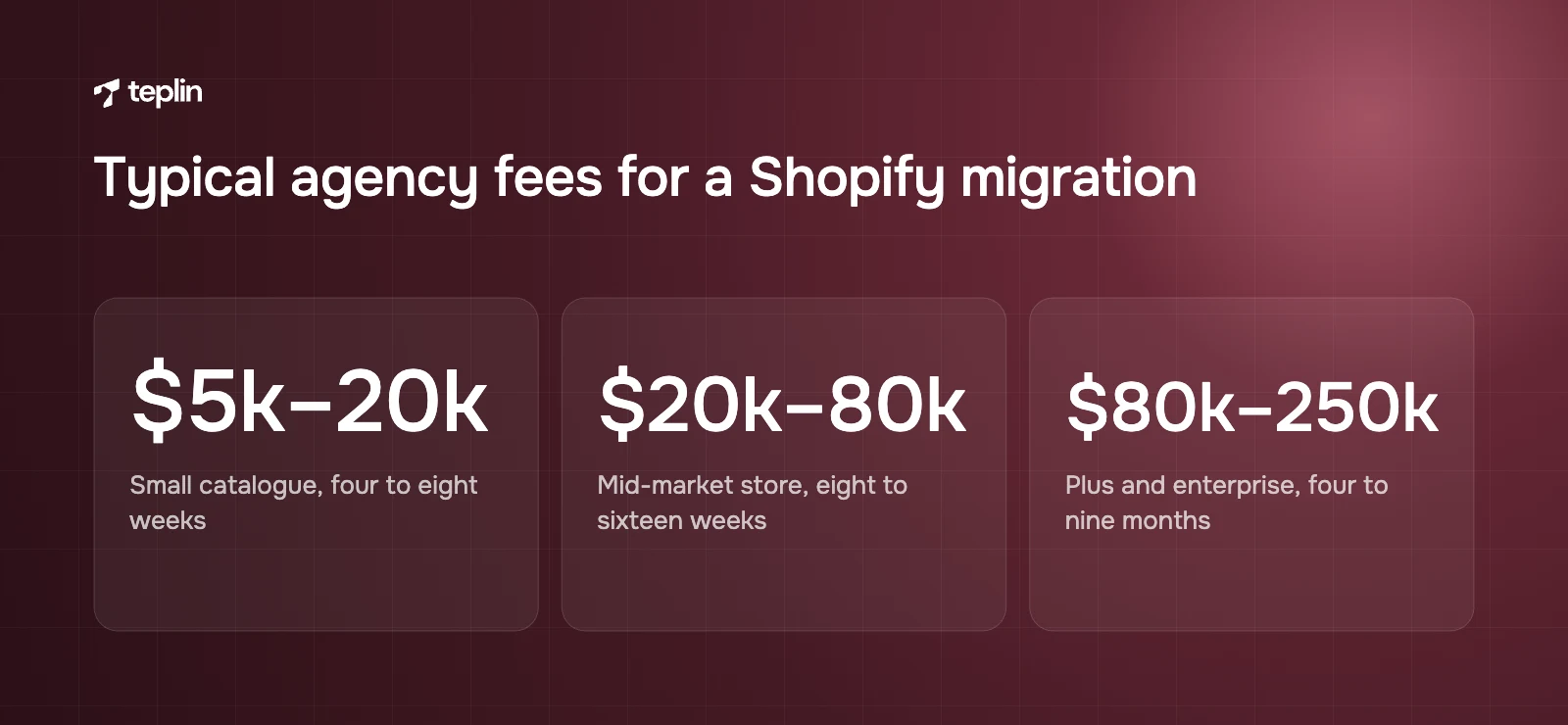
A Shopify migration typically costs between $5,000 and $250,000 or more in agency fees, depending on catalogue size, data volume, integrations, subscriptions and design scope. These are typical market ranges quoted by agencies in the UK, Europe and North America in 2025–2026, not a fixed price list. Freelancers can come in lower and large systems integrators considerably higher. In my experience most stores fall clearly into one of three bands once a few questions are answered.
Small catalogue migration
Up to a few hundred products with simple variants, a few thousand customers, no subscriptions, and one or two plain integrations such as an email platform and a shipping app. The design is usually a customised premium theme rather than a bespoke build.
- Typical market range
Roughly $5,000–$20,000 (or the £ or € equivalent) for data migration, theme setup, redirects, tracking and launch. - Typical timeline
Four to eight weeks from kick-off to launch. - Where the money goes
Data cleaning and mapping, theme configuration, redirect mapping and testing. The import itself is often the smallest line.
Mid-market migration
Thousands of SKUs with many attributes, a large customer and order history, and a store that depends on an ERP, a 3PL, a reviews platform, a loyalty programme or subscriptions. Most brands at this level also redesign during the move, because rebuilding the old theme pixel for pixel rarely makes sense.
- Typical market range
Roughly $20,000–$80,000, with custom design and integration work causing most of the spread. - Typical timeline
Eight to sixteen weeks. - Where the money goes
Custom design, integration development and testing, subscription migration, and several rounds of data validation.
Shopify Plus and enterprise migration
Several storefronts or markets, B2B pricing, complex promotions, custom checkout logic, deep ERP and PIM integrations, and sometimes a headless frontend. More stakeholders are involved too, and governance takes real time on top of the build.
- Typical market range
Commonly $80,000–$250,000, and higher for multi-brand or headless builds. - Typical timeline
Four to nine months, sometimes phased by market or brand. - Platform fees on top
Shopify Plus starts at $2,300 a month on a three-year term or $2,500 a month on a one-year term, with a variable platform fee at higher volumes. Our article on whether Shopify Plus is worth $2,300 a month breaks the full bill down.
Running costs sit outside the project budget and should be planned separately. That means the Shopify plan, paid apps that replace extensions from the old platform, and any ongoing development. For the standard plans, Shopify lists Basic at $39, Grow at $105 and Advanced at $399 a month on monthly billing, with lower rates when billed yearly.
Seven assumptions that push budgets over
When I compare a $10,000 quote with a $100,000 one for what looks like the same store, the difference almost always traces back to the same seven areas. Each one comes with an assumption that sounds reasonable and turns out to be expensive. If you prepare honest answers for all seven before your first agency call, the estimates you get back will be far closer to the final invoice.
"The product count tells you the size of the job"
It doesn't. Structure matters more than count. A Shopify product can have up to three options and, since October 2025, up to 2,048 variants (the earlier limit was 100). That removed the old workaround of splitting big products into several listings, but every attribute still needs mapping. Configurable products, bundles, kits and custom attributes from Magento or WooCommerce each need a decision. Is this an option, a variant, a metafield or a separate product?
Messy source data is where the hours go. Inconsistent sizes ("M", "Medium", "med"), missing weights, duplicated SKUs and images on an old CDN all have to be fixed somewhere. Fixing them before import is much cheaper than fixing them inside Shopify afterwards, and I push hard for that in every discovery phase.
"Customers will have to reset their passwords"
This one used to be true and it often still appears as a line item. Shopify states plainly that customer passwords cannot be migrated from another store, because they are encrypted outside Shopify. In the past that meant inviting every customer to reactivate an account and hoping they did.
Shopify's current customer accounts have mostly solved it. Customers sign in with their email address and a one-time six-digit code, and Shopify's help centre notes that anyone with a customer profile in your admin already has an account. Shopify deprecated legacy customer accounts in February 2026, so a new store will be on the current version anyway. What remains is the communication: a short email explaining the new sign-in, updated help pages and a check that order history shows correctly.
"We need all our order history"
Historical orders matter for customer service, returns, reorder flows and lifetime value reporting. Shopify recommends importing products first, then customers, then orders, so each order links correctly to both. Orders usually go in through a migration app or the API rather than a CSV. Switch off staff order notifications first, or Shopify will send an email for every imported order.
I always ask how much history the business actually uses. Many brands import two or three years and archive the rest in a data warehouse, which noticeably cuts migration time and the number of reconciliation rounds.
"Subscriptions just come across with the customers"
Subscriptions are the riskiest part of most migrations. A mistake means double-charging people or losing recurring revenue. Shopify's developer documentation explains how existing payment methods can be imported from Stripe, Braintree, PayPal Express and Authorize.net, so subscribers do not re-enter card details. Billing must be paused in the old system during the move, every customer needs an email address, first name and last name, and only some payment types migrate (from Stripe, for example, only credit cards).
I treat this as specialist work with its own phase and a dry run on a development store. On our subscription projects it is a separate workstream with its own sign-off, never something tacked onto the customer import.
"The integrations already exist and only need reconnecting"
Every system that exchanges data with the store needs reconnecting, and every connection needs testing against real scenarios such as a split shipment, a partial refund or a back-ordered item. ERPs, warehouse systems, PIMs, marketplaces and accounting tools are where mid-market budgets grow fastest. If a ready-made Shopify connector exists, the cost is mostly configuration and testing. If it does not, you are paying for custom middleware. The schedule risk is the other half of this. Integration partners have their own queues, and a slow reply from a 3PL can hold up a launch more than any bug.
"We'll rebuild every feature the old site had"
Product configurators, B2B portals, custom pricing logic, gift wrapping rules and home-grown loyalty schemes all need a Shopify equivalent. Sometimes that is an app, sometimes a Shopify Function, sometimes a custom app. My view is that a migration is the best chance you will get to retire features nobody uses. A good discovery phase lists every custom feature and asks whether it still earns its place before anyone quotes for rebuilding it.
"Design is a separate decision"
Keeping the current look on a configured theme is the cheapest route. A full redesign with custom sections adds design and front-end time, and it is usually where the commercial gain comes from. When we moved the New Zealand luxury fashion brand Bonz to Shopify, we migrated more than 300 products and redesigned the store around large imagery and material stories at the same time. Conversion rose by 33% and average order value by 21%. I would not credit the migration alone for that. The redesign and the conversion work done alongside it moved the numbers. Scoping design and migration together avoids paying twice for templates.
Four ways to move the data
Most projects combine at least two of these.
- Shopify Store Migration app
Shopify's own free app moves product and customer data. Its App Store listing currently names Square, WooCommerce, Etsy, Wix, Amazon, eBay, Clover and Lightspeed as sources, so check the listing for your platform before relying on it. - CSV import
Shopify's native product and customer CSV imports are fine for small, clean catalogues. Product CSV files cannot exceed 15 MB, column headers must match Shopify's template exactly, and an import cannot be cancelled once it starts. - Third-party migration apps
Matrixify is a widely used third-party app (developed by ITissible, not by Shopify) that imports and exports products, customers, orders, redirects, metafields, translations and more, and lists Magento and WooCommerce among its migration sources. Paid plans start at $20 a month according to its App Store listing. - Custom API scripts
For very large catalogues, complex attribute mapping or repeated delta syncs, a custom script against Shopify's Admin API gives full control and can be rerun as often as needed.
The tool matters less than the routine around it. Whatever you use, I want at least two full test imports into a development store, with counts reconciled each time, before the final import goes on the calendar.
A realistic twelve-week plan
A typical mid-market move to Shopify takes about 12 weeks from kick-off to launch. Small stores are closer to six weeks and enterprise projects run for several months. This is the shape of plan I would expect for a mid-market store with a redesign, a few integrations and a few thousand products.
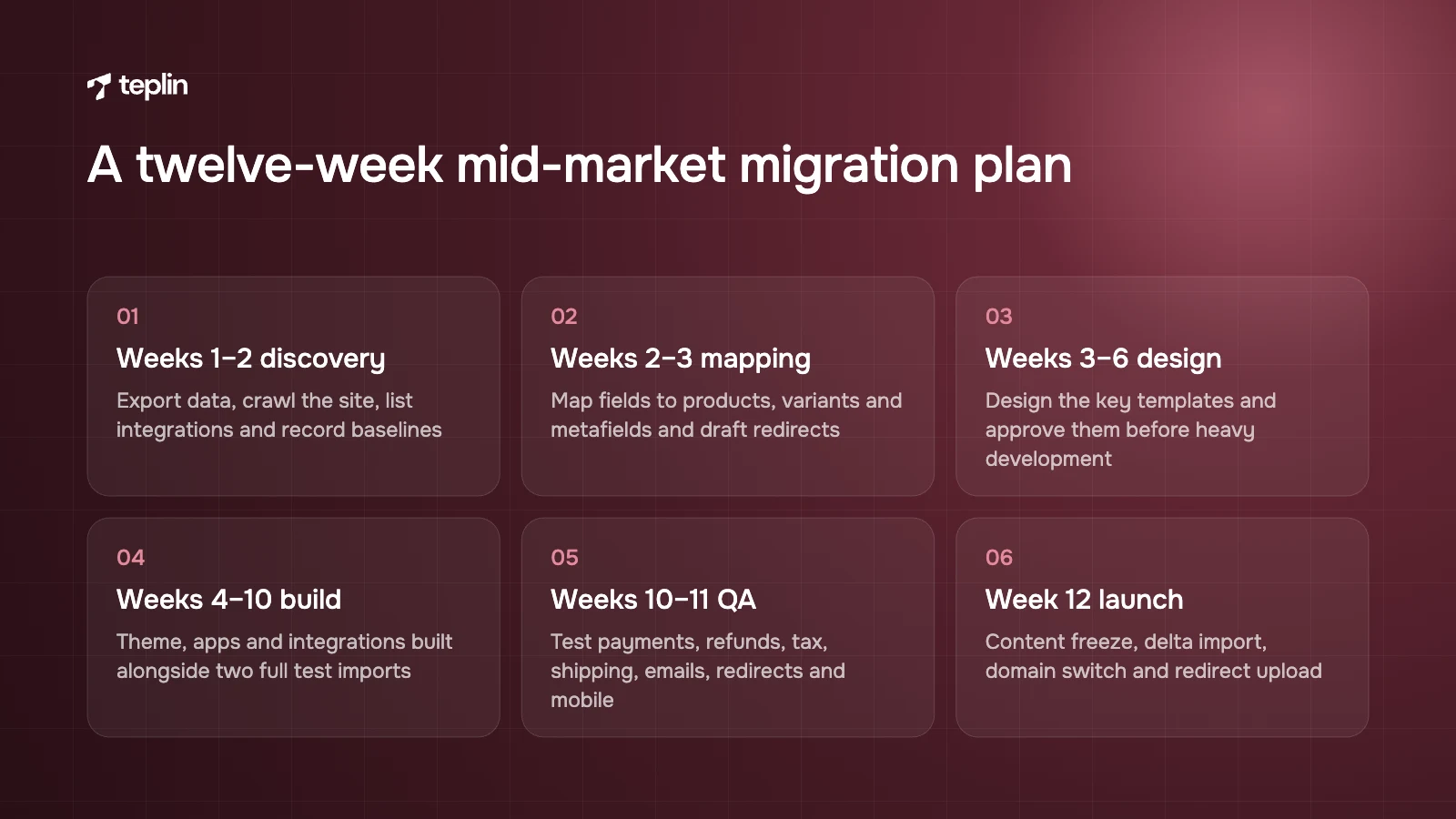
- Weeks 1–2 – discovery and audit
Export all data, crawl the current site, list every app, extension and integration, record analytics baselines (traffic, conversion, top landing pages) and agree scope, risks and a launch date. - Weeks 2–3 – data and URL mapping
Map source fields to Shopify products, variants, metafields and collections. Draft the redirect map. Decide how much order history comes across. - Weeks 3–6 – design
Wireframes and designs for the key templates (home, collection, product, cart, account and content pages). Design is approved before heavy development begins. - Weeks 4–9 – build and first import
Theme development, app selection and configuration, the first test import, and integration development in parallel. - Weeks 8–10 – integrations and second import
Connect ERP, 3PL and email systems, run a second full import with cleaned data, and rebuild tracking in Customer events. - Weeks 10–11 – QA and acceptance testing
Test orders with every payment method, refunds, cancellations, tax, shipping rates, emails, redirects and mobile layouts. Fix and retest. - Week 12 – final import and launch
Content freeze, delta import of new orders and customers, domain switch, redirect upload and the launch-day checks below. - Weeks 13–16 – monitoring
Daily and then weekly checks of revenue, errors, indexing and conversion, plus a backlog of quick fixes.
Two things delay migrations more reliably than any technical problem. One is late design approval. The other is slow access to integration partners. I ask clients for a single decision-maker on their side, and I ask them to book their ERP or 3PL partner's time before the project starts rather than when we need it.
Rankings survive when the redirects are right
An SEO-safe migration to Shopify means mapping every indexed URL on the old site to its new equivalent with a 301 redirect, carrying over titles, meta descriptions and content, and watching indexing after launch. Done properly, most stores keep their rankings, with some movement in the first few weeks.
Shopify's URL structure
Shopify uses fixed path prefixes that cannot be removed.
- Products
/products/product-handle - Collections
/collections/collection-handle - Pages
/pages/page-handle - Blog articles
/blogs/blog-handle/article-handle
A Magento URL such as /mens/shoes/runner-x.html or a WooCommerce URL such as /product/runner-x/ will not exist on Shopify, so nearly every old URL needs a redirect.
Redirect rules
Redirects can be imported as a CSV under Content, Menus, URL redirects. Shopify allows up to 100,000 redirects on standard plans and up to 20,000,000 on Plus. A redirect only fires from a URL that is broken, so it will not work if the old path still loads a real page on the new store. Keep the map one-to-one wherever you can. Each product goes to its new product, each category to the closest collection, and nothing gets dumped on the homepage.
Everything else that carries over
- Page titles and meta descriptions for products, collections and key pages.
- Category descriptions and other ranking content, including blog articles and their images.
- Structured data for products and reviews, which usually comes from the theme or a reviews app.
- Hreflang and language URLs if you sell in several languages (see our guide to selling internationally with Shopify Markets).
- An updated XML sitemap submitted to Google Search Console on launch day.
The checklist we work through
This is the list I run on every migration. Copy it into your project tool and give every line an owner.
Data
This section works as a general ecommerce data checklist, whichever platform you are leaving.
- Export products, variants, images, inventory, customers, orders, gift cards, store credit, reviews, blog posts and CMS pages from the old platform.
- Clean product data by removing duplicate SKUs, standardising option values and filling missing weights and barcodes.
- Map attributes to Shopify options, variants and metafields, and confirm no product exceeds three options or 2,048 variants.
- Import in Shopify's recommended order of products, then customers, then orders.
- Turn off staff order notifications before importing historical orders.
- Reconcile counts and spot-check 50–100 records against the source.
- Plan a delta import for orders and customers created between the final test import and launch.
URLs and SEO
- Crawl the old site and export every indexed URL, plus top landing pages from analytics and Search Console.
- Build a one-to-one redirect map to /products/, /collections/, /pages/ and /blogs/ URLs.
- Migrate titles, meta descriptions and ranking content.
- Test a sample of redirects on the development store before launch.
- Prepare the sitemap submission and a list of priority URLs to inspect in Search Console.
Tracking and analytics
- List every tag and pixel on the old site, including GA4, Google Ads, Meta, TikTok, Pinterest, affiliate and consent tools.
- Install official app pixels where they exist and build custom pixels for the rest under Settings, Customer events.
- Configure cookie consent so pixels respect visitor choices.
- Place test orders and confirm purchase events reach each platform with the right values and currencies.
- Annotate the launch date in your analytics tools.
Payments and tax setup
- Activate Shopify Payments or your chosen gateways, and add the local payment methods your customers expect.
- Configure taxes per country, including EU VAT and One Stop Shop settings where relevant.
- Recreate shipping zones, rates and delivery promises.
- Test successful and failed payments, refunds, cancellations and fulfilment, as Shopify's own launch guidance recommends.
Apps and integrations
- Replace each old extension with an app, a Shopify Function or custom code, or retire it.
- Reconnect ERP, 3PL, email, reviews, loyalty and support tools and test real scenarios.
- Set up staff accounts with individual permissions.
- Rewrite transactional email templates in your brand voice.
- Prepare customer communication about the new account sign-in.
Launch day should be boring
If launch day feels exciting, something slipped through QA. Pick a low-traffic day and time, stay away from Fridays and peak sales periods, and work through this sequence.
- Freeze product and content changes on the old platform.
- Run the final delta import of orders and customers and reconcile the counts.
- Upload the redirect CSV and test the top 50 URLs by traffic.
- Remove the online store password and connect the domain.
- Place real orders with each payment method and refund them.
- Confirm orders reach the ERP or 3PL and confirmation emails send.
- Check purchase events arrive in GA4 and the ad platforms.
- Submit the sitemap in Google Search Console.
- Keep the old platform available in read-only mode for reference for at least a few weeks.
The first 30 days decide whether it worked
For the first month after launch, check orders and payments every day, check 404s and redirects daily during the first week, review Search Console indexing weekly, and compare conversion rate against the pre-launch baseline weekly. Most problems that cost revenue show up in the first ten days.
- Days 1–3
Watch order volume against the same weekdays before launch, along with failed payments, integration errors and support tickets. Anything that blocks checkout gets fixed immediately. - Days 4–7
Review 404 reports and add missing redirects. Check inventory stays in sync with the warehouse. Confirm the conversions reported in analytics and ad platforms match Shopify's own order reports. - Days 8–14
Review Search Console coverage and crawl errors. Compare landing page traffic for the top 50 pages. Check site speed on the key templates. - Days 15–30
Compare conversion rate, average order value and revenue per session with the baseline. Start a backlog of improvements based on real behaviour, which is where CRO and UX work begins to pay off.
A dip in organic traffic for two to four weeks while Google recrawls the site is common. A fall that lasts longer usually points to missing redirects, changed content on top pages or indexing problems. I would investigate it rather than wait it out.
Is Shopify Plus needed for the move?
Any Shopify plan can receive a migrated store. Plus becomes worth considering when you need several expansion stores, B2B with company-specific catalogues, very high redirect volumes or deeper checkout customisation. Plus includes the main store and nine expansion stores, and B2B features such as unlimited catalogues and catalogues assigned to specific companies are Plus-only. Shopify also publishes a dedicated Plus launch checklist for these projects.
Coming from Magento, Adobe Commerce, Shopware or PrestaShop? Our separate guide on migrating from Magento, Shopware or PrestaShop to Shopify covers the platform-specific data mapping and redirect patterns.
Frequently asked questions
How much does it cost to migrate to Shopify?
As a typical market range, agency fees run from about $5,000–$20,000 for a small store, $20,000–$80,000 for a mid-market store and $80,000 or more for Shopify Plus and enterprise projects. Data complexity, integrations, subscriptions and design scope drive most of the difference. Shopify plan fees and apps come on top.
How long does a Shopify migration take?
Small stores usually move in four to eight weeks, mid-market stores in eight to sixteen weeks, and complex Plus migrations in four to nine months. The timeline is mostly set by data cleaning, integrations and how quickly design decisions are made. The import itself is rarely the slow part.
Will I lose my Google rankings?
Not if the migration is done properly. Map every indexed URL to its Shopify equivalent with a 301 redirect, carry over titles and content, and submit the new sitemap on launch day. Short-term movement is normal, while a sustained drop usually means redirects or content are missing.
Can I migrate customer passwords?
No. Shopify cannot import passwords from another platform because they are encrypted outside Shopify. With Shopify's current customer accounts this rarely matters, because customers sign in with a one-time email code and imported customers already have an account.
Can subscriptions move without customers re-entering their cards?
Often, yes. Shopify supports importing existing payment methods from Stripe, Braintree, PayPal Express and Authorize.net for subscription migrations, with some restrictions on payment types. Billing must be paused on the old system during the move to avoid double charges.
Is the Shopify Store Migration app enough?
For a small store on a supported platform, it can handle products and customers. For larger catalogues, order history, redirects, metafields and unsupported platforms, most teams add a third-party tool such as Matrixify or custom API scripts.
The cheapest way to avoid an overrun is to find the hidden work before anyone quotes for it. Every project on our Shopify migration service starts with that discovery audit of data, integrations and URLs. If you would like one for your store, the contact form is the quickest way to book it. Bring your product count, your integration list and a rough idea of your launch window, and we can start from there.
Sources
- Shopify Help Center – Migrating to Shopify
- Shopify App Store – Shopify Store Migration
- Shopify Help Center – Importing products with a CSV file
- Shopify Help Center – Importing and exporting customers
- Shopify Help Center – Customer accounts
- Shopify Changelog – Legacy customer accounts are now deprecated (February 2026)
- Shopify Help Center – Adding variants
- Shopify Changelog – Product variant limit increased to 2,048 (October 2025)
- Shopify Help Center – URL redirects
- Shopify Help Center – Custom pixels
- Shopify Help Center – Managing custom pixels
- Shopify.dev – Migrate customer information to Shopify (subscriptions)
- Shopify Help Center – Shopify Plus launch checklist
- Shopify Help Center – B2B features by plan
- Shopify – Shopify Plus pricing
- Shopify – Pricing
- Shopify App Store – Matrixify (third-party app by ITissible)
- Teplin – Bonz case study

Get a free Shopify store audit

.webp)
Stay ahead of the curve

More from our resources
Is Shopify Plus Worth $2,300 a Month? Here Is the Real Bill




Ecommerce insights, straight to your inbox


10:33

10:33

16:33