

Book an intro call

Getting Your Shopify Store Into ChatGPT and AI Search Answers

Most of what I read about AI search visibility treats ChatGPT as a new Google with a new set of tricks to learn. For a Shopify store that framing is mostly wrong. Your products reach AI assistants by two separate routes, and the work that moves the needle on both is plain, unglamorous ecommerce hygiene.
The first route is a feed. Shopify Catalog sends your product data straight to AI channels. The second is the open web, where assistants crawl and cite pages when someone asks a question. Robots.txt, schema and content affect the second route. Your admin settings and product data affect the first. I want to go through the myths I hear most often from founders and set each one against what Shopify, Google and OpenAI actually document as of October 2026.
In brief
- Shopify syndicates your catalogue to AI channels by default for eligible stores, so data gaps now reach more shoppers.
- Google says no special schema is needed for AI Overviews or AI Mode, although honest Product and Organization markup still matters.
- Blocking the wrong crawler can quietly take you out of ChatGPT answers, and robots.txt never touches the Catalog feed.
Myth one says there is a secret ranking formula
The reality. Neither OpenAI nor Google publishes a ranking formula for product recommendations, so I distrust any list of "AI ranking factors". What we can see is how the answers are assembled. Assistants combine a structured product source (a catalogue or merchant feed) with pages they retrieve when the question is asked, then pick the options that fit what the shopper said.
Hard facts such as price, stock, variants, shipping and returns mostly come from feeds. The "which one suits me" part leans on descriptive content, including product copy, comparison pages, reviews and third-party coverage. A perfect feed with thin copy gets skipped for nuanced questions. Great copy with missing prices loses the shopper who is ready to buy.
Hard facts come from your product feed, while your copy answers which product suits the shopper. Gaps in either one cost you sales.
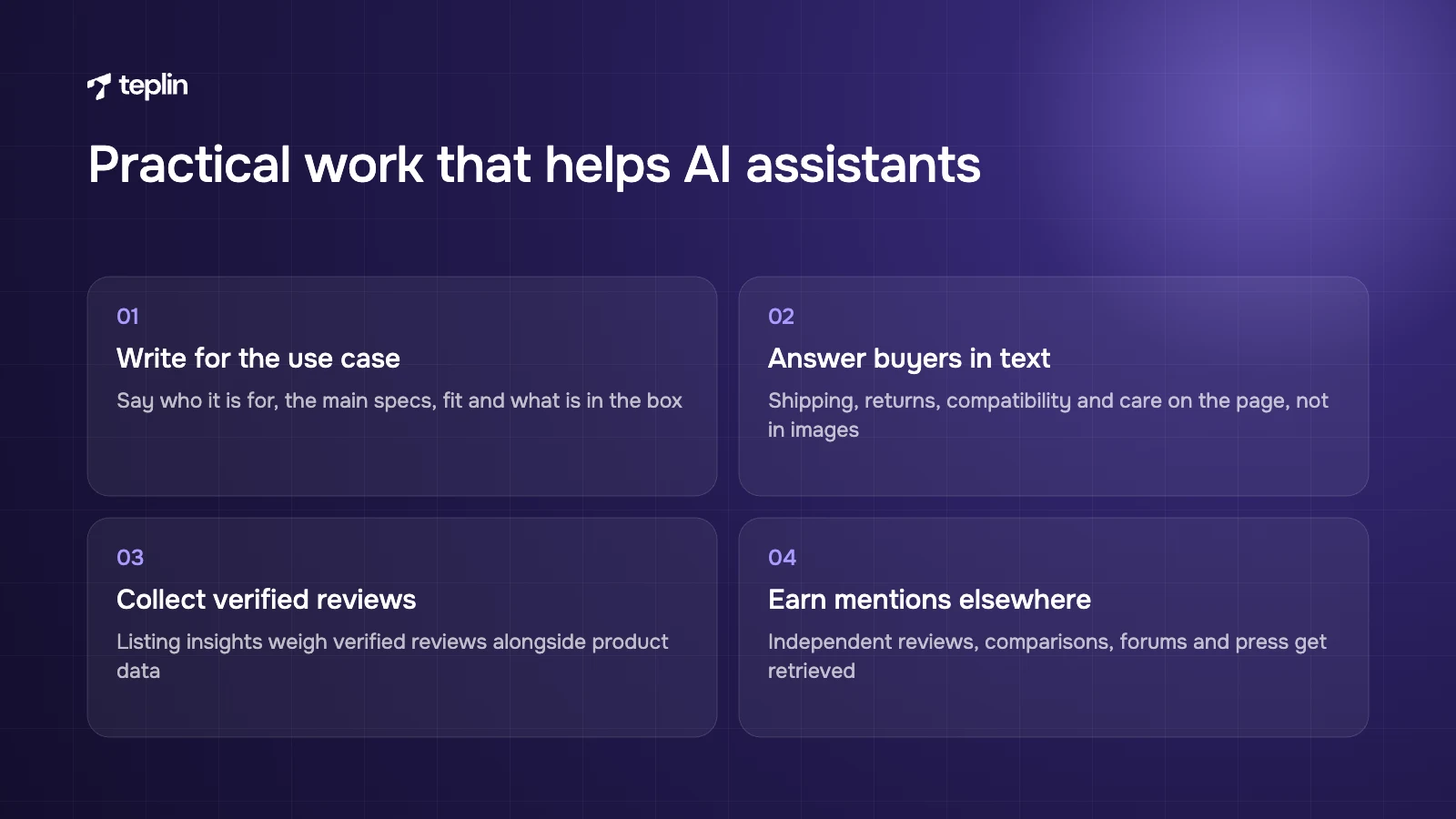
So the practical work looks like this:
- Write for the use case
Say who the product is for, the main specs, sizing or fit, what is in the box and how it compares with obvious alternatives. Someone asking for vegan creatine gummies is matched more easily by a page that says "vegan", "gummies" and the dose in plain words than by one promising "next-level performance". Our guide to optimising Shopify product pages covers the conversion side of the same work. - Put buyer answers in visible text
Shipping times, returns, compatibility and care belong on the page, not inside images or a chat widget. - Collect verified reviews
Shopify's listing insights on the Agentic page look at verified reviews alongside description length, image count, variant completeness and shop policies. - Earn mentions elsewhere
Independent reviews, comparison articles, forum threads and press are part of what assistants retrieve. Keep your brand facts consistent wherever they appear.
Myth two says you have to apply to get into ChatGPT
The reality. Shopify does this for you if your store is eligible. Shopify Catalog is the system that syndicates merchant products to AI channels. It was first announced for select developers in May 2025, and in December 2025 Shopify launched Agentic Storefronts in the Winter '26 Edition. The Help Center says agentic storefronts are active by default for eligible stores and are managed under Sales channels > Agentic in the admin. Shopify does not spell out eligibility in detail, so check your own admin.
In October 2026 the Help Center lists these AI channels:
- ChatGPT
Works mainly as a referrer, with the shopper checking out on your online store in ChatGPT's in-app browser or a new tab. - Google AI Mode and Gemini
Supports checkout inside the channel if you activate it. Products can also arrive through the Google & YouTube channel or Merchant Center. - Microsoft Copilot
Supports checkout inside the channel if you activate it. - Meta
Supports checkout inside the channel if you activate it.
Perplexity was named in the original December announcement but is not in the current Help Center list. You stay the merchant of record, and orders show which channel they came from.
The default does not fix your data
Catalog sends your title, description, options, images, price and availability, and keeps price and stock current. It cannot invent anything you have not entered. Shopify recommends keeping product data complete, using Catalog Mapping when key details live in metafields, metaobjects or tags, and grouping variants so they show as one listing. You also choose whether to share compare-at prices.
Two details I rarely see covered. Switching off ChatGPT or Copilot in the admin does not fully hide your products, because they can still be found through web search. Shopify says the only full opt-out is setting a product to Unlisted. And if you sell wholesale through custom apps rather than Shopify B2B, check that trade-only items are not being syndicated, because Shopify may not detect them.
The Shopify Knowledge Base app lets you write policy answers for AI agents. Those answers do not appear on your site, so keep your visible policy pages saying the same thing.
Myth three says the right schema gets you into AI Overviews
The reality. Google says plainly that no special schema.org markup is needed to appear in AI Overviews or AI Mode. Pages need to be indexed and eligible for a snippet. Structured data is still worth doing properly, because it states price, availability, brand and policies in a form machines do not have to guess from your layout. It is hygiene, not a hack.
This is what my team checks on a Shopify theme:
- Product and Offer
Shopify's Liquid structured_data filter outputs Product for single-variant items and ProductGroup for products with variants. Older or heavily customised themes often carry hand-written JSON-LD with missing availability or one price for every variant. - Review and AggregateRating
Mark up only real reviews visible on the page. Review apps usually inject this, so look for duplicate or conflicting blocks. - Organization
Google recommends the OnlineStore subtype for shops, with properties such as logo, sameAs links to official profiles, and hasMerchantReturnPolicy and hasShippingService for store-wide policies. - FAQPage
Google stopped showing FAQ rich results in Search from May 7, 2026. Visible questions and answers still help assistants reading the page, but the markup no longer earns a Google enhancement.
Test a handful of product URLs in Google's Rich Results Test and in Shopify's free agentic readiness tool, which checks product structured data and robots.txt access. Shopify itself calls those results informational, not a promise of visibility.
Myth four says blocking AI bots keeps you out of AI training and nothing else
The reality. Each company runs several crawlers for different jobs, and blocking the wrong one can remove you from answers without anyone noticing:
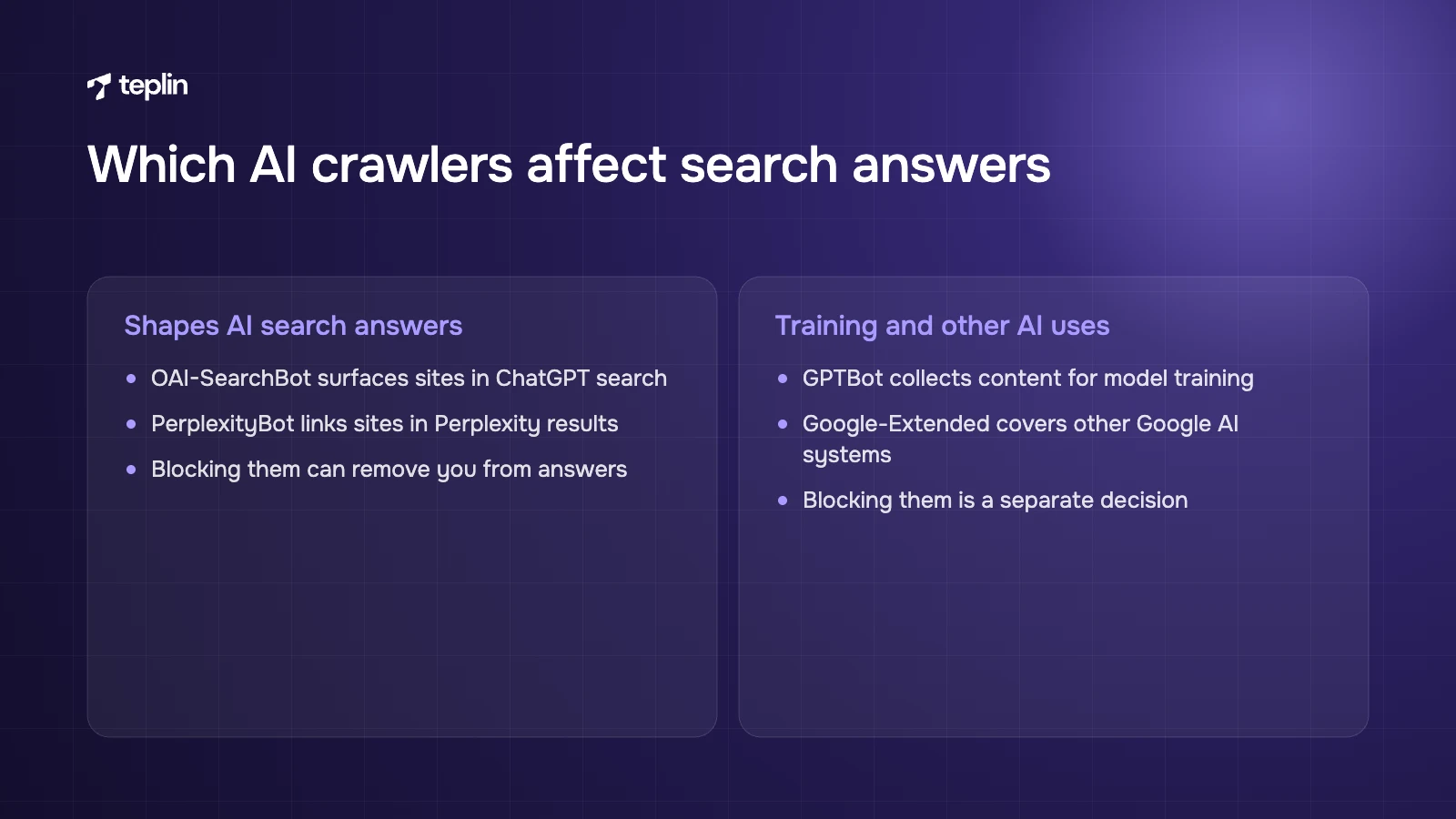
- OAI-SearchBot
Surfaces sites in ChatGPT search. OpenAI says a site that blocks it will not appear in ChatGPT search answers, though it may still show as a navigational link. Changes take about 24 hours. - GPTBot
Collects content that may be used to train OpenAI models. Blocking it is a training decision, separate from search visibility. - PerplexityBot
Surfaces and links sites in Perplexity results, and Perplexity recommends allowing it. - Google-Extended
Controls use of your content in some of Google's other AI systems, separately from Search.
On Shopify you change these rules with a robots.txt.liquid template in your theme. Shopify's developer docs warn that the rendered template may not match the generated default exactly, so save your current /robots.txt and compare before publishing. Stores with separate country domains can add host-specific rules, which our guide to selling internationally with Shopify Markets touches on. Also make sure a firewall, bot-protection app or geo-redirect is not blocking these crawlers before robots.txt even comes into play.
None of this affects the Catalog feed. Robots.txt governs the open-web route only.
Myth five says every store needs an llms.txt file
The reality. llms.txt is a proposed convention, published by Jeremy Howard in September 2024, for a Markdown file at /llms.txt that summarises a site and links to its most useful pages. It is not an official standard, and none of the OpenAI, Google or Perplexity documentation we reviewed says their systems use it. My honest take is that adding one is cheap and harmless. It sits far below product data, structured data and crawler access on the list.
Myth six says you cannot measure AI traffic
The reality. You can measure a fair amount of it. The Sales channels > Agentic page shows sales, orders, online store sessions and conversion per AI channel, combining referral sales with checkout inside the channel. A search preview shows how products might rank in Shopify Catalog search, with a listing quality score per product. Shopify calls it directional, since each channel re-ranks with its own logic. These analytics are not yet available for headless stores.
In Google Analytics 4, set up a custom channel group matching AI referrers such as chatgpt.com, perplexity.ai, gemini.google.com and copilot.microsoft.com. ChatGPT adds utm_source=chatgpt.com to its referral links, which makes it the easiest to isolate. Traffic from Google AI Overviews and AI Mode is not separated, because Search Console counts it within normal web search. Watch conversion rate as well as sessions. Volume alone undersells a young channel.
Frequently asked questions
Do I need to do anything to appear in ChatGPT shopping results?
If your store is eligible, agentic storefronts are on by default and products are syndicated through Shopify Catalog. Confirm it under Sales channels > Agentic, and make sure OAI-SearchBot is not blocked so ChatGPT can also cite your pages.
Is there special schema for Google AI Overviews?
No. Google says no special schema.org markup is needed for AI Overviews or AI Mode. Accurate Product, Offer, Review and Organization markup plus a Merchant Center feed keep you eligible for Google's shopping features.
Will blocking GPTBot hide my store from ChatGPT?
Not on its own. GPTBot relates to model training, while OAI-SearchBot decides whether your site appears in ChatGPT search. Products can also reach ChatGPT through Shopify Catalog, which robots.txt does not affect.
How do I stop a product appearing in AI channels?
Shopify says the only complete method is setting the product to Unlisted, which also removes it from your sitemap, search engines and on-site search. Turning off a single AI channel does not fully hide it.
The short version of my view is that AI visibility rewards the stores that already keep their data clean. Shopify now pushes your catalogue out for you, which means every missing size chart or vague title travels further than it used to. If you would like us to look over your theme's structured data, robots.txt and Catalog setup, that sits with our Shopify development team, and you can send us a note with your store URL.
Sources
- Shopify Help Center – Agentic storefronts
- Shopify Help Center – Products in agentic storefronts
- Shopify Help Center – Agentic home and performance
- Shopify News – Winter '26 Edition: Agentic Storefronts (December 10, 2025)
- Shopify Blog – What is agentic shopping (April 2, 2026)
- Shopify – Agentic Storefronts Supplemental Terms of Service
- Shopify Developer Changelog – Shopify Catalog (May 21, 2025)
- Shopify.dev – About Catalogs
- Shopify.dev – Customise robots.txt
- Shopify.dev – structured_data Liquid filter
- Shopify – Agentic readiness tool
- Google Search Central – AI features and your website
- Google Search Central – Product structured data
- Google Search Central – Organization structured data
- Google Search Central – FAQ structured data (discontinued)
- OpenAI – Overview of OpenAI crawlers
- OpenAI Help Center – Publishers and developers FAQ
- Perplexity – Perplexity crawlers
- llmstxt.org – The /llms.txt proposal

Get a free Shopify store audit

.webp)
Stay ahead of the curve

More from our resources
Is Shopify Plus Worth $2,300 a Month? Here Is the Real Bill

Ecommerce insights, straight to your inbox


10:33

10:33

16:33