

Book an intro call

Hydrogen or Liquid? An Honest Decision Guide

My default answer is Liquid. I say that as the founder of an agency that builds headless Shopify storefronts and is happy to do so when the case is right. The case is right less often than the confident advice online suggests. Some people will tell you Hydrogen is the only serious option for a growing brand, and others will call headless an expensive vanity project. Both are wrong often enough to be useless when you are the one signing off a six-figure rebuild.
This piece is for founders, ecommerce managers and CTOs choosing between a Liquid theme and a headless storefront built with Hydrogen. Instead of a feature comparison, I have built it around the situations that should decide it, because the right answer depends far more on your business than on the technology. You will also find what changed for Hydrogen in 2026, what headless takes away, how the three-year cost compares and a checklist to run before committing.
Where I land: stay on a well-built Liquid theme unless you can name a specific experience a theme cannot deliver, and you can fund developers to own a custom storefront for years. If both are true, headless can be the better investment. If either is missing, it rarely is.
Two architectures in plain language
A Liquid theme
Liquid is Shopify's template language, and a Liquid theme is the standard way to build a Shopify storefront. Shopify hosts the theme, renders the pages on its servers and serves them through its own infrastructure. Since Online Store 2.0, themes are built from sections and blocks that marketers can add, reorder and configure in the theme editor without code. Apps plug in through theme app extensions, which Shopify's documentation describes as integrating with Online Store 2.0 themes.
A Liquid theme also inherits a lot for free. The Online Store channel generates sitemaps, canonical tags and robots.txt, and with Shopify Markets it adds hreflang tags for international URLs automatically. Hosting, CDN, security and platform updates are Shopify's job.
A headless storefront on Hydrogen and Oxygen
Headless Shopify means Shopify still runs products, inventory, customers, orders and checkout, but the storefront customers browse is a separate application. It pulls data through the Storefront API and renders pages itself. When the customer is ready to pay, the cart's checkout URL sends them to Shopify's hosted web checkout.
- Hydrogen
Shopify's framework for headless storefronts. The current production version is built on React Router and provides components, utilities and patterns for working with Shopify's APIs. - Oxygen
Shopify's global serverless hosting platform for deploying Hydrogen storefronts at the edge, using a worker-based JavaScript runtime. - Other headless stacks
You can also build with Next.js or another framework, host it elsewhere and call the Storefront API directly. In 2026 that line is blurring.
Shopify's documentation calls Hydrogen and Oxygen its recommended stack for headless commerce.
Hydrogen is in the middle of a rebuild
2026 is the year Hydrogen stopped being tied to one framework. This is what has been announced on official channels:
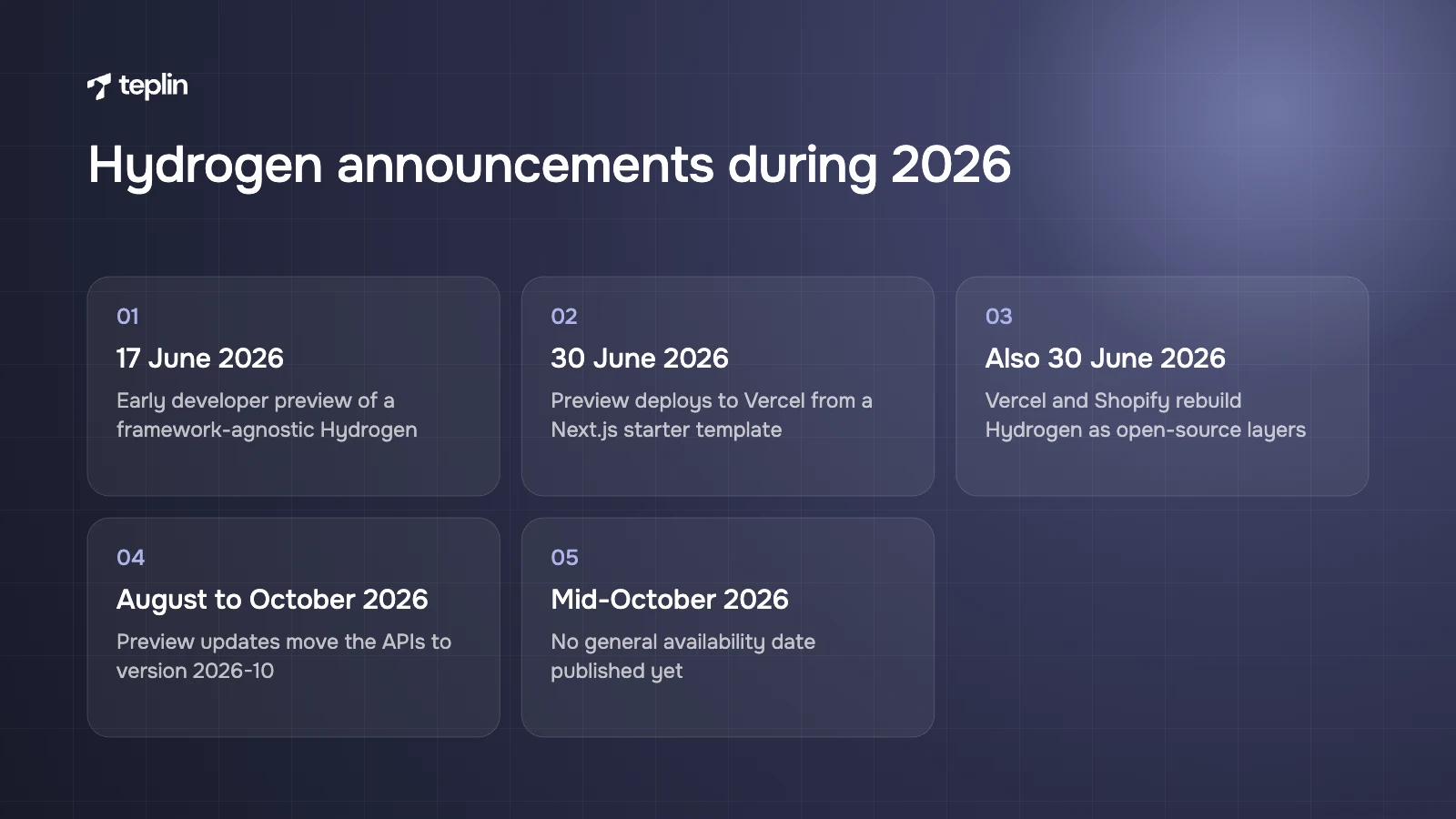
- 17 June 2026
Shopify announced an early developer preview of the next Hydrogen, which moves commerce logic out of React Router into a framework-agnostic core so developers can build storefronts in any JavaScript framework with Shopify's commerce primitives. - 30 June 2026
Shopify's changelog announced that the Hydrogen developer preview can be deployed to Vercel in a few clicks. A deploy button creates a repository from a Next.js starter template with a typed Storefront API client, cart, and product and collection pages already wired up. - Also 30 June 2026
Vercel announced that the two companies are rebuilding Hydrogen from the ground up as open-source, runtime-agnostic layers (core, client and server), with support for frameworks such as Next.js, Nuxt and Svelte. At announcement the client layer was available for React on the preview branch, with more frameworks to follow. Vercel says its own commerce template will adopt Hydrogen once it is stable. - August to October 2026
Shopify has shipped regular developer preview updates, including cart and customer account improvements. The October updates moved the Storefront API and Customer Account API to version 2026-10 and added Customer Accounts to the React Router template.
What has not been announced matters as much. As of mid-October 2026, Shopify has not published a general availability date for the rebuilt Hydrogen, and the official update notes are still titled "developer preview". The docs label older Hydrogen versions as legacy and recommend the latest version, but they set no shutdown date for the existing React Router stack.
My reading is straightforward. Plan new headless projects with the new architecture in mind, but expect anything going live in the next few months to ship on the current, stable React Router version or on a Next.js build using the Storefront API directly. I would be wary of anyone promising a production launch on a preview framework without explaining the upgrade risk.
It depends on which of these describes you
These are the situations I ask clients about before we talk architecture. Most brands recognise themselves in two or three of them, and the answer usually falls out of that.
1. The shopping experience is the product
Configurators, builders, editors and personalisation flows with complex state are much easier to build as an application than as Liquid sections held together with JavaScript.
My call. This is the strongest case for headless. Our work on StoryKeeper is a good example. It sells family albums and life story books through a built-in online editor, used largely by adult and senior customers. We have supported and developed it as a headless Shopify build since September 2024, including a step-by-step album builder with a visible progress bar and a calmer interface with larger, more legible type. Album creation conversion rose by 48% and bounce rate fell by 64%. The album builder is the product, which is exactly where headless makes sense.
2. You mainly want a faster store
Headless storefronts can feel very fast after the first page, because later page changes happen in the browser. They can also ship large JavaScript bundles that hurt Interaction to Next Paint on mid-range phones. Liquid themes benefit from Shopify's rendering and CDN and can be very fast when apps and scripts are kept under control.
My call. Stay on Liquid and fix the theme. A slow theme is usually a symptom of heavy apps, unoptimised media and too much JavaScript, all of which can be fixed without a rebuild. In our projects the biggest performance wins on Liquid come from removing apps and third-party scripts rather than from changing architecture. Our guide to speeding up a Shopify store covers how.
3. You mainly want better SEO
Search engines rank pages on content, relevance, links and a sound technical foundation. Both architectures can provide those. Headless changes who is responsible for the foundation.
My call. Not a reason to go headless. Google can render JavaScript, but its documentation explains that rendering happens in a separate step, so content that only appears after client-side JavaScript runs is a weaker bet than content in the initial HTML. Hydrogen renders on the server, which avoids the worst problems, but custom code can still hide product information behind client-side requests. And headless sites often launch without complete sitemaps, canonicals, hreflang, structured data or redirects, simply because nobody built them.
4. Marketing ships pages every week
If your team launches landing pages, changes homepage content and runs promotions weekly, the theme editor is doing a lot of quiet work for you.
My call. Liquid, unless you budget properly for a headless CMS and good tooling. Without that, every content change becomes a developer ticket, and campaigns slow down.
5. The store runs on a lot of apps
Reviews, upsells, bundles, loyalty, subscriptions and quizzes often depend on theme app extensions or scripts injected into the theme.
My call. Liquid, or a headless plan that lists every app and how it will be integrated. Apps with an API or headless SDK can be wired in with development work. Apps that only work through the theme cannot, and each one becomes its own small project.
6. Several front ends share one backend
A web store, a mobile app, in-store screens and kiosks can share components and data logic. Brands publishing a lot of editorial content from a headless CMS, or running several brands from one design system, also benefit from a single front-end codebase.
My call. A real case for headless, provided the next point is also true.
7. You have engineers who will own it
Headless needs in-house developers or a long-term agency partner who owns the codebase. The business also has to fund that work continuously, not only the build.
My call. Without this, nothing else on the list matters. Headless without ongoing engineering capacity decays quickly. If ongoing development would eat a large share of your margin, a custom Liquid theme will almost always give a better return. And if the goal is simply a distinctive design, a fully custom Liquid theme can look and feel unique too.
The middle ground most brands overlook
The choice is often framed as all or nothing, and it does not have to be. A custom Liquid theme can include rich, app-like sections where they matter, such as a product finder, a bundle builder or a guided size selector, built with modern front-end code inside the theme. You keep the theme editor, app blocks and Shopify's SEO defaults everywhere else.
I find this route fits a lot of brands who come to us asking for headless. Their real need is usually one or two interactive features rather than an entirely custom storefront. When that is the case, building those features inside a well-structured theme costs a fraction of a headless build and keeps the marketing team in control.
The limit shows when the interactive part stops being a feature and becomes the whole experience. If most of the customer's time is spent inside a builder or editor, with complex state that has to survive across many steps, the theme starts working against you. That is the point where I would look seriously at headless again.
The other version of the middle ground is the staged rollout in the checklist below: build the custom experience as a headless application first, keep the rest of the store on Liquid, and decide on the full move only once the custom part has proved its value with real customers.
What headless takes away
Everything a Liquid theme does by default becomes something your team designs, builds and maintains.
- The theme editor
Marketers lose drag-and-drop sections. You need a headless CMS, Shopify metaobjects with a custom rendering layer, or developer time for content changes. - Plug-and-play apps
Theme app extensions are designed for Online Store 2.0 themes, so app blocks do not appear in a custom storefront on their own. - Built-in SEO plumbing
Automatic sitemaps, canonical tags, theme structured data and Markets-generated hreflang belong to the Online Store channel. On a custom storefront they have to be built and tested. - Some international behaviour
Markets still provides currencies, prices and catalogues through the API, but routing, language switching and redirects must be implemented in the storefront. - Hosting simplicity
Oxygen removes much of this, within limits. Workers must be 10 MB or less, use at most 128 MB of memory and are limited to 30 seconds of CPU time per request. Oxygen also does not support proxies in front of deployments, which Shopify notes can conflict with bot mitigation and cause SEO issues. - Analytics defaults
Consent, analytics events and pixels need explicit implementation, although recent Hydrogen updates added consent-aware analytics and page view events.
What you keep matters too. Products, inventory, discounts, Shopify Functions, customer accounts and Shopify's checkout all stay on Shopify, and checkout customisation works through checkout extensibility in both setups.
Three-year cost tells the real story
Headless cost is mostly people rather than platform. Shopify includes Oxygen at no extra charge on paid plans from Starter to Plus, including the Pause and build plan, and the Shopify plan itself is the same whichever storefront you choose. Shopify Plus starts at $2,300 a month on a three-year term. Hosting elsewhere, such as Vercel, has its own pricing.
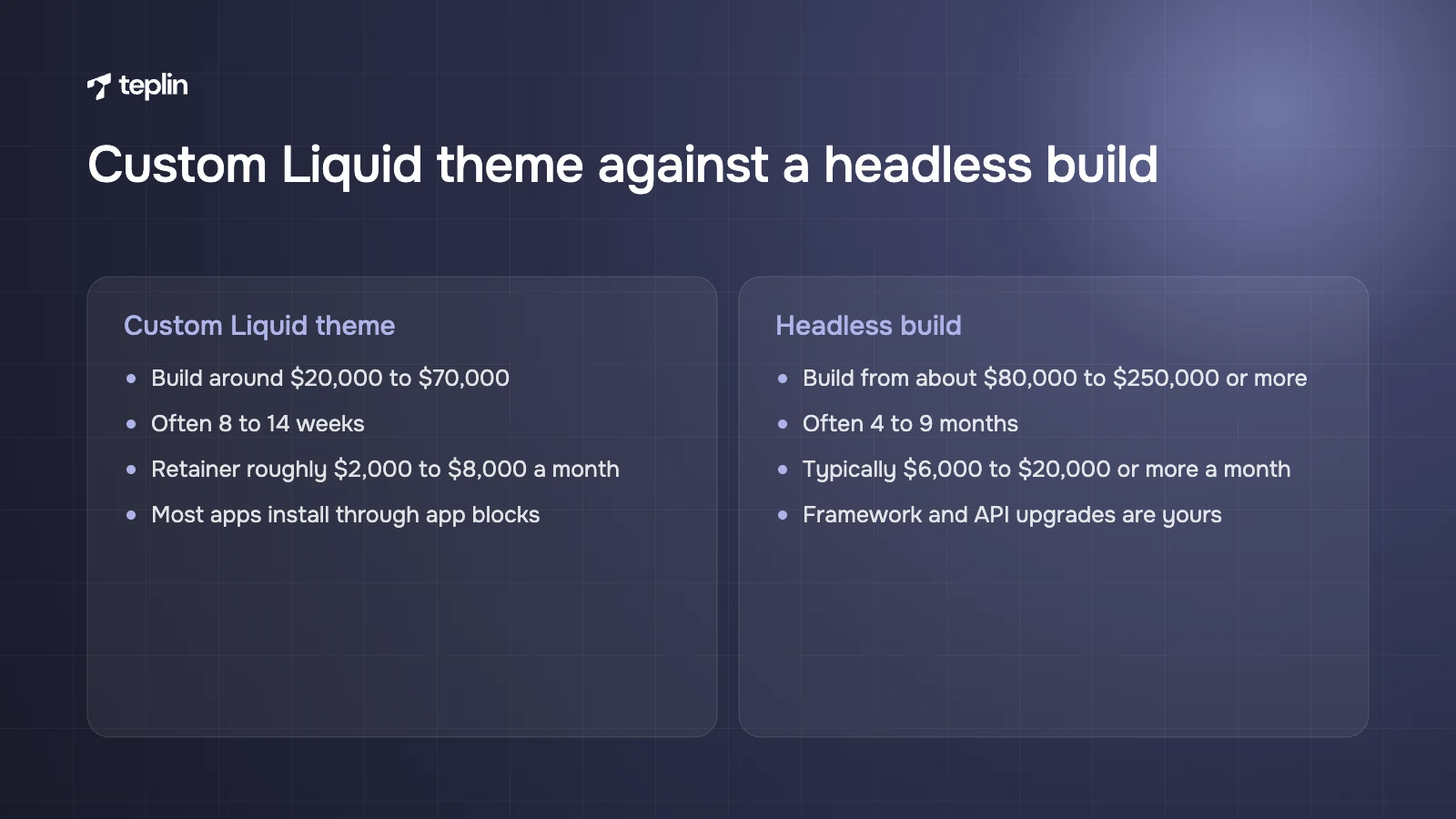
The ranges below are typical of what agencies in the UK, EU and US quote in 2026. They vary widely with scope and are not a Teplin price list.
Custom Liquid theme
- Build
Around $20,000 to $70,000 for a custom Online Store 2.0 theme for an established DTC brand, with premium theme customisations below that range. - Timeline
Often 8 to 14 weeks. - Ongoing development
Many brands run a retainer of roughly $2,000 to $8,000 a month, and marketers handle most content changes themselves. - Apps
Most install directly through app blocks.
Headless build with Hydrogen or Next.js
- Build
From about $80,000 to $250,000 or more, driven by the custom experience, the CMS and the number of integrations. - Timeline
Often 4 to 9 months. - Ongoing development
Typically $6,000 to $20,000 or more a month in agency retainers or in-house engineering, because most storefront changes need developers. - Additional software
A headless CMS, search, monitoring and sometimes third-party hosting, which together can add several hundred to several thousand dollars a month. - Upgrades
Framework and API version upgrades, including the 2026 Hydrogen transition, are your responsibility.
Compare three-year totals, never build quotes alone. On those ranges, headless often ends up costing two to four times as much as a custom Liquid theme over three years. That is only worth it if the custom experience produces a measurable revenue difference. For theme-based budgets in more detail, see what a custom Shopify website costs.
SEO and speed criteria for a headless launch
If you do go headless, write these into the brief as acceptance criteria rather than hoping they get done:
- product names, prices, availability and descriptions present in the server-rendered HTML;
- product, breadcrumb and organisation structured data on the right templates;
- XML sitemaps that cover every indexable URL and update when products change;
- correct canonical tags and hreflang for every market and language;
- a 301 redirect for every old URL, especially when moving from a Liquid theme;
- robots.txt rules, including access for AI crawlers, set as a deliberate choice.
For speed, use Core Web Vitals as the neutral yardstick. Google's thresholds for a good experience are a Largest Contentful Paint of 2.5 seconds or less, Interaction to Next Paint of 200 milliseconds or less and Cumulative Layout Shift of 0.1 or less, measured at the 75th percentile of real visits. Put those targets in the brief and measure them on real devices after launch, whichever architecture you choose. A move from Liquid to headless should be treated like a platform migration, with redirects and monitoring planned accordingly.
Checklist before you commit to Hydrogen
- Name the experience a theme cannot build
If you cannot point to a specific feature, stay on Liquid. - Confirm who owns the code
In-house developers or a long-term partner, for at least three years. - Audit every app and integration
Mark which offer an API or headless SDK and which only work through the theme. - Decide how marketers will edit content
Choose a headless CMS or a metaobject-based approach before design starts. - Model the three-year cost
Include build, retainer or salaries, CMS and software, and framework upgrades. - Pick the framework path
Current React Router Hydrogen, the new Hydrogen preview or a Next.js build, with a documented upgrade plan. - Write SEO and performance criteria
Use the list above and set a JavaScript budget per page type. - Stage the rollout
Where possible, launch the custom experience first and move the rest of the storefront once it proves itself.
Frequently asked questions
Do I need Shopify Plus to go headless?
No. Headless storefronts and Oxygen hosting are available on standard paid plans. Plus becomes relevant for other reasons, such as expansion stores, B2B depth or heavier API and checkout needs, not because headless requires it.
Should I wait for the new Hydrogen?
If your project launches in the next few months, plan on the current stable stack and budget for a later upgrade. If you are starting a long project now, prototype on the preview and follow Shopify's update notes, but do not tie a production launch date to a framework still labelled a developer preview.
Can I go back from headless to a Liquid theme?
Yes. Products, customers and orders stay in Shopify, so switching back mainly means rebuilding the storefront as a theme and redirecting any URLs that change. It is a significant project, but your store data is not locked in.
Bring me the feature you think needs headless
Hydrogen is a powerful tool for brands whose storefront is a product in its own right. For everyone else, a well-built Liquid theme delivers most of the benefit at a fraction of the cost and keeps marketing in control. Our headless and Hydrogen team builds both kinds of store. If you tell me which experience you are trying to build, I will give you my honest view on which architecture fits it.
Sources
- Shopify Developer Changelog – Hydrogen developer preview (June 2026)
- Shopify Developer Changelog – Hydrogen now deploys to Vercel (30 June 2026)
- Shopify Hydrogen – Updates
- Shopify Developer Changelog – Hydrogen developer preview update (September 2026)
- Shopify.dev – Hydrogen and Oxygen fundamentals
- Shopify.dev – Hydrogen deployments
- Shopify.dev – Manage a cart with the Storefront API
- Shopify.dev – Theme app extensions
- Shopify Help Center – International SEO for markets
- Shopify Plus – Pricing
- Vercel – Vercel and Shopify are rebuilding Hydrogen
- Google Search Central – JavaScript SEO basics
- web.dev – Web Vitals
- Teplin – StoryKeeper case study

Get a free Shopify store audit

.webp)
Stay ahead of the curve

More from our resources
Is Shopify Plus Worth $2,300 a Month? Here Is the Real Bill




Ecommerce insights, straight to your inbox


10:33

10:33

16:33