

Book an intro call

Building a Subscription Offer on Shopify That Keeps Customers

I design subscription offers for a living, and the part of the job I find most interesting happens after the first order. Getting someone to tick "subscribe and save" is a product page problem. Keeping them for the sixth delivery is a design problem that runs through the widget, the customer portal, the payment retry settings and the cancellation screen. This piece is my view of how to build that whole experience on Shopify in 2026, for brands selling supplements, drinks, coffee, beauty or anything else people run out of.
Where I land. Start with Shopify's free Subscriptions app, spend your effort on the product page and the retention settings, and move to a paid app only when churn tooling or build-a-box becomes the thing holding you back.
The plumbing belongs to Shopify
Before any design decision, it helps to know what sits underneath. Shopify subscriptions run on three platform objects that every app shares:
- Selling plan groups
A group represents a way of selling, such as "Subscribe and save" or "Prepaid", attached to the products and variants it applies to. - Selling plans
Each plan is one way to buy, for example "Deliver every 4 weeks", with a billing policy, a delivery policy, an inventory policy and a pricing policy that sets the discount. - Subscription contracts
At checkout with a selling plan, Shopify creates a contract holding the items, prices and schedules. At each renewal the app starts a billing attempt against it, and a successful attempt creates a new order.
Card details are stored by Shopify, not by the app. That is the detail I care about most from a design point of view, because it means your choice of app is reversible. The Shopify Subscriptions app can import contracts from third-party apps by CSV, so moving later is a project rather than a rebuild. Subscription products work on the online store, Shopify POS, Shop and custom storefronts, and checkout always shows a subscription disclosure that cannot be removed on any plan.
The free app is a good first offer
Shopify Subscriptions is Shopify's own app and is listed as free on the App Store. You still pay your plan and normal processing fees, and Shopify notes some setups add costs, such as PayPal Express transaction fees without Shopify Payments. In October 2026 the app covers:
- Plans
Delivery frequencies in weeks, months or years, an optional fixed billing day, an optional order limit and several frequency options per plan. - Discounts
Percentage off, amount off or a fixed price on the plan, and Shopify says amount, percentage, buy X get Y and fixed-amount discounts can apply to subscription products. - Customer portal
Customers can skip upcoming orders, pause, resume, cancel and update their payment method and shipping address from their account. - Billing attempts
Separate retry rules for payment failures and for stock shortages, with a choice to skip, pause or cancel once retries run out. - Storefront and notifications
A subscription widget block for Online Store 2.0 themes, subscription emails switched on by default and analytics on active, paused and cancelled subscriptions.
The limits are worth knowing before you sketch anything. Shopify states that bundles are not compatible with the app, so build-a-box needs a third-party app or custom work. Subscriptions cannot be added to draft orders, gift cards apply only to the first payment, and cancellation cannot be undone. Changing frequency or swapping products is not among the documented self-service actions, which is the gap I notice most as a designer. Your theme also needs to support sections and blocks.
Check your payment methods early
Subscriptions need a gateway that can store a card and charge it again. Shopify's supported list is Shopify Payments, PayPal Express, Authorize.net, Adyen and Stripe, with caveats:
- Stripe and Adyen
Stripe is available only to select merchants, and Adyen only to organisations with existing Adyen approval. - Wallets and local methods
Local, manual and non-card methods might not be available for subscriptions. Through Shopify Payments, Apple Pay is limited to Visa and Mastercard, and Authorize.net offers PayPal as its only wallet. - Card updates
Automatic card updates are widely supported in the United States through Shopify Payments, while international support varies. For UK and European brands, that makes dunning emails carry more of the load.
If your customers rely on iDEAL, Bancontact or bank transfer, confirm what your gateway can bill on a recurring basis before you design the offer around them.
Treat the widget as a decision the shopper makes
This is the part I would spend most of the budget on. A subscription widget asks the shopper to commit to something open-ended, so every element either lowers that worry or adds to it. In our CRO work on subscription brands, these are the details I keep coming back to:
- Choose the default deliberately
Preselecting subscribe and save tends to lift take-up, but it must be honest and obvious. Test it against one-time as the default instead of assuming. - Show the saving in money
Put the per-delivery price and the saving ("£4.20 off every order") next to the percentage. Shoppers compare prices more easily than percentages. - Offer two or three frequencies
Pick the interval that matches real usage plus one either side. A dropdown of ten intervals creates hesitation. - Put reassurance next to the button
"Skip, pause or cancel anytime" answers the biggest objection where the decision is made. - Give subscriptions their own page
Explain how it works and how to manage it, and link there from the widget and emails.
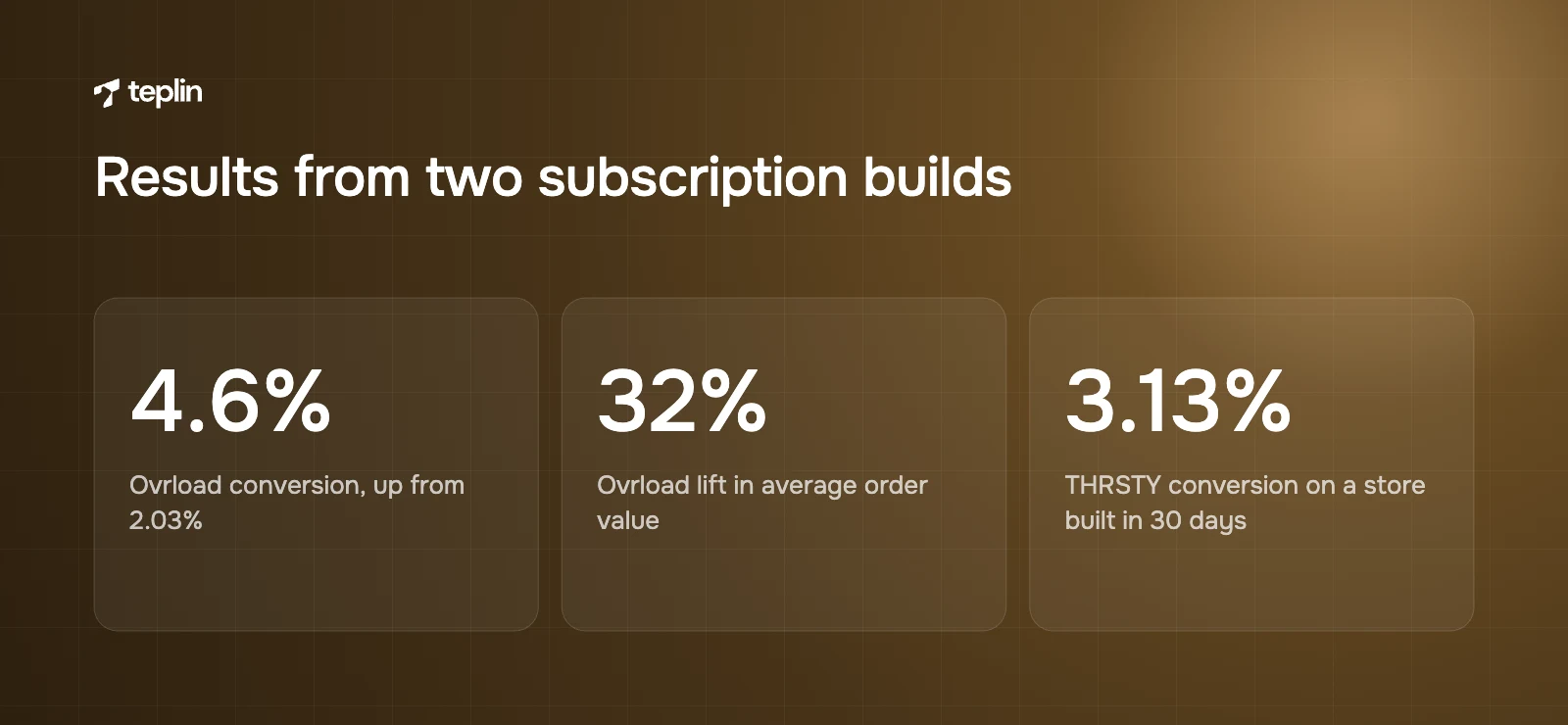
Two of our builds show what a well-designed offer can do. For Ovrload, a UK creatine gummy brand built around subscriptions, the rebuilt store moved conversion from 2.03% to 4.6% and lifted AOV by 32%. THRSTY, a UK electrolyte brand, launched with subscriptions on a store built in 30 days and converts at 3.13%. We have also shipped subscription stores for Quantum Padel and for Perla Helsa's EU launch. For wider product page guidance, see optimising Shopify product pages for conversion.
Retention is designed on the screens nobody screenshots
The customer portal, the failed-payment email and the cancellation screen rarely make it into a design review. I think they deserve the same care as the product page, because this is where subscribers decide whether to stay.
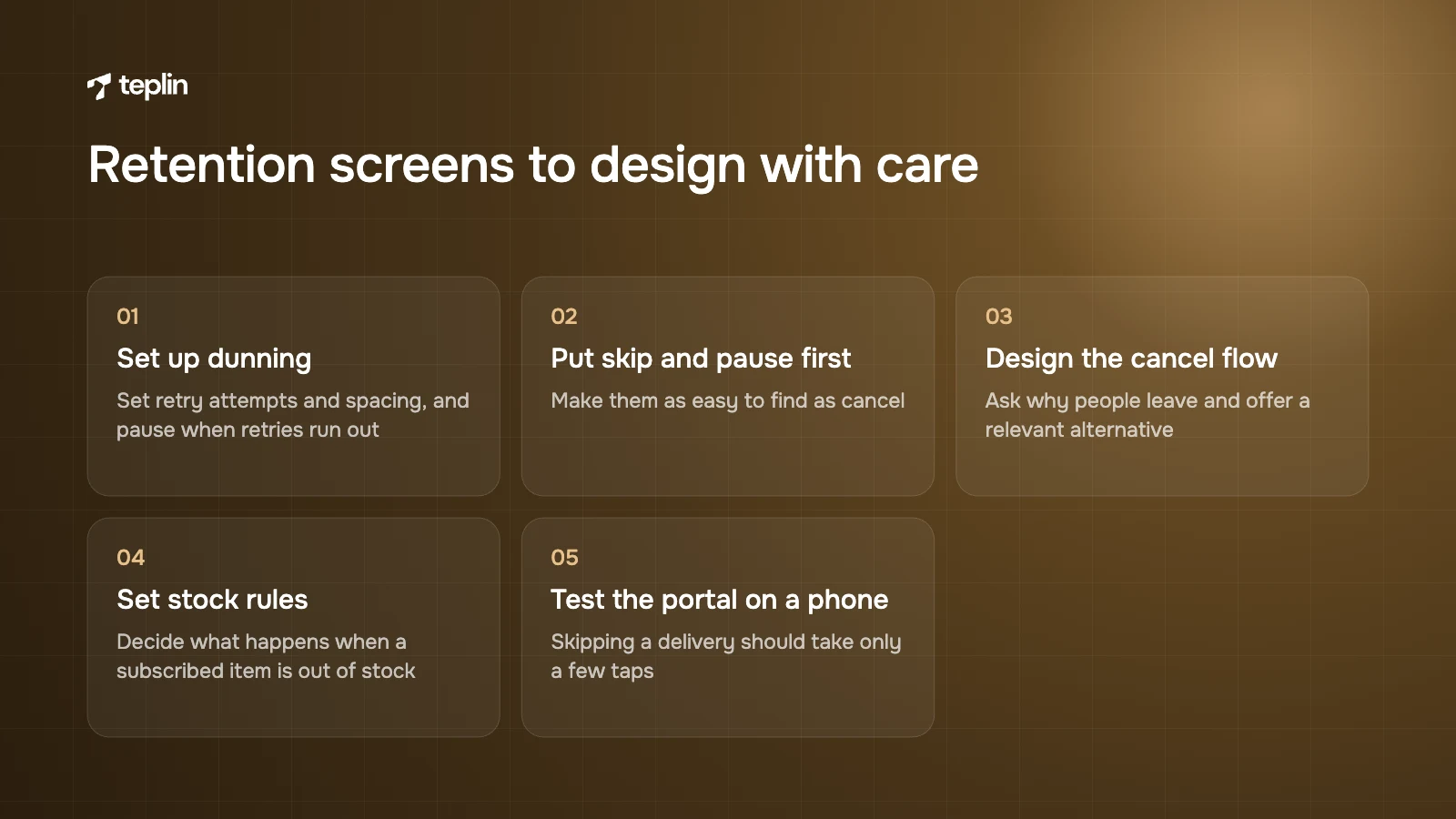
- Dunning
Set retry attempts and spacing for failed payments, and choose whether to skip, pause or cancel when retries run out. My preference is pause, which leaves the door open. - Skip and pause before cancel
Make them as easy to find as cancel. A customer with a full cupboard usually wants a break, not an exit. - Cancellation flow
Ask why people leave and offer a relevant alternative, while keeping cancellation simple and compliant with local consumer law. - Stock rules
Decide what happens when a subscribed item is out of stock, and tell the customer clearly. - The portal on a phone
Test every action on a small screen. If skipping a delivery takes more than a few taps, people email support or cancel.
When a paid app earns its fee
Because every app sits on the same contracts and payment vault, starting free carries little risk. I would look at a paid app once one of these is true: subscriptions are a large share of revenue and churn is now your main lever; you want a cancellation flow that offers skip, swap or a discount before the customer leaves; you sell variety packs and need build-a-box; or you need cohort, churn and lifetime value reporting beyond counts of active and cancelled contracts.
When you compare apps, judge them on pricing model (monthly fee, revenue share or both, modelled at next year's revenue), the customer portal on a phone, how mixed boxes are priced and stored as contracts, the depth of churn analytics, who handles contract migration and whether billing dates and payment methods move without customer action, and whether the app uses Shopify's native checkout and selling plans with your theme or headless storefront. App pricing changes often, so check the current App Store listings on the day you decide.
My checklist before a subscription offer goes live
- Confirm your gateway and local payment methods support recurring billing.
- Set up plans in Shopify Subscriptions with two or three frequencies that match real usage.
- Show the saving in money beside the percentage, and pick the default on purpose.
- Add "skip, pause or cancel anytime" next to the add-to-cart button.
- Publish a subscription explainer page and link to it from the widget and emails.
- Configure payment retries and choose pause as the outcome when they fail.
- Set out-of-stock behaviour for subscribed items.
- Test skip, pause, address change and cancel on a phone.
- Write the cancellation flow and check it against local consumer law.
- Review active, paused and cancelled numbers monthly and revisit the app choice when churn becomes the priority.
Subscriptions reward brands that treat them as a product in their own right. If you would like a designer's eye on your widget, portal and retention settings, our CRO and UX optimisation team works on exactly this, and a short note through our contact page is enough to start.
Sources
- Shopify Help Center – Shopify Subscriptions
- Shopify Help Center – Considerations and payment gateways for subscription products
- Shopify Help Center – Shopify Subscriptions app eligibility considerations
- Shopify Help Center – Create and edit subscription plans
- Shopify Help Center – Managing Shopify Subscriptions app settings
- Shopify Help Center – Shopify Subscriptions customer experience
- Shopify Help Center – Setting up Shopify Subscriptions
- Shopify Help Center – Import and export subscription contracts
- Shopify.dev – Subscriptions
- Shopify.dev – Selling plans
- Shopify.dev – Subscription contracts
- Shopify App Store – Shopify Subscriptions
- Teplin case study – Ovrload
- Teplin case study – THRSTY

Get a free Shopify store audit

.webp)
Stay ahead of the curve

More from our resources
Is Shopify Plus Worth $2,300 a Month? Here Is the Real Bill



Ecommerce insights, straight to your inbox


10:33

10:33

16:33