

Book an intro call

Selling Abroad With Shopify Markets in 2026


Turning on a second currency in Shopify takes about ten minutes. Turning a second country into a market that pays its way takes a dozen decisions, and most brands make them by accident. A few orders arrive from Germany, someone enables euros, and the store is suddenly international without anyone having decided who pays the duty, which language the returns page is written in, or whether the new French pages will start competing with the English ones in Google.
I wrote this for DTC founders and ecommerce managers who would rather make those decisions on purpose. I manage international launches at Teplin, and this follows the order I run them in day to day: pick the countries, settle the tax model, decide on one store or several, then build the market and make it convert. Every platform fact links to an official source at the bottom of the page.
In brief
- One store with Markets is enough for most brands
Markets sets currency, language, product availability and pricing per country or region, and submarkets inherit from their parent. Expansion stores are for genuinely different legal entities, catalogues or teams. - Managed Markets is open to some sellers only
It is offered to businesses based in the continental US and to certain stores in Canada and the UK, with Global-e as merchant of record and a 3.5% fee on international orders (3.25% on Plus). EU-based stores currently handle duties and taxes themselves. - The EU moved the goalposts in 2026
A temporary €3 customs duty per item on low-value parcels from outside the EU has applied since 1 July 2026, and online traders have had to offer a "withdraw from contract" function since 19 June 2026.
A quick map of Shopify Markets
Shopify Markets is the part of the admin where you decide how the store behaves for different groups of customers. Shopify defines a market as a group of countries, regions or customer segments that get a tailored shopping experience. For each one you configure currency, language, product availability and pricing, plus the domain or subfolder customers land on.
Markets is included on every standard plan. Shopify's pricing page lists storefront translation, local currencies, local payment methods, local domains and duty and tax estimates as available on Basic, Grow, Advanced and Plus. Local currencies and local payment methods need Shopify Payments.
Markets now have conditions that decide who they apply to: countries and regions, B2B company locations, retail locations or sales channels. That is why the same tool now runs cross-border selling, wholesale, retail and channel-specific setups. For this article I am only dealing with the cross-border side.
The rest of the article is a sequence. You can skip steps that do not apply to you, but I would not reorder them. Choosing a URL structure before settling the number of stores, for example, is how teams end up rebuilding redirects six months later.
Pick your first countries from data
The first decision is the one founders rush most. Expansion plans often start with the countries the team likes rather than the countries already showing demand. Shopify's own analytics usually has the better answer.
I look at three things before naming a single market:
- Existing traffic and orders
Which countries already send sessions and place orders without any localisation? Those customers are telling you the product travels. - Shipping cost and delivery time
A country with strong demand but a ten-day delivery window and expensive returns is a harder start than a neighbour you can reach in two days. - Tax and compliance effort
Selling into the EU from the UK or US is a different job from selling into Canada or Australia. The later sections cover what that means in practice.
My honest advice is to launch one or two markets properly rather than ten badly. A market with machine-translated pages, card-only checkout and unclear duties will convert poorly, and the team will conclude that the country does not work when the setup was the problem.
Settle who handles duties and tax
This step changes everything downstream, so it comes second. Shopify offers two levels of international selling, and they put very different jobs on your desk.
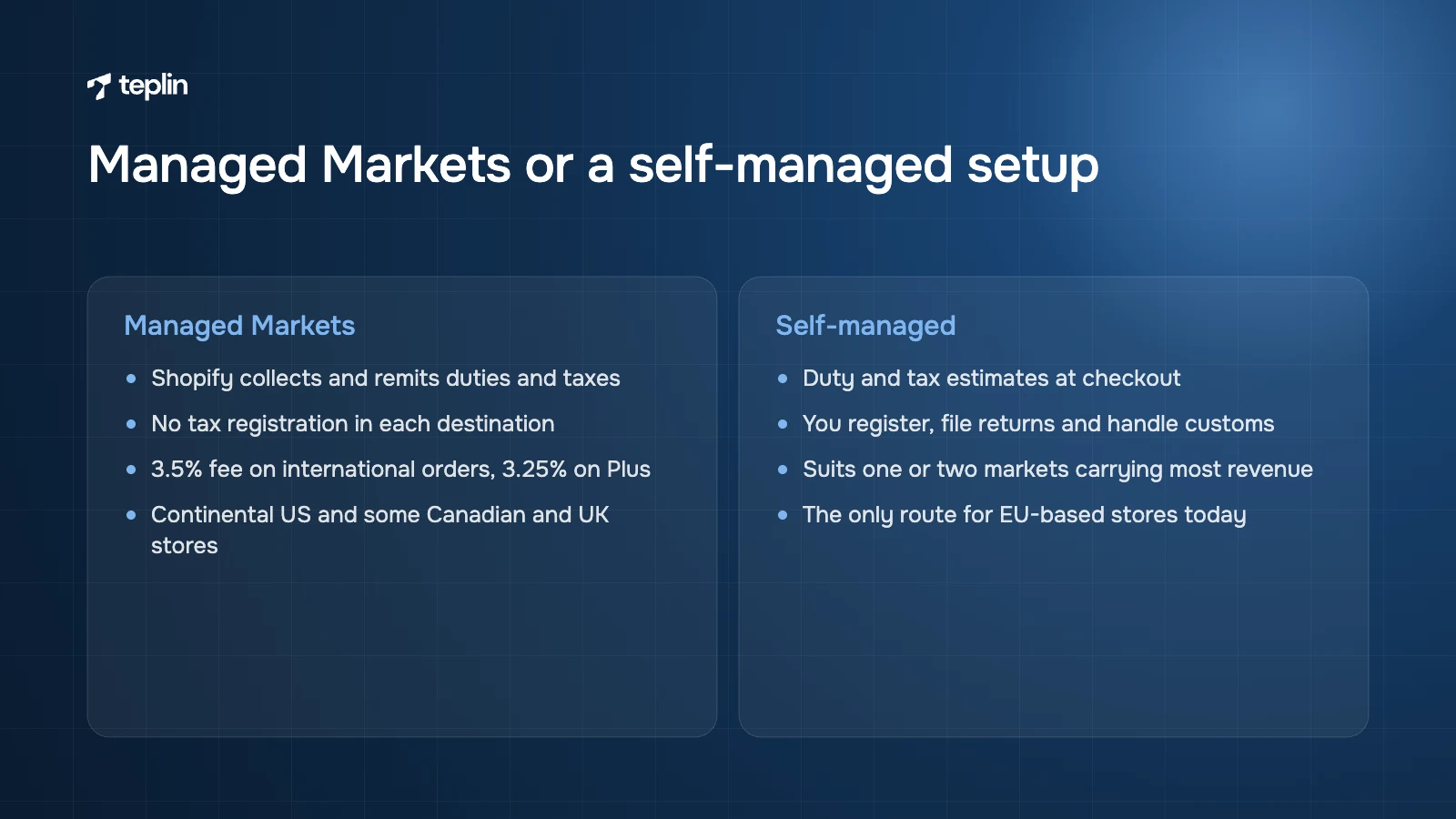
The standard international sales tools give you local currencies, languages, domains and duty and tax estimates at checkout powered by Avalara. You stay responsible for registering for taxes, filing returns and dealing with customs.
Managed Markets takes much more off your hands. Shopify calculates and collects duties and taxes at checkout, assigns HS codes automatically, remits duties and taxes on your behalf and removes the need to register for tax filing in each destination. If the amount owed changes after customs, Managed Markets covers the difference. It also manages product restrictions so you do not ship something a country prohibits, adds more local payment methods and supports refunds at the original conversion rate within 30 days.
Who can use Managed Markets
Plenty of guides skip this part. According to Shopify's Help Center, Managed Markets is available to businesses based in the continental United States and to certain stores in Canada and the United Kingdom. The store has to be on Basic or higher, run an online store and use Shopify Payments. Shopify says the service supports selling to 150+ regions and will expand to other regions, without giving a timeline.
So if your company and store are based in Spain, Germany, the Netherlands or elsewhere in the EU, you cannot switch it on today. Plan on a self-managed setup and treat any future availability as a bonus.
What Managed Markets costs
International orders through Managed Markets carry a 3.5% transaction fee on Basic, Grow and Advanced and 3.25% on Plus. Your normal Shopify Payments processing fees still apply, plus a currency conversion fee in line with your Shopify Payments rate. Global-e is the merchant of record, which means it legally sells to the international customer, handles tax remittance and commercial invoices and arranges carriers. The Global-e checkout disclaimer cannot be hidden or reworded, and a small number of destinations still ship delivered duty unpaid.
My rule of thumb for choosing
- Managed Markets usually makes sense
When you are an eligible US, Canadian or UK brand testing several countries at once, when your average order value is modest and one surprise duty bill would kill repeat purchases, or when nobody in the business knows customs. - Self-managed usually makes sense
When one or two markets will bring most of your international revenue, when you already hold or plan to register for VAT locally, when your margins cannot carry another 3.25–3.5%, or when you are EU-based and the choice is made for you. - The middle path I often suggest
Use Managed Markets to learn which countries respond, then bring the biggest one in-house with local registration and a fulfilment partner once volume justifies the admin.
Decide if a second store is worth it
Shopify's direction is clear. One store with several markets is meant to be the default, and most of the old reasons for separate country stores are now handled inside Markets.
There are still good reasons for expansion stores, and Shopify Plus is built for them. Plus includes your main store and 9 expansion stores in the monthly platform fee, additional stores cost $300 a month each, and a Plus contract covers one brand. Plus starts at $2,300 a month on a three-year term or $2,500 on a one-year term. If you are weighing that up, our breakdown of what Shopify Plus really costs in 2026 covers the full picture.
One store is probably enough when
- the catalogue is mostly the same everywhere;
- one team runs marketing and customer service for all countries;
- your key apps for reviews, subscriptions and loyalty work across markets.
An expansion store starts to earn its keep when
- Legal entities and accounting differ
If a US entity has to own US sales and a separate EU entity owns European sales, separate stores keep finance clean. Plus business entities can cover some of these cases inside one store, so check that option first. - Catalogues or product data differ a lot
When sizing, certifications, voltages or packaging differ enough that most products would need market-specific variants, a separate store is easier to run. - Country teams work independently
When a local team needs its own homepage, campaigns, discount calendar and app stack, sharing one admin creates constant collisions. - A critical app is not market-aware
Some subscription, loyalty and ERP integrations still assume one currency per store. If an app you cannot replace has that limit, a second store may be the pragmatic fix. - The brand needs a different face in the new country
Sometimes the market needs a different store experience rather than a translated copy of the existing one.
The subscription is rarely the expensive part of a second store. Duplicated apps, content operations, product syncing and split analytics cost far more over a year.
One of our own projects shows when the split is worth it. For Spa-Migo, a Canadian hot tub cover manufacturer, we redesigned the Canadian store and built a separate, localised US store for the American launch, with international SEO work so existing rankings were not lost. Sales tripled after the relaunch and bounce rate fell by 44%. The second store made sense because the US launch needed its own localised experience and go-to-market, not because Markets could not technically handle another currency.
Build the market hierarchy
Once you know how many stores you are running, design the structure inside each one. A submarket is a market inside another market. When you create one, it inherits the customisations of its parent by default, and you override only what needs to change.
In practice this gives you a tidy hierarchy. A "Europe" market can carry euro pricing and a shared catalogue, a "Switzerland" submarket overrides currency to CHF, and a "Germany" submarket overrides language and a handful of prices. Everything you do not override keeps following the parent.
I like this model because it forces a useful question for every setting. Is this actually different in this country, or are we copying it out of habit? The graph view in the admin shows which settings are inherited and which are customised. When we audit a setup someone else built, that view is the first screen I open.
Set currency and price rules
By default Shopify converts prices automatically at the current market exchange rate. You can set exchange rates manually if you prefer stable prices over exact conversion. You can also round converted prices per market, so a €39.37 product shows as €39.00 or €39.95 instead of an obviously converted number. I would always turn rounding on. Odd converted prices look foreign, and that is the opposite of what a localised market is for.
Conversion fees you will pay
Selling in a currency other than your payout currency costs a conversion fee. Shopify charges 1.5% for US-based stores and 2% for stores in other Shopify Payments regions, with 3% on PayPal wallet transactions processed through Shopify Payments in the US and France. The merchant pays this fee, and it is not returned when you refund an order. Build it into your margin model before you set prices.
Price adjustments and catalogues
Converted prices are only a starting point. Shopify lets you adjust prices per market with percentage-based adjustments and set specific product prices by country or region through catalogues. A catalogue is a set of products, with optional custom pricing, assigned to a market.
Catalogues also decide which products a market can see at all. That is how you hide a product that cannot ship to a country, or one that has a different SKU there.
A few catalogue features depend on your plan. On Basic, Grow and Advanced you can have up to 3 active catalogues across your B2B markets. Customising catalogues for retail markets requires POS Pro or Plus. Configuring business entities, which lets one store sell through different legal entities, requires Plus.
Choose a URL structure
Each market can have its own URL. Shopify supports three structures, and you can combine them:
- Subfolders
For example yourbrand.com/fr or yourbrand.com/de-at. They share authority with your primary domain, need no extra domain and are what Shopify recommends for most stores. - Subdomains
For example fr.yourbrand.com. Some search engines treat them as separate sites, and each needs its own DNS configuration. - Country-code domains
For example yourbrand.fr. Shopify describes them as the strongest local signal for a specific country, but each one is a separate domain to register and build authority for.
I recommend subfolders to almost everyone. A young market needs all the authority it can borrow, and a subfolder inherits it from day one.
Two details catch people out. Language-only subfolders such as /fr or /en can only exist on your primary market, so secondary markets need a language and country combination such as /fr-ca or /de-ch. And you cannot create international domains from your myshopify.com domain, so connect a real domain first.
What Shopify does for international SEO
Shopify generates hreflang tags automatically from your market and language configuration, and they are on by default. Tags are added only for markets with a distinct domain, subdomain or subfolder. Sitemaps are generated automatically, include all market-specific URLs and carry hreflang annotations. Each market version gets a self-referencing canonical. Automatic redirection based on location applies to customers but not to search engine crawlers, which is exactly the behaviour you want.
What you still have to do yourself
- Leave automatic hreflang switched on
Shopify warns that turning it off can hurt SEO. Only disable it if you have a tested alternative. - Translate handles and metadata
A German page with an English URL, title tag and meta description underperforms. Translate handles, titles, descriptions and image alt text as well as the body copy. - Research keywords per country
Search terms often differ even between countries that share a language, so a translated keyword is a guess until you check it. - Test any geolocation app
Shopify keeps crawlers out of automatic redirection. Third-party geolocation apps can undo that, so check how they treat bots. - Plan redirects before you change anything
Removing a market domain or subfolder returns 404 errors unless you set up redirects.
If you are consolidating separate country sites or arriving from another platform, URL mapping is where most international traffic gets lost, so give it its own line in the plan.
Translate and adapt the content
Languages are activated per market. Shopify's free Translate & Adapt app can auto-translate up to two languages, and you can add manual translations for as many languages as you need. For more than two machine-translated languages you will need a third-party translation app or a workflow outside Shopify.
The same app lets you adapt content between markets that share a language. Brands underestimate this. British and American English differ in spelling and sizing, and the Spanish written in Spain is not the Spanish written in Mexico.
Machine translation is good enough to launch and not good enough to scale. The weak spots are predictable: product names that should stay in the original, sizing and care instructions, legal pages, emails and anything that relies on wordplay. The rule we work to is simple. Machine-translate everything, then have a native speaker review the pages that carry revenue, such as the homepage, top product pages, cart, shipping and returns.
Check the places teams forget. Metafields, menus, notifications and app content are translated separately from theme text, and that is where English most often leaks into a German or French store.
Add the payment methods locals expect
Card-only checkout loses customers in countries where bank-based payments dominate. Shopify Payments supports a growing list of local methods, including:
- iDEAL | Wero in the Netherlands and Bancontact in Belgium;
- EPS in Austria (euros only);
- BLIK and Przelewy24 in Poland;
- MB WAY and Multibanco in Portugal, Bizum in Spain and Satispay in Italy;
- Swish in Sweden, TWINT in Switzerland and MobilePay in Denmark and Finland;
- Klarna across a range of European countries.
Each method appears only when the customer is in a supported country and pays in an eligible currency, and countries outside your business location must be set up as markets first. In May 2026 Shopify extended MobilePay, TWINT, BLIK and Przelewy24 to merchants in more countries, so a method that was unavailable to your store a year ago may be available now. Open your payment settings and check rather than relying on what was true at launch.
Cover the EU compliance basics
The EU is where DTC brands most often underestimate the admin. These are the rules I make sure every client has looked at before an EU launch. Treat this as a practical overview rather than legal or tax advice, and confirm your position with an adviser in your country.
VAT OSS for brands based in the EU
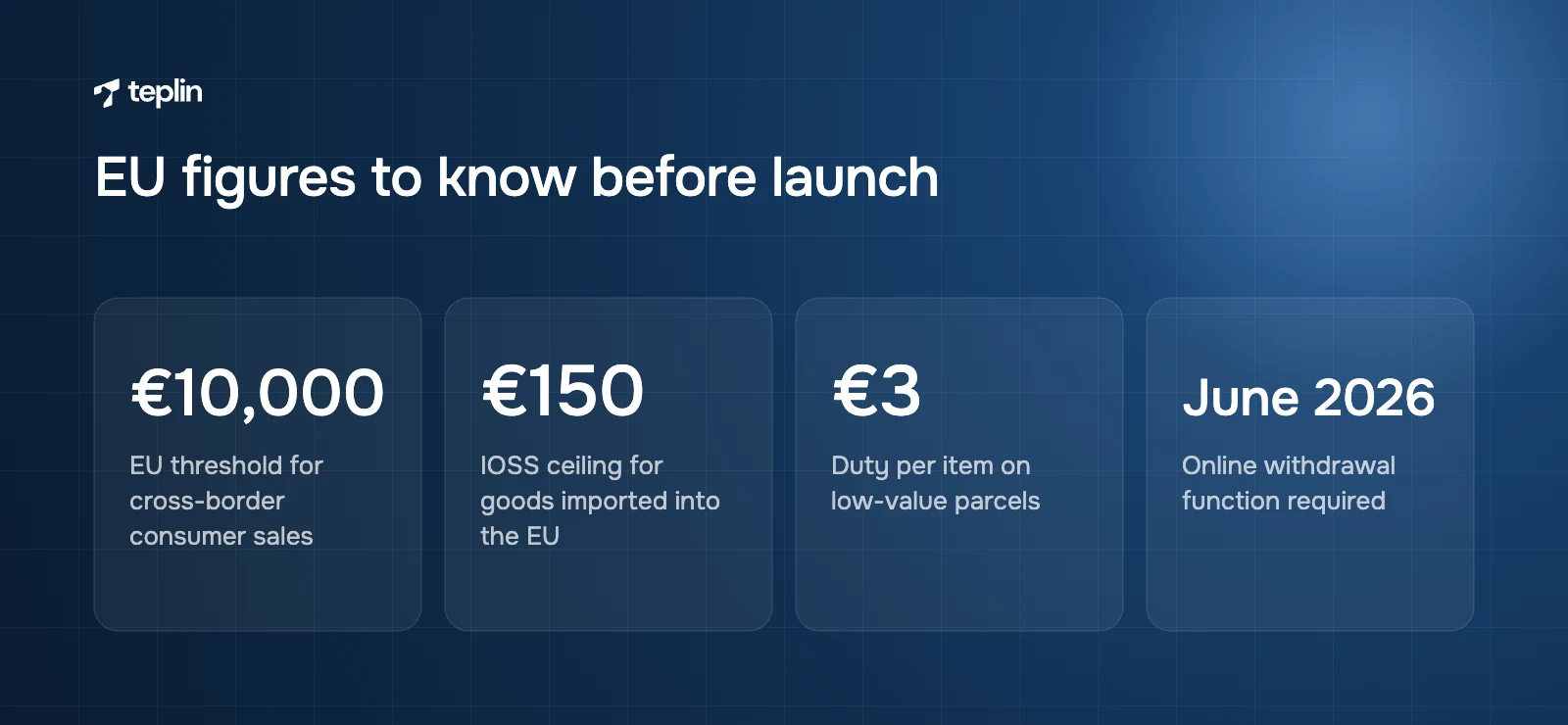
Since 1 July 2021 the EU has used an EU-wide threshold of €10,000 for cross-border sales to consumers in other member states. Below it, you can charge your home country's VAT. Above it, you charge the VAT rate of the customer's country. The One Stop Shop (OSS) lets you register once in your own member state and declare and pay that VAT for all EU countries in one return. Shopify can collect VAT at the right rate per country once you add your registrations in the tax settings, but filing stays your job unless you use a tax service.
IOSS for brands shipping in from outside the EU
For UK, US, Canadian and other non-EU brands, the Import One Stop Shop (IOSS) covers distance sales of goods worth up to €150 imported into the EU. With IOSS you charge EU VAT at checkout and the parcel clears customs without the customer paying VAT on delivery. Without it, the carrier usually collects VAT plus a handling fee at the door. In my experience that is one of the most reliable ways to generate refused parcels and chargebacks.
The new €3 duty on low-value parcels
Until this summer, goods worth up to €150 entered the EU without customs duty, although VAT still applied. From 1 July 2026 the EU introduced a temporary €3 customs duty on low-value parcels imported from outside the EU. According to the European Commission, the duty applies per item based on tariff classification rather than quantity. Five T-shirts in one parcel count as one item and incur €3, while three T-shirts and a watch fall under two classifications and incur €6. The seller or importer declares and pays it as part of the customs process.
The Commission describes the measure as temporary, and its FAQ indicates it runs until 1 July 2028 while the wider customs reform is completed. Check the Commission's pages for updates. If you ship from the UK or US, add the duty to your landed cost model and show it at checkout. Managed Markets handles this for eligible stores, and everyone else should review duty estimates and shipping rates.
The online withdrawal button
Directive (EU) 2023/2673 added a new rule to EU consumer law. For contracts concluded online, traders must provide a withdrawal function labelled "withdraw from contract here" or an unambiguous equivalent, followed by a confirmation step labelled "confirm withdrawal" or similar. After the customer confirms, you must send an acknowledgement on a durable medium, such as an email, with the content and the date and time of the withdrawal. Member states had to apply these rules from 19 June 2026.
Do not assume your theme already does this. Check if your theme, returns app or legal app provides a compliant flow, and test it in each EU language you sell in.
Product safety information under GPSR
The General Product Safety Regulation (EU) 2023/988 has applied since 13 December 2024. For online sales, every product offer must clearly show the manufacturer's name and postal and electronic address, the name and address of an EU responsible person if the manufacturer is outside the EU, details that identify the product including a picture and type, and any warnings or safety information in a language consumers in that country can easily understand. On Shopify we usually solve this with metafields rendered on the product page and translated per market.
Accessibility
The European Accessibility Act (Directive (EU) 2019/882) has applied to ecommerce services since 28 June 2025, with an exemption for microenterprises. If you sell to EU consumers, the accessibility of your storefront and checkout flow is a compliance question now, on top of being good practice.
Show shipping and returns honestly
Customers compare your delivery promise with local competitors, not with your home market. A two-day promise in the UK means little to a shopper in Lyon who can get the competing product tomorrow.
Show delivery times and any duties on product pages and in the cart rather than revealing them at the last checkout step. Offer a local returns address or a prepaid label where you can. These two changes are often worth more than another round of translation polishing.
Test as a customer and then measure
Before launch, place real test orders from each market. Use a local address, pay with a local method, then process a refund and a withdrawal. Most problems found at this stage are small, such as an untranslated email or a payment method missing because the currency was wrong.
After launch, track conversion rate, average order value and refund rate per market for the first 90 days. Compare each new market with your home market, and give it time. A new country rarely converts like home in month one.
Pre-launch checklist for a new market
- Countries chosen
One or two markets picked from traffic, orders and shipping cost. - Tax model agreed
Managed Markets eligibility checked, or OSS or IOSS in place, with duty estimates updated for the 2026 EU rules. - Store structure decided
One store with Markets unless an entity, catalogue or team reason says otherwise. - Hierarchy built
Parent markets and submarkets set up so only real differences are overridden. - Prices ready
Exchange rate handling, rounding and catalogues configured, with conversion fees in the margin model. - URLs live
Subfolders created and hreflang tags and sitemaps confirmed. - Content localised
Native review of revenue pages, legal pages, notifications and metafields done. - Payments enabled
Local methods switched on and tested. - Compliance covered
GPSR product information, the withdrawal function and localised legal pages in place. - Test orders placed
Orders, refunds and withdrawals tested from every market.
Frequently asked questions
Is Shopify Markets free?
Markets itself is included on Basic, Grow, Advanced and Plus. The costs come from transactions: a currency conversion fee of 1.5% for US-based stores and 2% in other Shopify Payments regions when you sell in another currency, and a 3.5% fee (3.25% on Plus) on international orders if you use Managed Markets.
Can a store based in the EU use Shopify Managed Markets?
Not at the time of writing. Shopify lists Managed Markets as available to businesses based in the continental US and certain stores in Canada and the UK. EU-based stores use the standard international sales tools and handle VAT and customs themselves or through a tax partner.
How many languages can Shopify translate for free?
Translate & Adapt can auto-translate up to two languages for free, and you can add manual translations for as many languages as you like. For more machine-translated languages, brands usually add a third-party translation app.
Does Shopify Markets handle hreflang automatically?
Yes. Shopify generates hreflang tags from your market and language settings and includes them in the automatic sitemaps. They are added only for markets with their own domain, subdomain or subfolder, so a market without its own URL will not get them.
Do I need a separate Shopify store for the US and Europe?
Usually not. One store with markets handles currencies, languages, local pricing and domains. A separate store makes sense when you have different legal entities, very different catalogues, independent country teams or a critical app that cannot handle multiple markets.
How does the EU €3 customs duty affect my store?
If you ship parcels worth up to €150 into the EU from outside the EU, each item in a different tariff classification carries a €3 customs duty, applied since 1 July 2026. Include it in landed cost and show it at checkout. EU-based brands shipping within the EU are not affected.
Talk to us before you switch the next country on
Markets has removed most of the technical pain from international expansion. What is left are decisions about which countries come first, who carries the tax admin, how many stores you run and how much localisation each market deserves. Our Shopify development team sets up markets, translations, local payments and international SEO, and our Shopify Plus specialists handle expansion stores and multi-entity setups. If you send me the list of countries you have in mind, I will tell you honestly what each one involves.
Sources
- Shopify Help Center – Getting started with markets
- Shopify Help Center – Overview of markets features and concepts
- Shopify Help Center – Pricing in local currencies
- Shopify Help Center – Currency conversion fees
- Shopify Help Center – International domains
- Shopify Help Center – International SEO for markets
- Shopify Help Center – Comparing international sales tools and Managed Markets
- Shopify Help Center – Overview of Managed Markets
- Shopify – Managed Markets
- Shopify Help Center – Local payment methods
- Shopify Changelog – Local payment methods available in more countries (May 2026)
- Shopify App Store – Translate & Adapt
- Shopify – Pricing
- Shopify Plus – Pricing
- European Commission – €3 customs duty on low-value parcels (June 2026)
- European Commission – VAT One Stop Shop (OSS and IOSS)
- EUR-Lex – Directive (EU) 2023/2673 (withdrawal function)
- EUR-Lex – Regulation (EU) 2023/988 on general product safety
- EUR-Lex – Directive (EU) 2019/882 (European Accessibility Act)
- Teplin – Spa-Migo case study

Get a free Shopify store audit

.webp)
Stay ahead of the curve

More from our resources
Is Shopify Plus Worth $2,300 a Month? Here Is the Real Bill


Ecommerce insights, straight to your inbox


10:33

10:33

16:33