

Book an intro call

Leaving Magento, Shopware or PrestaShop for Shopify


Adobe Commerce 2.4.6 left standard support on 11 August 2026. Shopware 5 has had no scheduled security fixes since the end of July 2024. PrestaShop 1.7 stopped being maintained when PrestaShop 9.0.0 shipped on 10 June 2025. If your store runs on any of these, the upgrade you are being quoted is a rebuild in all but name, and once a brand accepts it has to rebuild anyway, Shopify becomes a fair comparison rather than a leap.
I am a project manager at Teplin, and replatforming projects from these systems are a large part of what I run day to day. This guide is the field version: for each platform, why brands leave, how the data lands in Shopify, which URL patterns need redirects and what happens to extensions. After that come the European details that single-market guides skip (VAT, languages, currencies and B2B), a plan you can work through and a short FAQ. Find your platform below and read that section first.
The real reason brands leave open-source platforms
Features are rarely the trigger. Total cost of ownership is: hosting, security patching, major version upgrades, extension compatibility and the developer hours needed to keep it all running. On Shopify, hosting, security and platform updates are part of the subscription. The money that went into keeping the lights on can go into design, conversion and marketing instead.
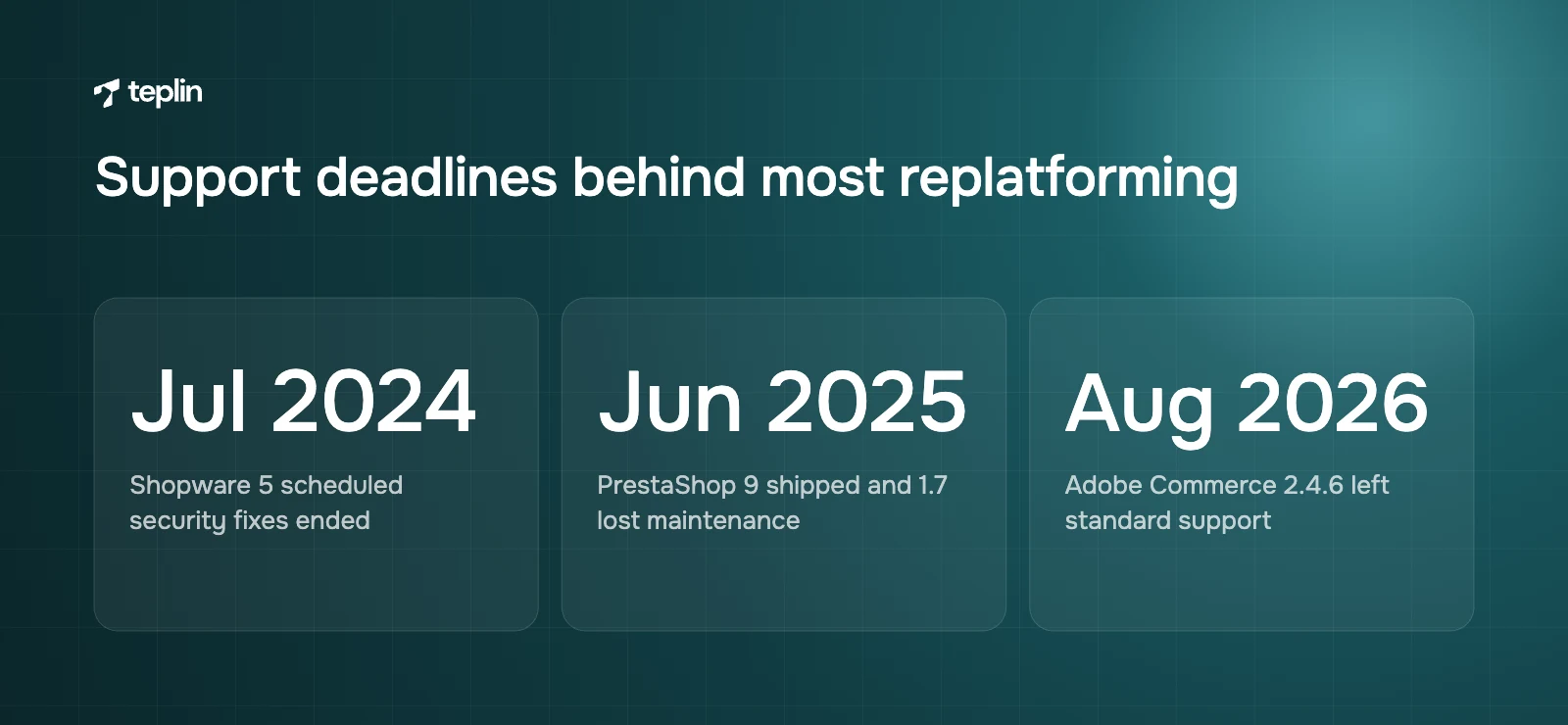
The second reason is timing. Each of these platforms has had a major version change or end-of-life event in the last few years. A forced upgrade means rebuilding the theme, re-testing every extension and re-checking integrations, which is most of the work of a migration anyway.
Magento and Adobe Commerce
Magento stores are usually the most complex of the group because Magento lets developers change almost anything. In my experience the single most valuable step is an honest audit of what the store actually uses, as opposed to what is installed.
The most valuable step on a Magento project is an honest audit of what the store actually uses, as opposed to what is installed.
The support calendar
Adobe publishes a lifecycle policy with fixed support windows for each Adobe Commerce 2.4.x release:
- Adobe Commerce 2.4.5
End of standard support on 12 August 2025. - Adobe Commerce 2.4.6
End of standard support on 11 August 2026. - Adobe Commerce 2.4.7
End of standard support on 31 May 2027. - Adobe Commerce 2.4.8
End of standard support on 31 May 2028. - Adobe Commerce 2.4.9
Released on 12 May 2026, with standard support until 31 May 2029.
Magento Open Source follows the same 2.4.x release line, so self-hosted merchants face a similar rhythm. In practice that means a meaningful upgrade project every two to three years, plus regular security patches, on top of hosting, caching, search infrastructure and extension updates. Stores on 2.4.6 or older are now outside standard support.
Where Magento data lands
- Simple products
Map directly to Shopify products with a single variant. - Configurable products
Become one Shopify product with variants, and the configurable attributes become options. Shopify allows up to three options and up to 2,048 variants per product, a limit that applies to every plan since October 2025. A product with four or more configurable attributes needs a decision: merge two attributes into one option, split the product, or use an app. - Attribute sets and custom attributes
Non-variant attributes such as material, fit or care instructions become metafields, which a compatible theme can display without code. - Bundle and grouped products
Have no exact native equivalent. We usually rebuild them with Shopify's bundle features or an app, or simplify them into separate products with cross-selling. - Categories
Become collections. Deep category trees are usually flattened, with menus and filters doing the work nested categories did. - Customer groups
Retail groups map to customer tags and segments. Wholesale groups with special pricing map to Shopify B2B companies, locations and catalogues. - Tier prices
Map to B2B quantity rules and price breaks for trade customers, or to discount logic for retail. - CMS pages and blocks
Pages become Shopify pages. Reusable blocks are rebuilt as theme sections or metaobjects so editors can manage them in the theme editor. - Websites, stores and store views
Store views for languages and currencies map to Shopify Markets and published languages on one store. Separate websites with different catalogues or brands may need Shopify Plus expansion stores. Plus includes the main store and nine expansion stores.
Magento redirect patterns
Magento URLs often end in .html and may carry the category path, for example /women/dresses/linen-midi-dress.html. On Shopify the same product lives at /products/linen-midi-dress, and the category becomes /collections/dresses. The redirect groups I plan for on every Magento project are:
- product URLs with and without category paths, since Magento can serve one product at several URLs;
- category URLs at every level of the tree;
- CMS pages, which move to /pages/;
- blog posts from extensions, which move under /blogs/ with the blog name and article name in the path;
- store view prefixes such as /de/ or /fr/, mapped to the matching Shopify language URLs.
Shopify allows up to 100,000 redirects on standard plans and up to 20 million on Plus, which covers even large Magento catalogues with several store views.
What happens to Magento extensions
List every installed extension and sort it into one of four groups: built into Shopify, replaced by an app, rebuilt as custom code or a Shopify Function, or retired. Many Magento stores run dozens of extensions, and a fair share usually turns out to be unused, duplicated or already covered by Shopify features such as native filtering, discounts, B2B and Flow. Custom checkout logic needs the most care. On Shopify it is built with Checkout Extensibility and Shopify Functions, which our guide on replacing Scripts with Shopify Functions explains.
Shopware
Shopware is especially common in Germany, Austria and Switzerland. Many Shopware stores I see were built by agencies that are no longer involved, so the first weeks of the project are often archaeology: finding out which plugins and customisations exist and what they do.
The version problem
Shopware's own documentation states that Shopware 5 development was completely discontinued at the end of July 2024, with no more scheduled security fixes after that date. Its update guide also makes clear that there is no major update from Shopware 5 to Shopware 6. A migration is required because Shopware 6 is built on a different technical framework, which in practice means rebuilding the theme and replacing plugins regardless. For brands still on Shopware 5, Shopify is therefore an alternative to a rebuild they cannot avoid. Brands on Shopware 6 tend to leave for the same total-cost reasons as Magento merchants.
Where Shopware data lands
- Products with variants
Variants built from properties such as size and colour map to Shopify variants and options, within the limit of three options and 2,048 variants per product. - Properties and custom fields
Become metafields, which can also power Shopify's storefront filters. - Categories
Become collections, with menus rebuilding the navigation tree. - Customer groups
Map to customer segments for retail, or to B2B companies and catalogues for trade customers on net prices. - Shopping Experiences and CMS content
Layouts are rebuilt as theme templates and sections. Text and media can be migrated, but the layouts themselves cannot be imported. - Sales channels
Several sales channels for different countries usually map to Shopify Markets. Separate brands or very different catalogues may need Plus expansion stores.
Shopware redirect patterns
Shopware generates SEO URLs from configurable templates, so two Shopware stores can have very different URL structures. Do not assume a pattern. Export the full list of SEO URLs from the database or crawl the live site, and include technical fallback URLs such as /detail/ and /navigation/ paths that may still be linked or indexed. Then map each one to its new /products/ or /collections/ URL.
What happens to Shopware plugins
Typical Shopware plugins cover payment providers, ERP connectors, B2B features, product configurators and legal texts. Payments and legal needs are usually handled by Shopify Payments, local payment methods and policy pages. ERP connectors usually have Shopify equivalents, and B2B suites can often be replaced by native Shopify B2B. Configurators are the most likely candidates for custom development, so I flag them early in the estimate.
PrestaShop
PrestaShop is widely used in France, Spain, Italy and Poland, often by brands that started small and grew into a heavily customised store with many modules.
The version problem
PrestaShop announced in January 2023 that the 1.7.8 branch had entered a security-only phase and that this maintenance would end when PrestaShop 9.0.0 was released. PrestaShop 9 became available on 10 June 2025, so stores still on 1.7 are now running an unmaintained version. Moving from 1.7 to 8 or 9 is a significant project, mainly because themes and modules need to be compatible with the new version. As with Shopware 5, brands facing that work often price it against a move to Shopify.
Where PrestaShop data lands
- Products with combinations
Combinations map to Shopify variants, and attribute groups map to options. Products using more than three attribute groups need restructuring before import. - Features
Product features such as composition or dimensions become metafields. - Categories
Become collections, with menus rebuilding the hierarchy. - Customer groups and specific prices
Map to customer segments and discounts for retail, or to B2B catalogues and price breaks for professional customers. - CMS pages
Become Shopify pages, with module-based content rebuilt as theme sections. - Multistore
Country or language shops map to Shopify Markets and languages. Separate brands map to Plus expansion stores or separate Shopify stores.
PrestaShop redirect patterns
Default PrestaShop URLs usually include numeric IDs, such as /12-dresses for a category or /dresses/34-linen-midi-dress.html for a product, and multilingual stores add a language prefix such as /fr/ or /es/. Because the ID is part of the path, you cannot build the new URLs by stripping a prefix. Generate the redirect list from your export, match each product ID to its new Shopify handle, and send each language version to the matching Shopify language URL.
What happens to PrestaShop modules
PrestaShop stores often rely on modules for layered filtering, reviews, loyalty, carriers and marketplace feeds. Shopify covers filtering natively, and reviews, loyalty and feeds are mature app categories. Carrier modules are replaced by Shopify shipping settings, carrier-calculated rates or a shipping app, depending on your plan and carriers.
A short note on WooCommerce
WooCommerce is the simplest of the four to move. Shopify's free Store Migration app lists WooCommerce as a supported source for products and customers, and third-party tools cover orders and other data.
- Variable products
Map to Shopify products with variants, and variation attributes become options. - Global attributes
Non-variant attributes become metafields. - URLs
/product/ URLs move to /products/, /product-category/ URLs to /collections/ and WordPress posts to /blogs/. - Plugins
Subscriptions, memberships and page builders need the most planning. Content-heavy WordPress sites should also decide whether the blog moves to Shopify or stays on WordPress.
European details that decide the setup
European stores usually sell in several countries, languages and currencies at once. Most of that maps well to Shopify, but the setup has to be deliberate, and these four topics come up on almost every project I manage.
1. VAT and the One Stop Shop
Since 1 July 2021 the EU's €10,000 annual threshold for intra-EU distance sales of goods decides if you charge your home country's VAT or the customer's, and the One Stop Shop (OSS) lets you declare VAT due in other member states through one registration. On Shopify you can collect VAT using an OSS registration, but only if your store uses Shopify Tax or Basic Tax. Shopify notes that Basic Tax is only available in the EU to stores set up to collect tax there before 13 May 2026, so a newly migrated store will normally use Shopify Tax or manual settings. Shopify charges the tax but does not file or remit it, so your accountant's OSS process stays exactly where it is.
2. Languages and translations
When you publish a language on Shopify, each translated page gets its own URL with the language code, such as yourbrand.com/fr and yourbrand.com/de. Translations can be added with Shopify's Translate & Adapt app, by CSV or with compatible third-party apps, and product handles can be translated as well. Export your existing translations from Magento store views or Shopware and PrestaShop language versions so you can import them. Retranslating from scratch costs money and loses wording that already ranks.
3. Markets and currencies
Shopify Markets sets currency, language, product availability and pricing per market, and submarkets inherit their parent's settings. That covers most of what Magento store views or PrestaShop multistore were used for. Brands that want Shopify to calculate, collect and remit duties and import taxes on international orders can look at Managed Markets. Our guide to selling abroad with Shopify Markets goes through the options.
4. B2B and trade customers
Many European merchants run B2B on the same platform as retail. Shopify B2B is available on Basic, Grow, Advanced and Plus, with up to three active B2B catalogues on non-Plus plans and unlimited catalogues on Plus. Catalogues assigned directly to specific companies are a Plus feature, and for Magento and Shopware merchants with customer-specific pricing that is often what decides the plan.
Shopify compared with Magento for a European brand
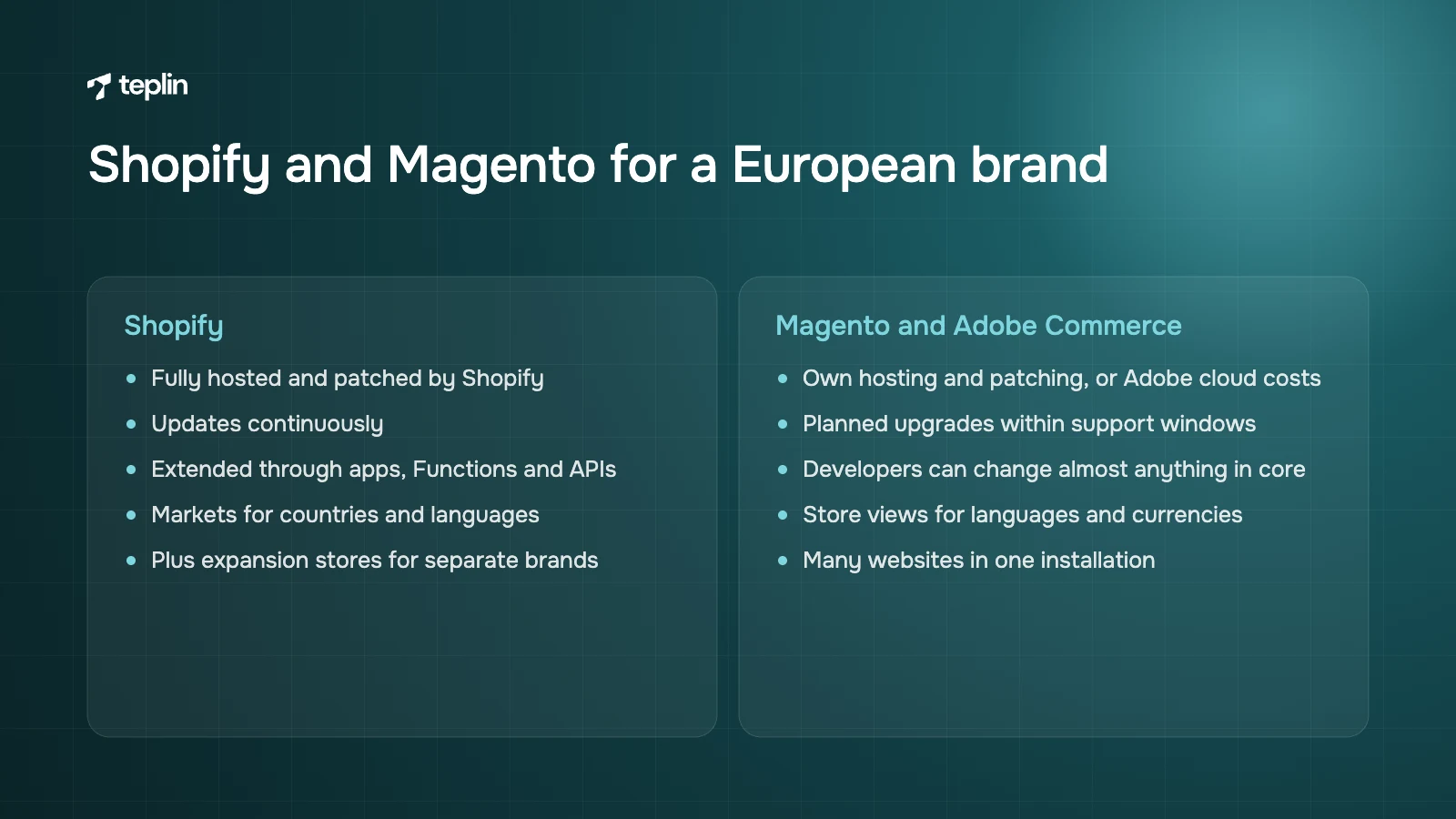
For most DTC and mid-market brands, Shopify wins on total cost of ownership and speed of change, while Magento and Adobe Commerce still win on unlimited backend customisation.
- Hosting and security
Shopify is fully hosted and patched by Shopify. Magento Open Source needs your own hosting and patching, and Adobe Commerce has its own licensing and cloud costs. - Upgrades
Shopify updates continuously. Magento requires planned version upgrades within Adobe's support windows. - Customisation
Magento lets developers change almost anything in the core. Shopify is extended through apps, Functions, metafields and APIs, which is more constrained and far more stable. - Catalogue complexity
The 2,048-variant limit and metafields cover most catalogues. Very complex configurators or products with many independent options still need extra work. - Multi-store
Magento runs many websites in one installation. Shopify uses Markets for countries and languages, and Plus expansion stores for separate brands or catalogues.
The plan I work through on every migration
- Audit the current store
Export data, crawl every URL, list every extension, plugin, module and integration, and record traffic and conversion baselines. - Decide what to keep
Retire unused features, decide how much order history to import and agree which customisations are essential. - Design the Shopify data model
Map product types, options, variants, metafields, collections, customer segments, B2B companies and markets. - Clean the source data
Fix duplicated SKUs, inconsistent option values, missing translations and broken image links. - Build the redirect map
Map every product, category, CMS and language URL to its Shopify equivalent. - Build the storefront
Build the theme, configure Markets and languages, and set up taxes, shipping and payments for each country. - Replace extensions and integrations
Install apps, build Functions or custom apps, and reconnect ERP, PIM, 3PL and marketing tools. - Run test imports
Import products, then customers, then orders into a development store at least twice and reconcile the results. - Rebuild tracking
Set up app and custom pixels under Customer events, connect consent management and test purchase events. - Launch and monitor
Place test orders in every market and currency, run the final delta import, switch the domain, upload redirects and check orders, 404s and indexing daily for the first weeks.
On timing, I usually ask clients to freeze major catalogue changes for the final weeks before launch. Every product added in the old system after the last test import has to be caught by the delta import, and a quiet catalogue makes that check far easier to trust.
Steps four and five are where I would put your most careful person. Data cleaning and redirect mapping are unglamorous, and they are also where most lost revenue after a migration comes from. Our article on what a Shopify migration costs and how long it takes adds a week-by-week timeline and a 30-day monitoring plan to go with this list.
Frequently asked questions
Is Shopify better than Magento?
For most DTC and mid-market brands, Shopify is cheaper to run and quicker to change because hosting, security and upgrades are included. Magento and Adobe Commerce remain stronger when a business needs deep custom backend logic. The honest answer depends on how much of your Magento customisation you actually use.
How long does a Magento to Shopify migration take?
A small Magento store can move in six to eight weeks, while a mid-market store with integrations usually takes three to four months. Adobe Commerce stores with several websites, B2B and ERP integrations often take four to nine months. Data cleaning and extension replacement are the biggest variables.
Is there an official tool to migrate from Shopware or PrestaShop?
Shopify's free Store Migration app does not currently list Shopware, PrestaShop or Magento as sources. Migrations from these platforms are usually done with third-party apps, CSV exports or custom API scripts, plus manual work for content and layouts.
Will my multi-language store keep its SEO?
It can, if each language version of every URL redirects to the matching Shopify language URL and translations are imported rather than recreated. Shopify gives each published language its own URLs, which supports hreflang for international SEO.
Do I need Shopify Plus to migrate from Adobe Commerce?
Not always. Many Adobe Commerce stores fit on Advanced or Grow. Plus becomes necessary when you need expansion stores for several brands, company-specific B2B catalogues, more than 100,000 redirects or deeper checkout customisation.
Get a second pair of eyes on your audit
If you are weighing an upgrade against a move, a short look at your data model, extensions and URLs usually makes the choice obvious. Our Shopify migration team handles moves from Magento, Shopware and PrestaShop. Send me your current platform version and a rough extension count, and I will tell you what the move would involve.
Sources
- Adobe Experience League – Adobe Commerce lifecycle policy
- Shopware Documentation – Shopware 5 End of Life
- Shopware Documentation – Update guide Shopware 6
- PrestaShop Project – PrestaShop 1.7.8 is now in the extended support phase
- PrestaShop Project – PrestaShop 9.0 release announcements
- Shopify Help Center – Adding variants
- Shopify.dev Changelog – The product variant limit is now 2,048 for all merchants
- Shopify Help Center – Metafields
- Shopify Help Center – B2B features by plan
- Shopify Help Center – Getting started with Shopify Markets
- Shopify Help Center – Managed Markets compared
- Shopify Help Center – Managing languages
- Shopify Help Center – Setting up EU taxes
- Shopify Help Center – Taxes in the European Union
- Shopify Help Center – URL redirects
- Shopify Help Center – Managing custom pixels
- Shopify App Store – Shopify Store Migration
- Shopify – Shopify Plus pricing
- European Commission – VAT One Stop Shop

Get a free Shopify store audit

.webp)
Stay ahead of the curve

More from our resources
Is Shopify Plus Worth $2,300 a Month? Here Is the Real Bill



Ecommerce insights, straight to your inbox


10:33

10:33

16:33