

Book an intro call

Shopify Scripts Have Stopped Running. Now What?


On 30 June 2026 Shopify switched off every Script still running on a Plus store. There was no grace period and no fallback. Tiered discounts, hidden shipping rates and payment rules that had not been rebuilt simply stopped applying. Some stores spotted it within hours, because a "free gift over £100" promotion vanished from checkout. Others are still finding quieter gaps months later, like a cash-on-delivery option that used to be hidden for international orders and has quietly come back.
I manage Shopify Plus projects at Teplin, so I come at this from the scoping and testing side. This article is a walkthrough in the order I would run it. It starts with recovering what your Scripts actually did, then maps each rule to the right Shopify Functions API, covers the plan restrictions and technical limits that cause most production bugs, deals with the visual and tracking pieces that are easy to forget, and ends with a testing routine. If your Scripts were migrated before the deadline, the same steps work as an audit of what was rebuilt.
Do these three things first
- Export the Scripts customisations report
It lists every Script that was active, with its source code, and it is the only reliable record of the rules your store used to apply. - Check your top three revenue rules by hand
Place test orders for your biggest discount, your main shipping rule and any payment restriction, and note which ones no longer behave as they did. - Look for the visible and tracking pieces
Banners, gift selectors and Thank you page tracking that sat alongside Scripts may have broken at the same time.
What changed and when
Shopify Scripts were small Ruby programs, available only on Shopify Plus, that ran on Shopify's servers during cart and checkout. Merchants used them for three jobs. Line item Scripts changed prices for discounts, bundles and gifts. Shipping Scripts hid, renamed, reordered or discounted rates. Payment Scripts hid or reordered gateways.
Shopify confirmed the final timeline in its developer changelog. From 15 April 2026, merchants could no longer edit or publish Scripts. On 30 June 2026, all Shopify Scripts stopped executing. Shopify's Help Center confirms that Scripts still published at that point were deactivated and no longer work.
The replacement is Shopify Functions, part of the checkout extensibility platform that also replaced checkout.liquid. If you went through the checkout.liquid upgrade on Plus (the deadline for the Information, Shipping and Payment pages was 13 August 2024), the end of Scripts is the second half of the same project. Shopify wants every checkout customisation to run through apps, extensions and functions that it can keep upgrade-safe and fast.
Functions work differently from Scripts
Scripts were powerful but awkward to manage. They were written in a restricted Ruby dialect inside a browser editor, had no version control, and could only be tested by publishing them or using the Script Editor preview. Functions are compiled to WebAssembly, deployed inside apps with the Shopify CLI, kept in Git like any other code, and configured by merchants in the admin. Shopify's Help Center states that functions execute in under 5 milliseconds, which matters at peak trading, when a slow Script could hold up checkout.
Distribution is the other big shift. A Script lived on one store. A function lives inside an app, so a developer can build a discount type once and any merchant can install it. That is why so many common Script use cases are now covered by off-the-shelf apps, and why the first question on every rule should be whether an app already does it.
Step one is recovering what your Scripts did
Shopify generates a Scripts customisations report in the admin, under Apps, then Script Editor, then the Replace Shopify Scripts banner. It groups Scripts into Payment gateways, Shipping and Product discounts, lists each Script's name, description and source files, and suggests apps or Functions tutorials. It can be exported as a CSV. If nobody exported it before 30 June, do it now, before people's memory of the old rules fades any further.
Then I turn every Script into something a non-developer can sign off.
- Keep every source file
Save the Ruby source of every Script, including ones you think were unused. Comments in old code often reveal business rules nobody remembers agreeing to. - Write each rule in plain English
For example, "Wholesale-tagged customers get 30% off all products except the Gift Card collection, and the discount does not combine with codes." That sentence becomes the acceptance test later. - Name an owner and a value
Ask who relies on each rule and what it is worth. Rules nobody can explain are candidates for retirement rather than rebuilding.
If the Scripts have already stopped and you are working backwards, use whatever evidence you still have. Old order exports show which discounts were applied and at what values. Support tickets from July 2026 onwards often point straight at a rule that disappeared. Screenshots of the old checkout, if anyone kept them, show which shipping rates and payment methods used to appear for which customers. None of this replaces the source code, but together it is usually enough to rebuild the plain-English list.
Step two is mapping each rule to a Function API
Line item Scripts become Discount Functions or Cart Transform Functions. Shipping Scripts become Delivery Customization Functions, with the Discount Function API handling any shipping discounts. Payment Scripts become Payment Customization Functions. Logic that Scripts could only fake now has its own Cart and Checkout Validation API. The detail below is based on the current Function APIs reference on shopify.dev.
Line item rules
- Discount Function API
Covers tiered discounts, buy X get Y, spend thresholds, customer-tag pricing and VIP discounts. One discount function can now apply product, order and shipping discounts together, using product, order and delivery discount candidate targets. - Cart Transform API
Covers bundle logic and price overrides. It can merge several lines into one bundle line (linesMerge), expand a bundle into its components (lineExpand), or update a line's price, title or image (lineUpdate). - A restriction worth knowing early
The lineUpdate operation only works on Shopify Plus or development stores, and each app can install at most one cart transform function per store.
The older Product Discount and Order Discount Function APIs are now labelled legacy in the documentation, and their delivery group input is always empty. Any new build that touches shipping discounts should use the unified Discount Function API. A store can have at most 25 active discount functions. They all run at the same time and know nothing about each other, so stacking is controlled by the combination settings on each discount. In a single Script, code order decided that. This is the change that catches the most teams out.
Shipping rules
- Delivery Customization API
Covers Scripts that hid, renamed or reordered shipping rates, such as hiding express delivery for heavy items or adding a message to a rate name. Up to 25 delivery customisation functions can be active per store. - Discount Function API for shipping discounts
Delivery customisation does not change prices. If a Script reduced shipping costs, for example free express shipping for VIPs, that logic moves to a discount function using the delivery discount target. - Pickup and local delivery generators
Local pickup and pickup point delivery option generators let apps create pickup options and charges. Some were marked unstable in the API reference at the time of writing, so check their status before depending on them.
Payment rules
- Payment Customization API
Covers Scripts that hid, renamed or reordered payment gateways, such as hiding cash on delivery above a cart value or for certain countries. Up to 25 payment customisation functions can be active per store. - Capabilities Scripts never had
The same API can set payment terms (fixed, net or event-based, with optional deposits) and add a review requirement so B2B orders are submitted as drafts for approval.
Rules Scripts handled badly
- Cart and Checkout Validation API
Blocks checkout when a rule is broken, such as a maximum quantity per customer, a restricted destination or a minimum order value. It also runs on express checkouts like Shop Pay, Apple Pay, Google Pay and PayPal, which theme-based workarounds never covered. Up to 25 validation functions can be active per store. - Fulfillment Constraints API
Controls how items are grouped into fulfilments, for example keeping certain products shipping from one location. - Order Routing Location Rule API
Sets which locations get priority when Shopify routes an order, which helps multi-warehouse brands.
Step three is choosing between an app and custom code
If a Script did something common, such as tiered pricing, gift with purchase, a free shipping threshold or hiding a gateway by country, I would look for an App Store app first. Custom function apps make sense when the logic depends on your own data, combines several conditions no app supports, or is a genuine competitive feature you would rather not rent.
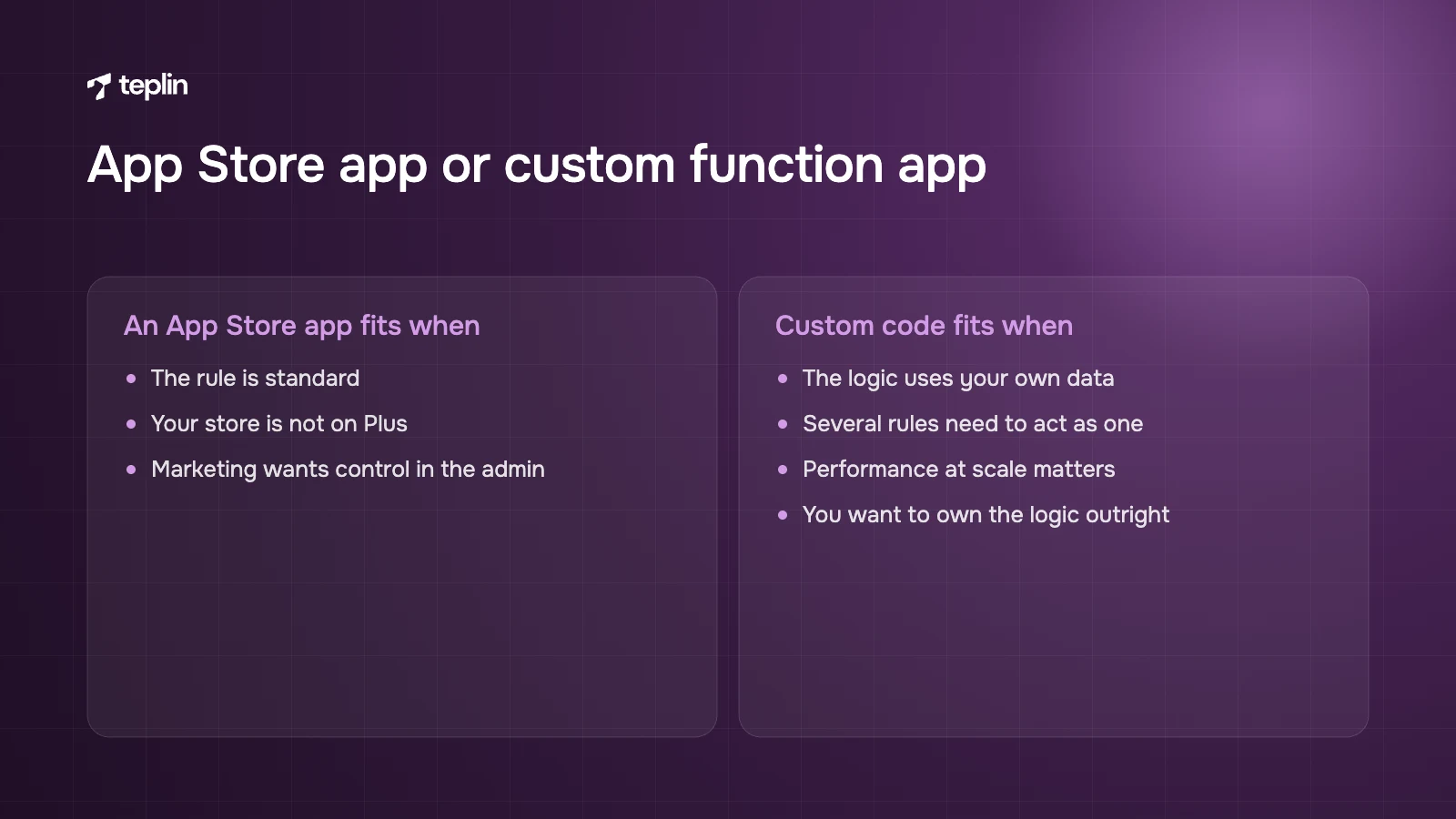
My rule of thumb is that most simple Scripts belong in an app, and only a small number of business-critical rules justify custom code. That is a healthy outcome. Nobody wins anything for rebuilding a free shipping banner from scratch.
An App Store app is usually right when
- The rule is standard
Volume discounts, bundles, BOGO and hiding payment or shipping methods by country, cart total or product tag are all well covered by public apps. - You are not on Plus
Public apps that contain functions work on any Shopify plan, so non-Plus stores can now get Script-like logic for the first time. - The marketing team wants control
Good apps expose settings in the admin, so thresholds can change without a developer.
A custom function app is worth it when
- The logic uses your own data
Pricing based on metafields, customer segments, loyalty tiers or ERP-fed attributes is often easier to build than to bend an app around. - Several rules need to act as one
A single custom discount function can apply product, order and shipping savings in one decision and avoid conflicts between three separate apps. - Performance at scale matters
You control the code, the input query and the language. Shopify recommends Rust for functions that must handle large carts. - You want to own it
A custom app has no per-feature monthly fee and cannot disappear from the App Store.
One practical detail trips up a lot of teams. Shopify's migration guide notes that Functions-based apps require App Bridge, which custom apps created directly in the Shopify admin do not support. Custom function apps therefore have to be built through the Dev Dashboard and the Shopify CLI, then connected to the store. Building those is the kind of work our custom apps and integrations team does.
Step four is checking what your plan allows
Every Shopify plan can use public App Store apps that contain functions. Only Shopify Plus stores can use custom apps that contain Function APIs. Some individual capabilities are restricted to Plus as well, and the API reference flags these per API. The cart transform lineUpdate operation is the one I run into most.
Network access is a further tier. A function can fetch data from an external service, such as live pricing from an ERP, only through a fetch target, which Shopify limits to custom apps on Plus and Enterprise stores. Network access has to be requested separately, is not available on development stores, and is not supported for discount functions on draft orders.
If you are wondering whether Plus is justified for this alone, our breakdown of whether Shopify Plus is worth $2,300 a month goes through the full bill. For many brands, a couple of public apps on a standard plan do the job.
Step five is designing within the technical limits
Functions run in a strict sandbox, and in my experience the limits are behind most production bugs. Shopify's documentation sets these numbers.
- Instruction count
For carts with up to 200 line items, a function can execute up to 11 million instructions. Above 200 lines, the limit scales in proportion to the number of lines. - Binary size
The compiled WebAssembly module must stay under 256 kB. - Active functions per type
Up to 25 active discount functions, 25 delivery customisation functions, 25 payment customisation functions and 25 validation functions per store. - Cart transforms
One cart transform function per app per store, and checkout rejects cart transform operations when a selling plan (subscription) is present. - No direct calls
Functions cannot be called by URL. Shopify runs them at fixed points during cart and checkout.
The instruction limit is where JavaScript functions most often fail. A function that loops over every line, then every discount tier, then every customer tag can blow through the budget on a large B2B cart while working perfectly on a three-item test cart. Ask the GraphQL input query for only the fields you need, avoid nested loops, and test with your largest realistic carts. The Shopify CLI reports instruction counts and input size for each run, so this can be measured instead of guessed.
Where functions do and do not run
Coverage is not universal, which is easy to miss if your Scripts only ever ran in online checkout. The Discount Function API is supported in cart, checkout, POS, admin and storefront, partially supported on draft orders, order edits and subscriptions, and not supported on the Create Order API, pre-orders or Try Before You Buy. Validation functions run on checkout, cart, B2B and draft orders, but not on POS, order edits or subscriptions. If you sell subscriptions or use POS, map every function against these surfaces before launch.
Step six is rebuilding what customers saw
Functions change the logic. Checkout UI extensions change what customers see. If a Script came with checkout.liquid edits, such as a banner explaining a discount or a gift selector, that visible part now needs a checkout UI extension.
Checkout UI extensions come in three forms. Block extensions are placed by merchants in the checkout editor. Static extensions render in fixed positions, for example after the cart line items. Runnable extensions have no UI and respond to events such as address entry. Extensions on the Information, Shipping and Payment steps are available only to Shopify Plus stores, while apps that customise the Thank you and Order status pages work on Basic and above.
Typical Plus uses include upsell blocks in checkout, delivery date pickers, gift message fields, trust badges, loyalty point balances and B2B purchase order fields. The Checkout Branding API, which controls fonts, colours and layout beyond the standard editor, is Plus-only too.
One-click upsells after payment
A true one-click post-purchase upsell, where the customer adds an item after paying without re-entering card details, uses Shopify's post-purchase checkout extension. According to shopify.dev, post-purchase extensions are still in beta. They work without restriction on development stores, but live stores must request access.
The payment limits matter for forecasting. The post-purchase page does not appear when customers pay with wallets or instalment providers such as Apple Pay, Google Pay, Amazon Pay, Klarna or Affirm, or when the original purchase used a gift card or a non-card payment method. Gateways that need the card security code to be retained are not supported either. If many of your customers use express wallets, the realistic upsell audience is smaller than your order count. Pre-purchase offers in checkout (Plus only) and offers on the Thank you page are the usual alternatives.
Step seven is moving tracking into Customer Events
Tracking that used to sit in "Additional scripts" or script tags on the Thank you page now belongs in Customer Events, as app pixels or custom pixels built on the Web Pixels API. Shopify's Help Center states that from 28 August 2025 the additional scripts section in checkout settings became view-only, and that 26 August 2026 was the deadline for non-Plus stores to upgrade their Thank you and Order status pages.
Custom pixels run in a sandbox and subscribe to standard events such as page_viewed, product_viewed, product_added_to_cart, checkout_started, payment_info_submitted and checkout_completed. This is how I would handle it.
- Official app pixels first
Google, Meta, TikTok and most major platforms provide app pixels through their Shopify apps, which handle consent and deduplication better than custom code. - Custom pixels for everything else
Affiliate networks, smaller ad platforms and custom analytics can subscribe to checkout_completed in a custom pixel. - Consent checked properly
You are responsible for compliance, consent and code security in custom pixels, and some third-party scripts need changes to work inside the sandbox. - Numbers reconciled
Compare pixel-reported conversions with Shopify orders for at least two weeks. A gap of more than a few percent usually means a missing event or a consent misconfiguration.
Step eight is testing before anything goes live
Test in a development store or a duplicated staging environment first, then on the live store with the function or app active but limited to test conditions. Because Scripts no longer run, there is no side-by-side comparison in production any more. Your plain-English rules from step one and any screenshots of old behaviour are now the reference.
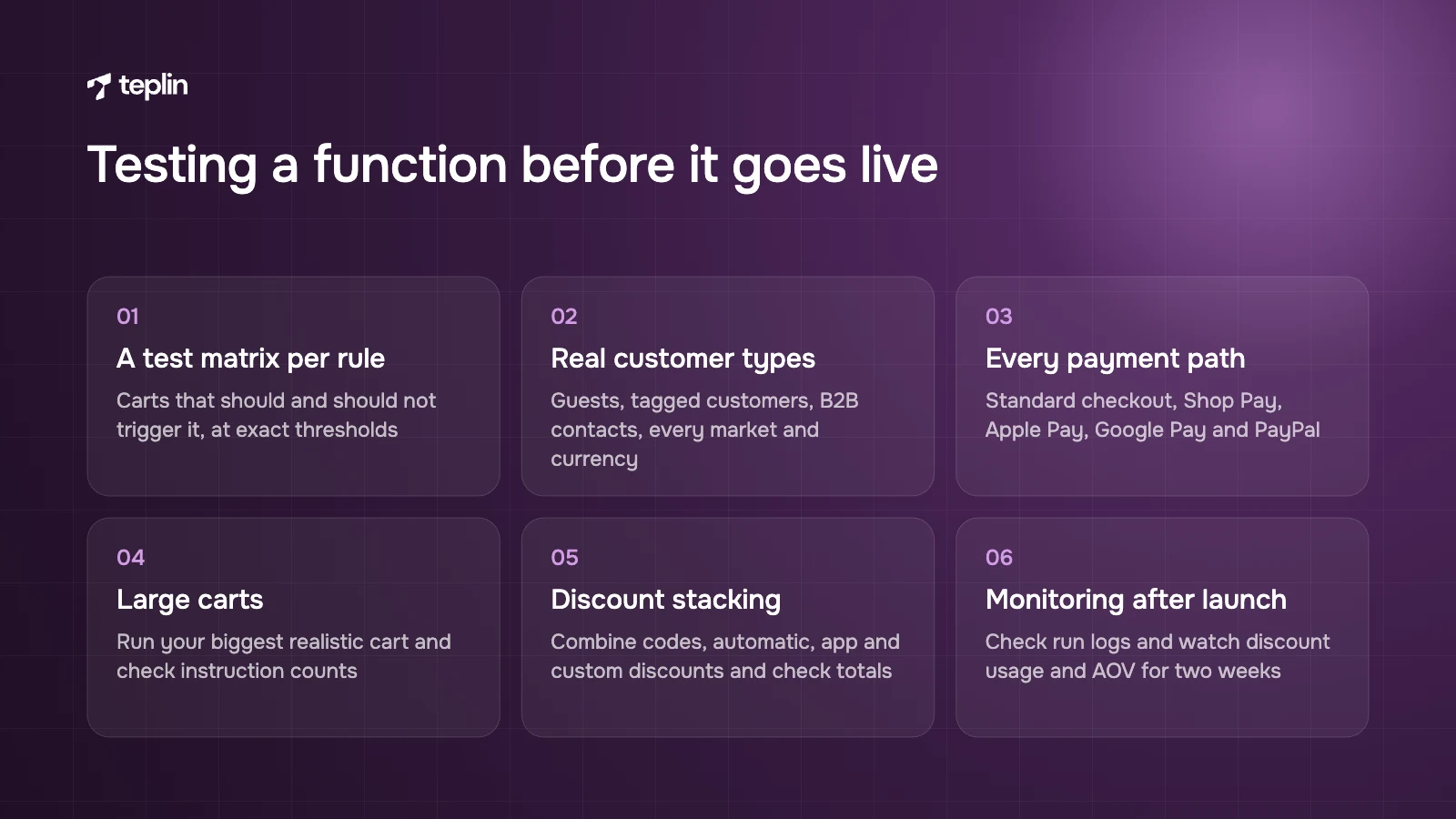
- A test matrix per rule
List the carts that should and should not trigger it, including edge cases at exact thresholds (£99.99 against £100.00). - Real customer types
Logged-out guests, tagged customers, B2B company contacts and customers in each market and currency. - Every payment path
Standard checkout, Shop Pay, Apple Pay, Google Pay and PayPal. Validation functions should block all of them. - Large carts
Run the function against your biggest realistic cart (for B2B, often 100 lines or more) and check instruction counts in the CLI output. - Discount stacking
Combine automatic discounts, codes, app discounts and custom functions and confirm the totals are right. - Admin and POS
Create a draft order and a POS sale if those channels matter to you. - Monitoring after launch
Check function run logs in the Partner or Dev Dashboard and watch discount usage and average order value for the first two weeks.
One habit I insist on in our Shopify Plus development projects is automated unit tests for each function's input and output JSON. Shopify's function templates support this, and it means a future change to one discount tier cannot quietly break another rule.
Before closing the project, update the documentation. Record which app or function now owns each rule, with the plain-English description beside it, so the next person does not have to repeat this audit from scratch.
Mistakes I see most often
- Rebuilding everything as custom code
Many Script features are now a free or cheap app, and custom code you do not need is code you have to maintain. - Ignoring discount combinations
A single Script decided all pricing in one place. Several functions run independently, so badly set combination rules can double-discount. - Testing only small carts
Functions that pass with three items can exceed the 11 million instruction budget on large orders. - Forgetting subscriptions
Cart transform operations are rejected when a selling plan is present, and several APIs only partly support subscription orders. - Losing tracking without noticing
A broken discount gets reported by customers within a day. A missing conversion pixel stays invisible until ad performance drops.
Frequently asked questions
Do Shopify Scripts still work in 2026?
No. Shopify stopped Scripts from being edited or published on 15 April 2026, and all Scripts stopped running on 30 June 2026. Any Script logic that was not rebuilt with Shopify Functions or an app is no longer applied at checkout.
Can I use Shopify Functions without Shopify Plus?
Yes, through public apps from the Shopify App Store that contain functions, which work on any plan. Custom apps containing Function APIs, specific capabilities such as the cart transform lineUpdate operation, and network access are restricted to Shopify Plus (and Enterprise for network access).
How long does a Scripts to Functions migration take?
It depends on how many Scripts you had and how custom they were. Replacing a few simple Scripts with apps can take days, while a custom function app with complex pricing, B2B rules and thorough testing typically takes several weeks. In my experience the audit and the testing take longer than the coding.
The end of Scripts is a good excuse to clear out years of layered checkout rules, and most stores come out with fewer customisations that are easier to change and test. If you have your Scripts customisations report, send it to us through the contact page. We will tell you which rules an off-the-shelf app can cover, which need a custom function, and which you can simply retire.
Sources
- Shopify developer changelog – Shopify Scripts will be deprecated on 30 June 2026
- Shopify changelog – Shopify Scripts can no longer be edited or published
- Shopify Help Center – Transitioning from Shopify Scripts to Shopify Functions
- Shopify.dev – About Shopify Functions
- Shopify.dev – Function APIs reference
- Shopify.dev – Optimise instruction counts
- Shopify.dev – Discount Function API
- Shopify.dev – Cart Transform Function API
- Shopify.dev – Delivery Customization Function API
- Shopify.dev – Payment Customization Function API
- Shopify.dev – Cart and Checkout Validation Function API
- Shopify.dev – Migrating from Shopify Scripts
- Shopify.dev – Checkout UI extensions
- Shopify.dev – Post-purchase product offers
- Shopify Help Center – Checkout extensibility
- Shopify Help Center – Upgrading to checkout extensibility
- Shopify Help Center – Upgrading the Thank you and Order status pages
- Shopify Help Center – Custom pixels
- Shopify.dev – Web Pixels API standard events

Get a free Shopify store audit

.webp)
Stay ahead of the curve

More from our resources
Is Shopify Plus Worth $2,300 a Month? Here Is the Real Bill


Ecommerce insights, straight to your inbox


10:33

10:33

16:33