

Book an intro call

Shopify B2B Without Plus Is Finally Workable

Shopify wholesale used to come with a simple rule: pay for Plus, or glue a few apps together and hope the customer tags hold. Plenty of brands still plan their trade channel around that rule. It stopped being true some time ago. Native Shopify B2B now runs on Basic, Grow, Advanced and Plus, with company accounts, catalogues, net payment terms and quantity rules available well below the Plus price.
The differences between plans still matter. They are just no longer the difference between having B2B and not having it. I have written this for DTC brands opening a trade channel, wholesalers moving off spreadsheets and email orders, and ecommerce managers trying to work out whether Plus is worth the jump. I have organised it around the beliefs I hear most often, because correcting those usually settles the plan question faster than a feature list does.
The short answer
You can run proper B2B on Shopify without Plus. Basic, Grow and Advanced include companies and locations, net terms, vaulted cards, draft orders, quick order lists, quantity rules, volume pricing, the Trade theme, Shopify Flow and up to 3 active B2B catalogues, with contextual storefront and checkout on Advanced. Plus adds unlimited catalogues assigned to specific companies, deposits, partial payments and payment requests per fulfilment. If your programme is a few pricing tiers on net terms, a standard plan will usually do. If you have contract pricing per customer or take deposits, Plus is usually the cleaner answer. Starter and Retail do not include B2B.
Seven myths about Shopify B2B
Myth one says B2B needs Shopify Plus
The reality. Shopify B2B is available on the Basic, Grow, Advanced and Shopify Plus plans. It is not available on Starter or Retail. Most B2B features are switched on by default, and you use them by setting up each business customer as a company in the admin.
The shared toolkit is larger than most people expect. Every eligible plan gets business accounts with multiple locations and permissions, net payment terms with reminders, US bank transfers (ACH), stored cards and PO numbers, draft order invoicing, checkout to draft, repeat ordering, quick order lists, quantity rules, volume pricing, sales staff permissions, the Trade theme and Flow automations. That covers what most first-year trade programmes need.
Myth two says a wholesale app does the same job
The reality. Wholesale apps usually imitate trade pricing with customer tags and discounts. Native B2B uses a dedicated company model. Pricing, payment terms, tax exemptions and buyer permissions live on the company location, and the checkout understands them.
That difference shows up the first time a buyer orders for two branches, or your accountant asks why tax exemptions are stored as tags. Apps still have a place. They fill gaps such as minimums across mixed variants or locking specific pages from public view. I just would not build the foundation on them any more.
Myth three says three catalogues are too few to be useful
The reality. On Basic, Grow and Advanced you get up to 3 active B2B catalogues in total, across all B2B markets combined. Catalogues are assigned through markets, not directly to individual companies or locations. If you assign all three to one market, you have to remove or draft one before adding a catalogue elsewhere.
Three sounds tight, but a lot of trade programmes are really three tiers: distributor, retailer and trade, for example. If you can group customers that way, three catalogues go a long way. Where it breaks is contract pricing that is truly per customer. Grouping dozens of individual price lists into three tiers is a business decision, and if the business will not accept it, Plus is the honest fix.
Before you decide, write every current price list on one page and look for the pattern. In my experience the list is often longer on paper than in practice: special prices agreed years ago for accounts that barely order, or near-identical lists that differ by a percent or two. Tidying that up is a commercial conversation with your sales team, and it is worth having before you pay for unlimited catalogues you might not need.
One more condition is easy to miss. On non-Plus plans, catalogue features only work if your store uses the new Shopify Markets.
Myth four says net terms mean Shopify collects the money
The reality. Payment terms are set per company location or on individual draft orders. The options are no terms (pay immediately, the default), Net 7, 15, 30, 45, 60 or 90 days from the order date, due on fulfilment, or a fixed date on draft orders. Customers can pay early from their account.
What Shopify does not do is charge a saved card automatically when terms expire. Someone on your team still has to chase overdue invoices. Vaulted cards make that easier: with Shopify Payments a buyer can save a card to a company location, so later orders and invoices can be charged without re-entering details. I see this as the simplest way to combine terms with reliable collection, but it is a process you design, not something the platform runs for you.
Myth five says trade customers need their own store
The reality. Shopify supports both. A blended store serves D2C and B2B customers from one storefront and shows different prices, catalogues and content once a B2B buyer logs in. A separate wholesale store is dedicated to B2B and can be restricted to logged-in buyers only.
My view is that blended is the better default for a DTC brand adding wholesale. You keep one catalogue, one inventory pool, one set of apps and one theme, and trade buyers see the same product pages your consumers do. A separate store makes sense when B2B is a distinct business, with its own range and team and a buying experience built around dense order forms, spec sheets and pack sizes.
There is a middle ground worth knowing about. On Advanced and Plus, contextual storefront and checkout let you tailor theme content and checkout by market, so a blended store can still feel different for trade buyers without a second theme. On Plus you can go further and customise theme editor content by customer type.
Cost plays a part too. On standard plans a second store is a second subscription. Shopify Plus includes the main store plus 9 expansion stores, so a separate wholesale store adds no platform fee there.
Myth six says Shopify plugs straight into your ERP
The reality. Shopify's B2B documentation describes integrations with ERP, accounting, PIM and third-party logistics systems that are built by Shopify Partners and sync products, pricing, customers, orders and inventory. There is no single built-in ERP connector. You either use an existing connector app for your ERP or build a custom integration on Shopify's APIs.
In most projects I see, the ERP is the master for customers, prices and credit status. The sync usually covers:
- Customers and companies
Account numbers, locations, addresses, tax IDs and credit status. - Pricing and catalogues
Customer-specific price lists and contract prices pushed from the ERP into Shopify catalogues. - Inventory
Stock levels by warehouse, often several times an hour. - Orders and invoices
Orders flowing from Shopify into the ERP, with payment status or invoice numbers flowing back. - Payment terms
Terms and credit limits held in the ERP and reflected per company location.
Integration is where B2B projects succeed or fail. If the ERP owns prices and customers, the sync logic matters more than the storefront design. Our custom apps and integrations team builds these connections.
Integration is where B2B projects succeed or fail. If the ERP owns prices and customers, the sync logic matters more than the storefront design.
Myth seven says Plus is always worth it for wholesale
The reality. Shopify Plus starts at $2,300 a month on a three-year term or $2,500 a month on a one-year term, according to Shopify's Plus pricing page. Advanced costs $299 a month billed annually. That gap is real money, and I would only spend it when at least one of these is true:
- You need more than 3 catalogues
For example separate price lists for distributors in several countries, key accounts with contract pricing and regional assortments. - Pricing has to be company-specific
Only Plus lets you assign catalogues directly to individual companies or locations. - You take deposits
Made-to-order, furniture, equipment and project sellers often need a deposit up front and the balance on terms, which is Plus-only. - You ship large orders in stages
Partial payments and payment requests per fulfilment are Plus features. - The checkout needs custom logic
Custom apps with Shopify Functions and checkout UI extensions on the main checkout steps, such as PO fields or delivery date pickers, require Plus. - You want a separate wholesale store
Expansion stores come with no extra platform fee.
If none of those applies, I would keep the money and spend it on onboarding and integration instead. Our breakdown of what Shopify Plus really costs in 2026 covers the full fee structure.
The plan differences in one place
Once the myths are out of the way, this is the reference list I use when we scope a B2B build. Everything in the shared toolkit above applies to all four plans.
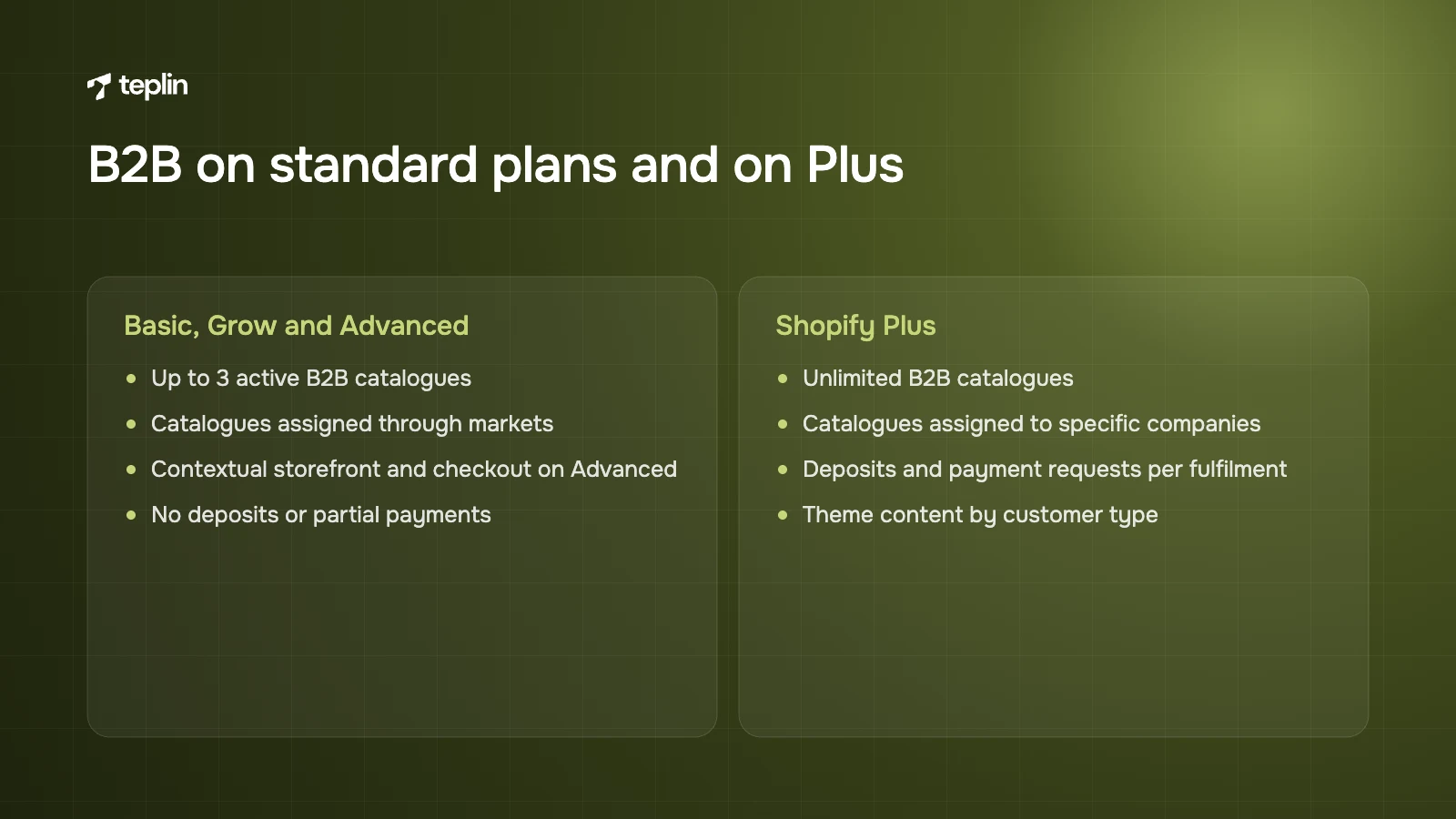
- Basic and Grow
Up to 3 active B2B market catalogues in total, assigned through markets. No contextual storefront and checkout. No deposits or partial payments. - Advanced
The same 3-catalogue limit. Contextual storefront and checkout are included through Shopify Markets, so you can tailor theme content and checkout by market. No deposits or partial payments. - Shopify Plus
Unlimited B2B catalogues that can be assigned directly to companies or company locations. Deposits for companies and draft orders, partial payments and payment requests per fulfilment. Contextual storefront and checkout, plus theme editor customisations by customer type (B2B versus D2C), which Shopify lists as Plus-only. B2B abandoned checkouts are available on Plus only, switched off by default, and turned on by Plus Support on request.
The building blocks in plain English
Shopify B2B has its own data model. Getting it right early saves a lot of rework, especially when an ERP is involved.
- Company
The top-level organisation, such as a retail chain. - Company location
The specific business you sell to, such as a store, branch or warehouse. Each location can have its own shipping and billing addresses, tax ID and exemptions, pricing, payment terms, checkout settings and contacts. Most of the important settings live here rather than on the company. - Customer
The individual who buys on behalf of a business, linked to one or more locations with a permission level such as location admin or ordering only. A customer not linked to any company location is treated as a normal D2C shopper. - Catalogue
Defines which products a buyer sees and what they pay, either as an overall adjustment or fixed prices per product. If several catalogues apply to the same buyer and product, Shopify shows the lowest price. - Quantity rules
A minimum, a maximum and an increment per variant. A café supplier might sell cups in multiples of 50 with a minimum of 100. Rules apply per variant, so a buyer cannot combine five blue and five grey hats to reach a minimum of ten. - Volume pricing
Lower unit prices at higher quantities in one order, with up to 10 price breaks per product. Once volume pricing applies to a product, its price is fixed and any overall percentage adjustment on the catalogue no longer applies to it. - Draft orders and checkout to draft
Your sales team can create orders and send invoices. If a location is set to submit orders for review, the buyer's checkout creates a draft for approval, which suits businesses that confirm stock, freight or pricing first. - Quick order list
A theme block that lets buyers enter quantities for many variants on one page. Supported in the Trade theme and addable to other themes. It is how most trade buyers actually want to order.
Sign-in is simple for buyers. They enter the email address linked to their company location, receive a six-digit code and log in without a password. If they have access to several locations, they pick the one they are buying for before adding items to the cart. B2B requires Shopify's new customer accounts, and legacy accounts cannot be used.
Gaps you will probably fill with an app or a Function
Some common B2B needs sit outside the native feature list. These are the patterns we use most:
- Dynamic payment terms
Terms that change by cart total, customer type or a metafield need a Payment Customization Function, through a custom app or an App Store app. - Credit limits
Credit limits are not part of Shopify's listed B2B features, so they usually stay in the ERP. A common pattern stores them in metafields and uses a checkout validation function to block orders above the limit. - Minimum order values
Minimum and maximum order subtotals are typically handled with an app such as Checkout Blocks or a validation function. - Mixed-variant minimums
Rules like "any 12 items from this collection" need an app or custom logic, because native quantity rules are per variant.
If you are coming from Scripts, the Functions behind several of these are covered in our guide on replacing Shopify Scripts with Shopify Functions.
Limits worth knowing before you commit
- Catalogue cap below Plus
3 active catalogues across all B2B markets on Basic, Grow and Advanced. - Price break cap
Up to 10 price breaks per product. - No automatic collection
Saved cards are not charged automatically when terms expire. - New customer accounts only
Themes and apps built around legacy accounts may need changes. - Theme customisation by customer type is Plus-only
On other plans, showing different content to B2B and D2C buyers is done in theme code. - Checkout restrictions
Payment terms cannot be set when the cart contains subscription items and are not supported in accelerated checkouts. B2B abandoned checkouts are Plus-only. - Page-level hiding
Restricting a whole B2B store to logged-in buyers is supported, but hiding selected pages from D2C visitors usually needs an app.
Setting it up in nine steps
This is the order we follow on our own B2B builds. The data steps take longer than the storefront steps, and that is normal. Most of the effort goes into agreeing who your customers are, how they are grouped and which system owns each field, long before anyone touches the theme.
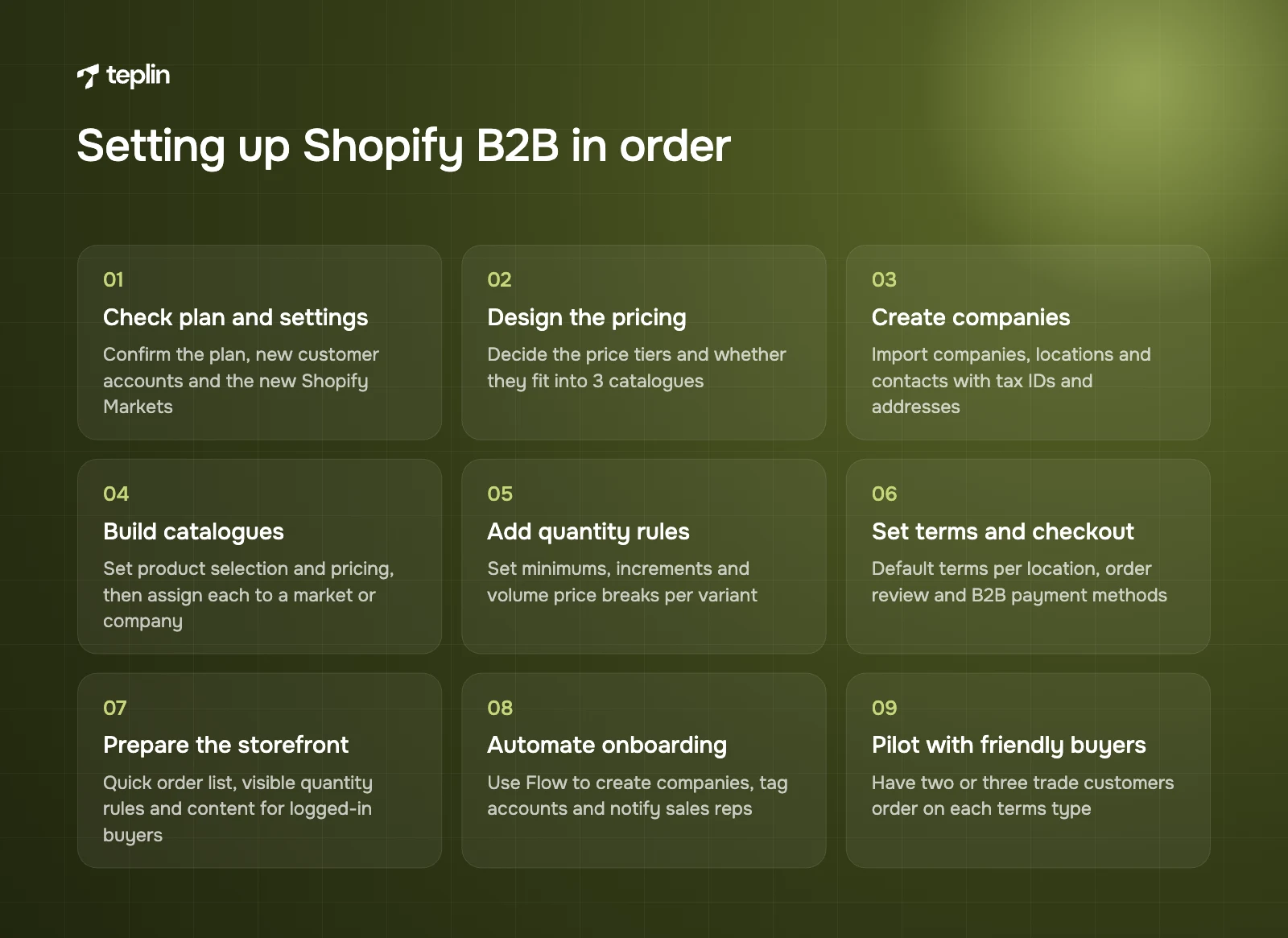
- Check plan and settings
Confirm you are on Basic, Grow, Advanced or Plus, switch to new customer accounts, and confirm the store uses the new Shopify Markets if you are not on Plus. - Design the pricing structure
Decide how many price tiers you need and whether they fit into 3 catalogues. - Create companies and locations
Import companies, locations and contacts in bulk by CSV or a bulk editing app, including tax IDs, exemptions and addresses. - Build catalogues
Set product selection and pricing for each, then assign it to the right B2B market, or directly to companies on Plus. - Add quantity rules and price breaks
Set minimums, increments and volume pricing per variant. - Configure terms and checkout
Set default terms per location, decide which locations need order review and choose the payment methods B2B buyers can use. - Prepare the storefront
Add the quick order list, show quantity rules and price breaks on product pages and tailor content for logged-in buyers. - Automate onboarding
Use Flow to create companies from application forms, tag accounts, send welcome emails and notify sales reps. - Pilot with friendly buyers
Ask two or three trade customers to place orders on each terms type before inviting everyone. Test tax on sample orders too, including cross-border EU orders where reverse charge applies.
Frequently asked questions
Can I use Shopify B2B without Shopify Plus?
Yes. Shopify B2B is available on Basic, Grow, Advanced and Plus. Non-Plus plans include companies, net terms, vaulted cards, draft orders, quick order lists, quantity rules, volume pricing and up to 3 active B2B catalogues.
How many B2B catalogues can I have?
Basic, Grow and Advanced allow 3 active catalogues in total across all B2B markets. Plus allows unlimited catalogues and lets you assign them directly to companies or company locations. If a buyer qualifies for more than one catalogue, Shopify shows the lowest price for each product.
Does Shopify support net payment terms?
Yes, on every plan that includes B2B. You can set Net 7, 15, 30, 45, 60 or 90 days, due on fulfilment, or a fixed date on draft orders. Deposits and partial payments are Plus-only.
Can B2B and D2C run on the same Shopify store?
Yes. In a blended store, logged-in B2B buyers see their own catalogues, prices and terms while consumers see the normal store. You can also run a separate B2B-only store, which on Plus can be one of the included expansion stores.
A small first version beats a perfect plan
The B2B launches I like best start modestly: a few clear pricing tiers, sensible terms, a quick order list and a data sync that works. Catalogues, deposits and custom checkout logic can come once the channel proves itself. If you are planning a wholesale launch or an ERP integration, our Shopify Plus development team can tell you which plan and build you actually need. Write to me with a few lines on how your trade customers order today, and we will start from there.
Sources
- Shopify Help Center – B2B features by plan
- Shopify Help Center – B2B on Shopify
- Shopify Help Center – Companies and customers in B2B
- Shopify Help Center – Catalogues and pricing in B2B
- Shopify Help Center – Creating and managing B2B catalogues
- Shopify Help Center – Quantity rules and volume pricing
- Shopify Help Center – B2B payment terms
- Shopify Help Center – Checkout, orders and draft orders in B2B
- Shopify Help Center – Sign-in and customer accounts in B2B
- Shopify Help Center – Online store customisation in B2B
- Shopify Help Center – B2B and Markets
- Shopify Help Center – Reporting, automations and integrations in B2B
- Shopify.dev – Payment Customization Function API
- Shopify Plus – Pricing
- Shopify – Pricing

Get a free Shopify store audit

.webp)
Stay ahead of the curve

More from our resources
Is Shopify Plus Worth $2,300 a Month? Here Is the Real Bill


Ecommerce insights, straight to your inbox


10:33

10:33

16:33