

Book an intro call

The European Accessibility Act Through a Shopify Lens

If your Shopify store sells to consumers in the European Union, the European Accessibility Act almost certainly applies to you, and it has since 28 June 2025. That holds for a brand in Manchester or Toronto as much as one in Munich. The only general exemption is for microenterprises. The practical benchmark is WCAG 2.2 at level AA, and most of the work sits in your theme settings, content and apps rather than in Shopify itself.
That is the answer. The rest of this article is the reasoning behind it, written from where I sit as a CRO designer. I have always treated accessibility as part of good design rather than a legal add-on: a store that works with a keyboard, a screen reader and a cracked phone screen is a store that converts better for everyone.
This article is general information, not legal advice.
Key takeaways
- The law covers sellers outside the EU
Directive (EU) 2019/882 applies to ecommerce services provided to EU consumers, wherever the business is based. - Microenterprises are the main exemption
That means fewer than 10 staff and annual turnover or balance sheet total of no more than €2 million. - Design and test to WCAG 2.2 AA
EN 301 549 V4.1.1, published on 2 September 2026, uses WCAG 2.2 AA as its web baseline. - Overlay widgets do not fix the problem
Fixes belong in the theme code and content, checked with real assistive technology.
The legal reasoning in brief
The European Accessibility Act is Directive (EU) 2019/882, which sets common accessibility requirements for a list of products and services, including ecommerce. Member States had to apply their national versions from 28 June 2025. Because it is a directive, the rules you actually deal with are national laws, such as Germany's Barrierefreiheitsstärkungsgesetz (BFSG), implementing the same core requirements.
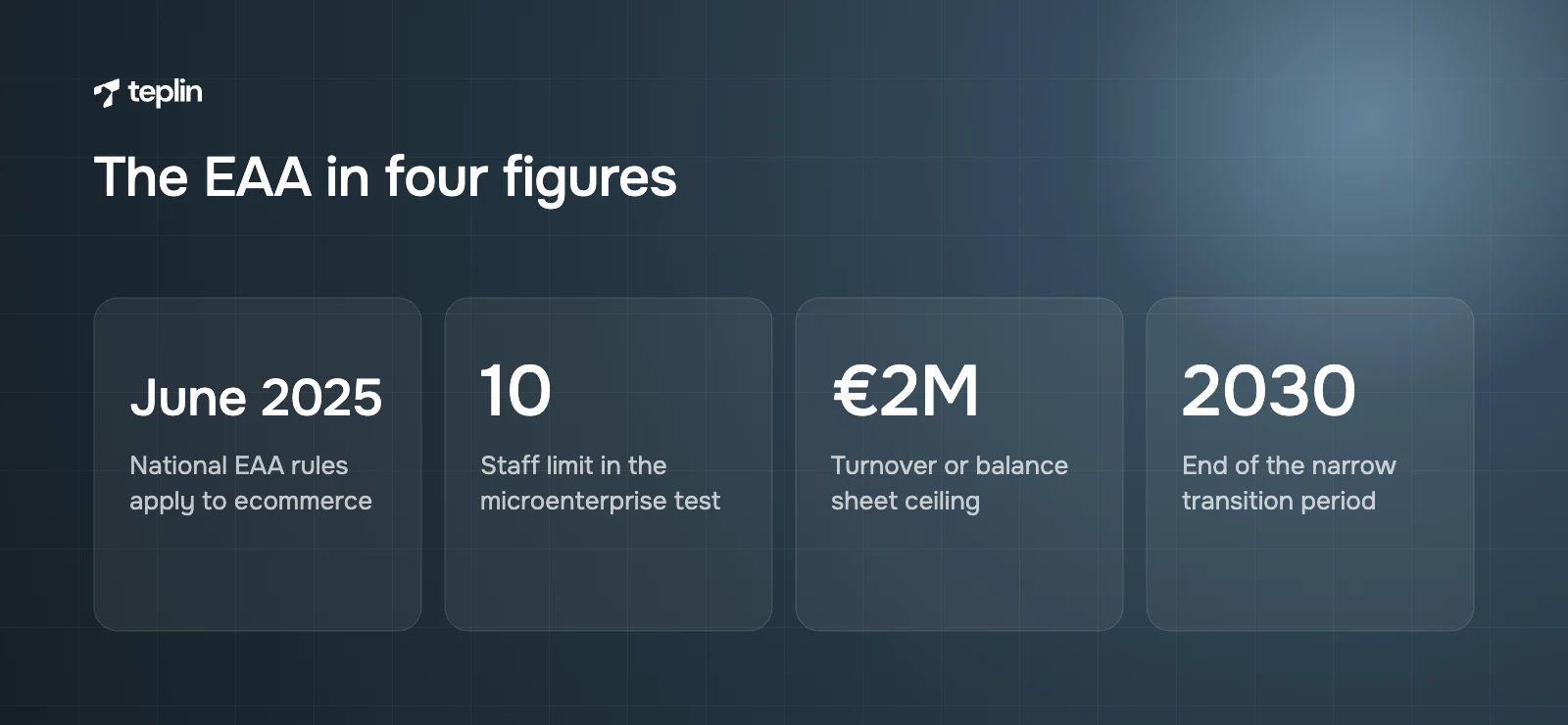
The directive describes ecommerce as services provided at a distance through websites and mobile apps, by electronic means, with a view to concluding a consumer contract. If someone in the EU can browse, add to cart and pay on your store, you are providing one. It applies whether or not you are established in the EU, so a UK, US or Canadian brand selling to EU customers through Shopify Markets is in scope for those sales. A consumer is defined as a natural person, so pure B2B trade sits largely outside it, but a B2B store that also sells to individuals does not. Article 32's transition period to 28 June 2030 covers only narrow cases, such as contracts agreed before June 2025.
The microenterprise test has two parts
Article 4(5) exempts microenterprises that provide services. Article 3(23) defines one as an enterprise employing fewer than 10 persons with annual turnover not exceeding €2 million or an annual balance sheet total not exceeding €2 million. Both parts matter. A five-person brand with €3 million in turnover and a €3 million balance sheet is not exempt. Article 14 also allows exceptions for a disproportionate burden, but you have to assess and document that yourself, and it rarely covers routine fixes.
Enforcement is national
Each Member State enforces its own law through market surveillance authorities, which can check services, demand corrections and restrict non-compliant ones. Article 30 requires penalties to be effective, proportionate and dissuasive, but each country sets its own amounts and procedures, so exposure varies by market.
WCAG 2.2 AA is the standard to design for
The EAA describes outcomes rather than code. Services have to meet the four principles WCAG is built on, and ecommerce services must also make identification, security and payment steps accessible. The detailed technical benchmark is EN 301 549, the European ICT accessibility standard, which incorporates the Web Content Accessibility Guidelines.
That standard has just moved on. Version 3.2.1 referenced WCAG 2.1 AA. EN 301 549 V4.1.1, published on 2 September 2026, uses WCAG 2.2 at levels A and AA instead. It gives a formal presumption of conformity with the EAA only once it is cited in the Official Journal of the EU, which had not happened at the time of writing. My advice is to design and test to WCAG 2.2 AA now. It contains everything in 2.1 AA and adds criteria such as minimum target size, which matters a great deal for shoppers tapping small buttons on a phone.
Shopify gives you a starting point and nothing more
Themes in the Shopify Theme Store must reach an average Lighthouse accessibility score of at least 90 across home, collection and product pages, support full keyboard navigation with visible focus states, use alt attributes on images, link labels to form inputs and meet 4.5:1 contrast for body text. Shopify's own checkout conformance report, dated March 2026, lists most WCAG 2.2 A and AA criteria as supported and some, including contrast and focus visibility, as partially supported.
That does not make your store compliant, and Shopify's help centre says following its guidance does not guarantee full accessibility. Whatever you configure, upload, install or code on top of the theme is yours. The EAA also applies to the whole service a shopper uses, so an accessible checkout does not cover your navigation, search, product pages or cart.
An accessible theme and checkout are only a starting point. Everything you configure, upload, install or code on top of them is yours to get right.
The failures I see most often are design decisions
Almost every issue on this list started as a visual choice that nobody tested with a keyboard or screen reader:
- Colour contrast
Light grey prices, white text over lifestyle photography and pale "sold out" badges often fall below 4.5:1 for text or 3:1 for icons and large text. - Missing or useless alt text
Product images with no alt text, or alt text that repeats the file name, leave screen reader users guessing which colourway they are looking at. - Keyboard traps and hidden focus
Mega menus that open only on hover, cart drawers that do not manage focus and custom CSS that removes the focus outline. - Unlabelled form fields
Newsletter sign-ups, search boxes and variant pickers relying on placeholder text instead of a proper label. - Carousels and pop-ups
Auto-rotating sliders without a pause control, and discount pop-ups that steal focus or cannot be closed with the keyboard. - Apps that inject widgets
Reviews, upsell, chat and cookie banner apps add markup you do not control, and one inaccessible app can break an otherwise sound product page.
Most of these hurt conversion as well, which is why we fold accessibility into our CRO and UX work instead of treating it as a separate audit.
Overlays are not a shortcut
Overlay widgets add a toolbar or script that tries to patch accessibility in the browser. They do not repair the underlying markup that screen readers and keyboards depend on, and they can clash with assistive technology people already use. In April 2025 the US Federal Trade Commission approved a final order requiring overlay provider accessiBe to pay $1 million over claims that its tool could make any website WCAG compliant. EU regulators judge whether your service meets the requirements, not which plug-in you installed.
You need an accessibility statement
Article 13 requires service providers to publish information, set out in Annex V, explaining how the service meets the accessibility requirements, in written and oral formats that are themselves accessible. On Shopify that usually means a page linked from the footer stating the standard you test against, known limitations, the date of your last review and a contact route for anyone who hits a barrier.
Testing works best as a habit
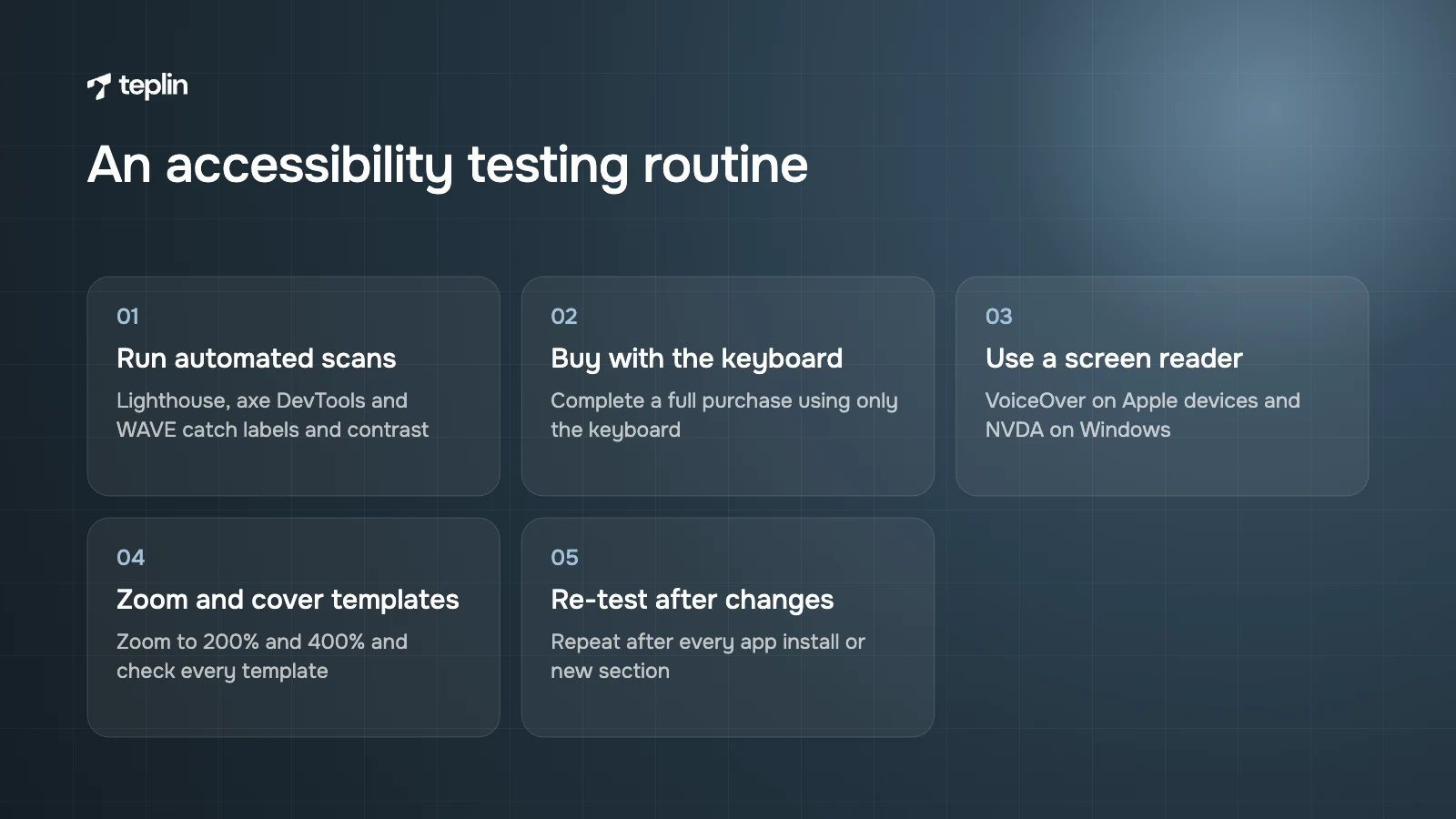
Combine automated and manual testing. Lighthouse, axe DevTools and WAVE catch missing labels and contrast failures, but not everything. Then complete a purchase using only the keyboard, repeat it with a screen reader (VoiceOver on Apple devices, NVDA on Windows), zoom to 200% and 400% and cover every template. Re-test whenever you install an app or launch a new section, because accessibility drifts as stores change. A monthly retainer is a sensible place to make that routine.
EAA readiness checklist
- Confirm you sell to EU consumers and check honestly whether you meet both microenterprise conditions.
- Run automated scans of home, collection, product, cart, search and account pages on mobile and desktop.
- Complete a full purchase with the keyboard only, then with VoiceOver and NVDA.
- Fix contrast in theme settings, including badges, sale prices and buttons.
- Write descriptive alt text and give every form field a visible label.
- Add pause controls to carousels and make pop-ups closable by keyboard.
- Audit each installed app's front-end output and replace the ones that fail.
- Publish an accessibility statement with a contact route and review date.
- Re-test after every theme update, app install or major launch.
Frequently asked questions
Does the European Accessibility Act apply to UK and US Shopify stores?
Yes, for sales to consumers in the EU. The EAA covers ecommerce services provided to EU consumers regardless of where the business is established, unless it qualifies as a microenterprise.
Is a Shopify Theme Store theme automatically EAA compliant?
No. Theme Store themes must meet baseline requirements, including a Lighthouse accessibility average of at least 90 and full keyboard support. Your content, colour settings, apps and customisations can still introduce failures that automated scores miss.
Should we follow WCAG 2.1 or WCAG 2.2?
Aim for WCAG 2.2 AA. EN 301 549 V4.1.1 moved its web baseline from WCAG 2.1 to 2.2, and meeting 2.2 AA also covers 2.1 AA.
Does Shopify's accessible checkout cover the whole store?
No. The EAA applies to the whole service a consumer uses, including navigation, search, product pages and cart.
If you sell into the EU and have not looked at your store through this lens yet, the most useful first step is an audit of your real page templates and installed apps, followed by fixes in the theme code. That is everyday work for our Shopify development team, and I am happy to look at where your store stands if you share the URL with us.
Sources
- Directive (EU) 2019/882 on the accessibility requirements for products and services (EUR-Lex)
- European Accessibility Act (European Commission)
- Theme Store requirements (Shopify.dev)
- Accessibility for your online store (Shopify Help Center)
- Accessibility Conformance Report for Shopify Checkout (Shopify)
- FTC approves final order requiring accessiBe to pay $1 million (US Federal Trade Commission)
- European Accessibility Act ICT standards update (Davis Wright Tremaine)
- EN 301 549 V4.1.1 is final (Deque)
- A guide to the European Accessibility Act for online retailers (Bird & Bird)

Get a free Shopify store audit

.webp)
Stay ahead of the curve

More from our resources
Is Shopify Plus Worth $2,300 a Month? Here Is the Real Bill





Ecommerce insights, straight to your inbox


10:33

10:33

16:33